UTM-00339 | Rev 19
Page 76 of 253
DetNet South Africa Copyright © 2021
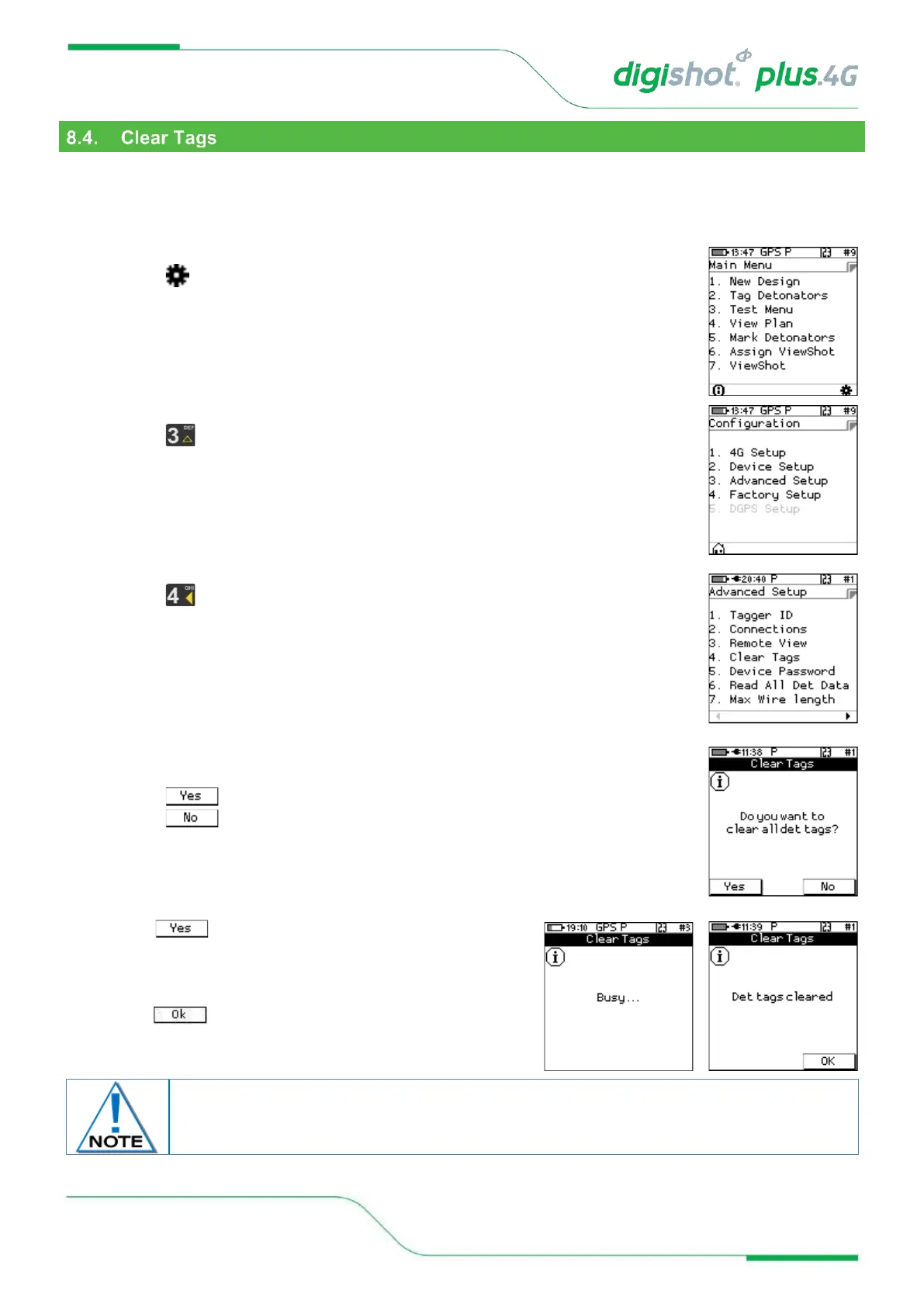
This function enables the user to clear the detonator memory and remove the tag that was assigned. After the
process completes the detonators will contain the factory ID that they were shipped with.
Connect the harness wire to the Harness wire terminals of the CE4 Tagger. The detonators should remain
connected to the Harness wire during the process.
1. Main Menu
• Press SoftKey to select Configuration Settings.
2. Configuration Settings Menu
• Press to select Advanced Setup.
3. Advanced Setup Menu
• Press to select Clear Tags
4. Clear Tags
• An information screen will be displayed.
• Press SoftKey to erase all detonators tags for connected detonators.
• Press SoftKey to exit without clearing detonators.
5. When SoftKey was selected, the Tagger will display
Busy… to ensure that all the dets are clear and then Det tags
cleared message will be displayed to indicate that Tags have
been cleared.
6. Press SoftKey to return to Advanced Setup Menu.
Use this feature with caution. Once all det tags are cleared, the detonators will need to be
re-tagged from the start, which will be time consuming.



 To Next Page