UTM-00339 | Rev 19
Page 77 of 253
DetNet South Africa Copyright © 2021
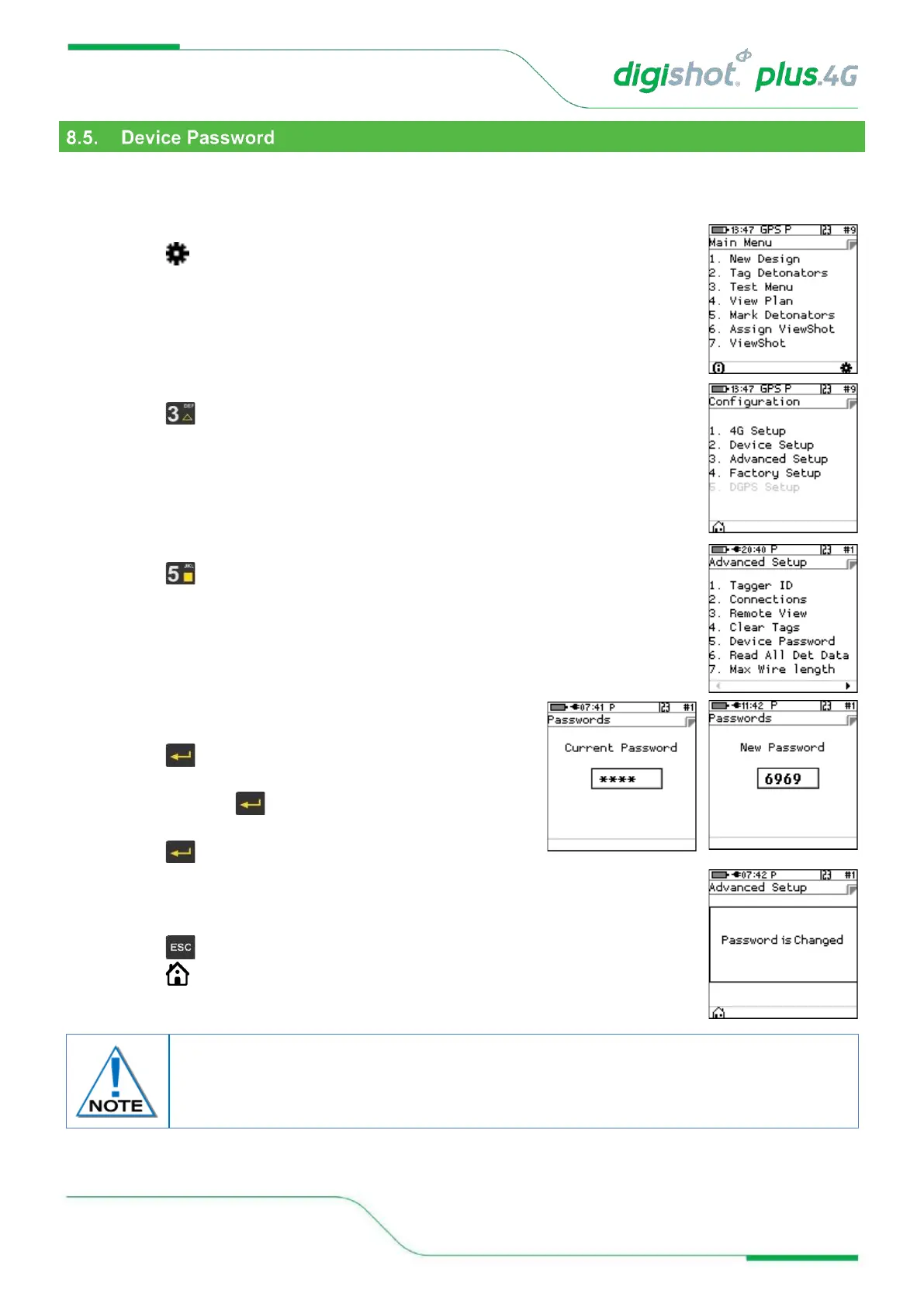
The CE4 Tagger is protected from unauthorised use by assigning a password.
This function enables the user to change the default password by assigning a new unique password that is known
only to the user.
1. Main Menu
• Press SoftKey to select Configuration Settings.
2. Configuration Settings Menu
• Press to select Advanced Setup.
3. Advanced Setup Menu
• Press to select Device Password
4. Passwords
• Use the numerical keypad to enter Current Password.
• Press to confirm.
• Use the numerical keypad to enter New Password. Leave
blank and press for NO password requirement during
start-up of the Tagger
• Press to confirm.
5. Passwords
• Information message confirming password changed will be displayed briefly.
• CE4 Tagger will display Passwords Screen.
• Press to return to Advanced Menu.
• Press SoftKey to return to Main Menu.
The Password should be changed regularly to maintain security.
Unlike conventional password entry, the chosen password is visible to the user (rather
than ****) to enable the user to see if any typing errors are being made.



 To Next Page