UTM-00339 | Rev 19
Page 71 of 253
DetNet South Africa Copyright © 2021
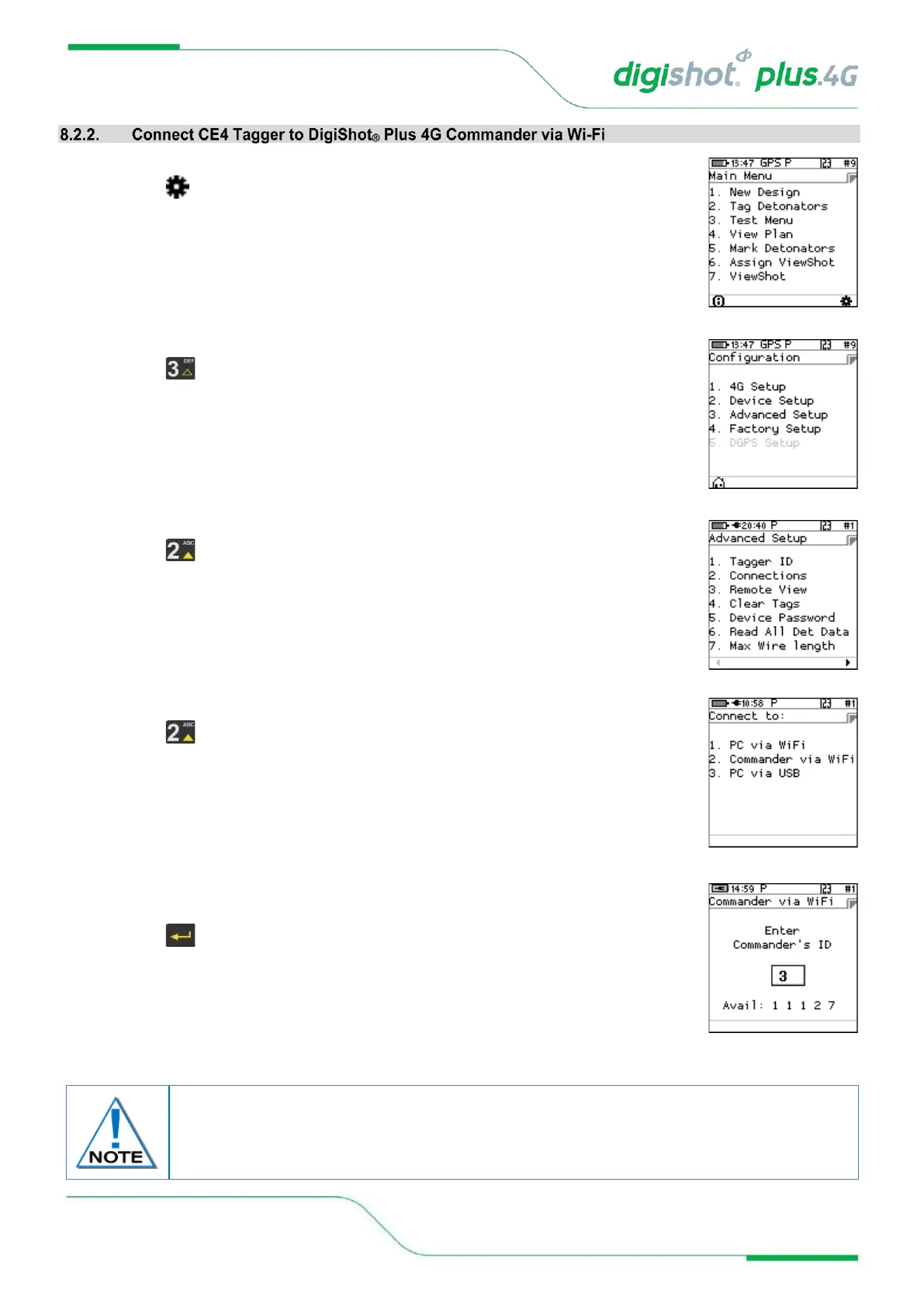
1. Main Menu
• Press SoftKey to select Configuration Settings.
2. Configuration Settings Menu
• Press to select Advanced Setup.
3. Advanced Setup Menu
• Press to select Connections.
4. Connect to
• Press on the keypad to connect CE4 Tagger to DigiShot
®
Plus 4G
Commander via Wi-Fi.
5. Commander via Wi-Fi
• Enter the Commander’s ID using the keypad to connect
• Press to continue
• Enter Commander’s ID will also be displayed if Commander is not found while
attempting to connect.
Only one Commander with selected ID must be active when connected.
When connectivity is established between the CE4 Tagger and the Commander an audible
“Bling” and subsequent “Tock” sound should be heard for every button press.



 To Next Page