UTM-00339 | Rev 19
Page 69 of 253
DetNet South Africa Copyright © 2021
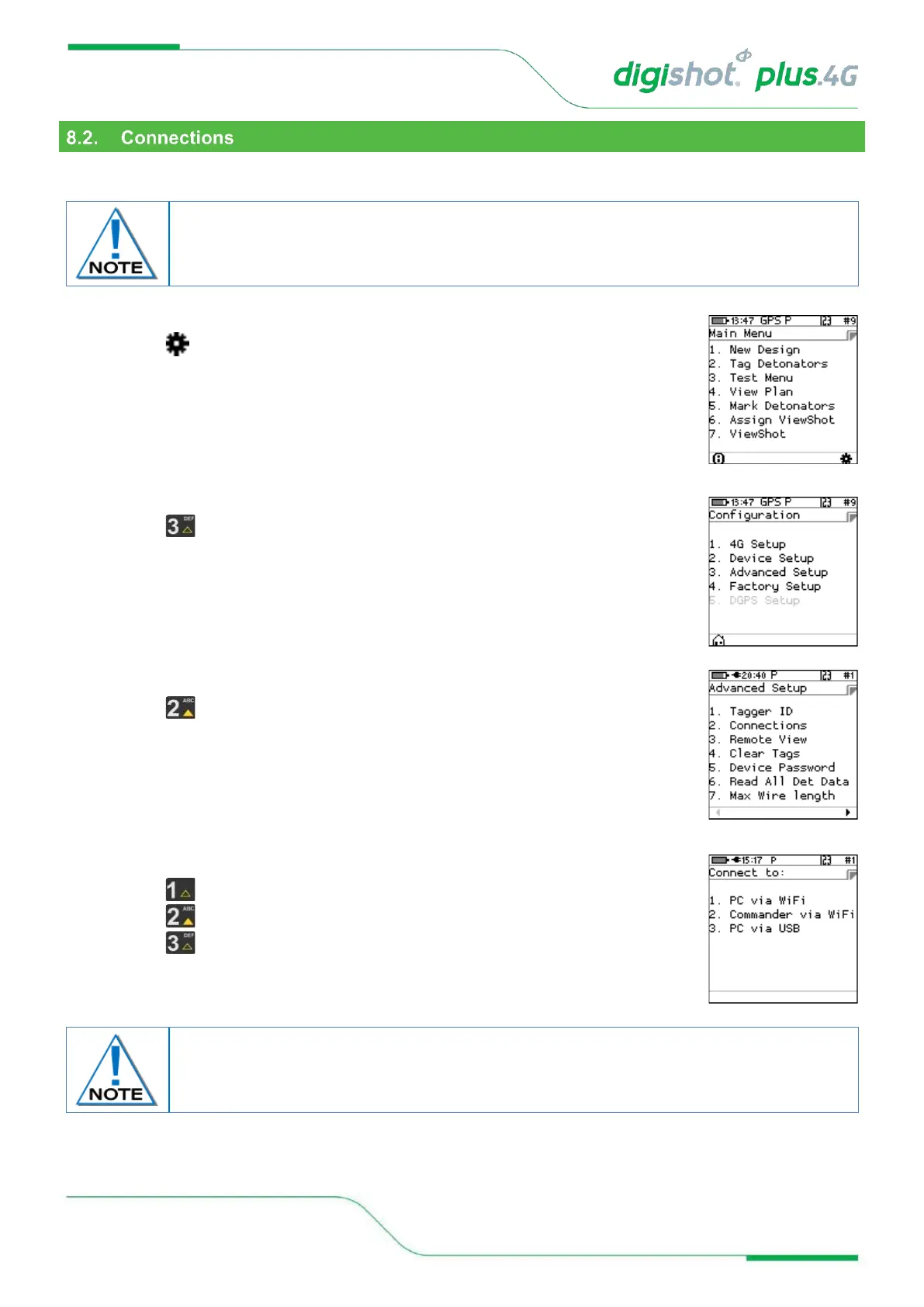
This function enables the user to activate the Wi-Fi and/or USB module allowing the Tagger to communicate with
other equipment.
1. Main Menu
• Press SoftKey to select Configuration Settings.
2. Configuration Settings Menu
• Press to select Advanced Setup.
3. Advanced Setup Menu
• Press to select Connections.
4. Connections
• Press on the keypad to connect Tagger to PC via Wi-Fi.
• Press on the keypad to connect Tagger to Commander via Wi-Fi
• Press on the keypad to connect Tagger to PC via USB
Additional software for a PC may be required from the manufacturer to support this
feature. USB cable or Wi-Fi must be connected, and the PC software must be configured
and activated before this function can be used.
During initial connection with a PC, the device will be displayed on the PC Wi-Fi List and
will require a Password to connect. Use Generic Password: 145634235.
Subsequent connections will connect automatically.



 To Next Page