UTM-00339 | Rev 19
Page 197 of 253
DetNet South Africa Copyright © 2021
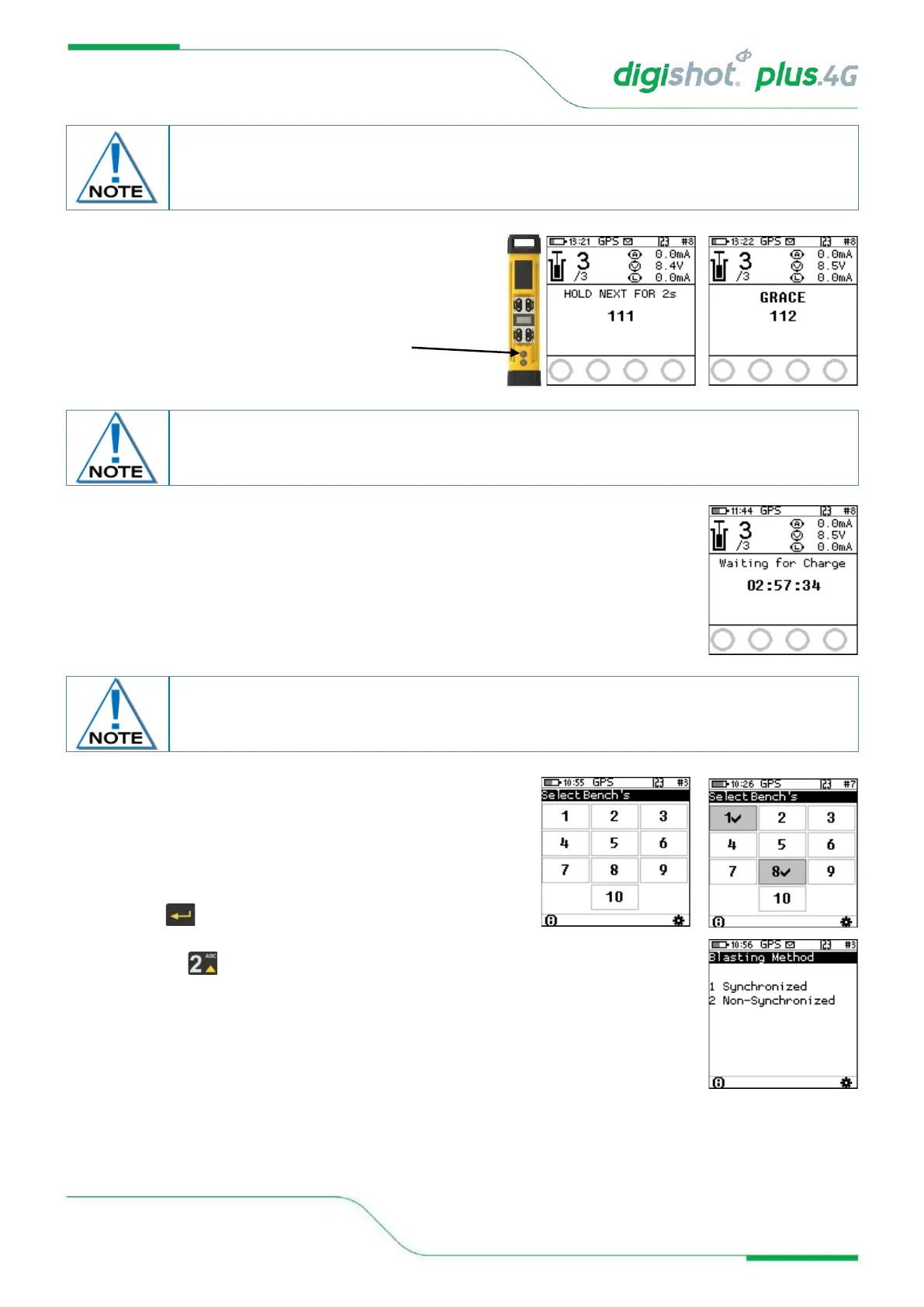
36. Remote Blast
• Press and hold the NEXT button on the front
of the DigiShot
®
Plus 4G Commander for 2 seconds
• The DigiShot
®
Plus 4G Commander will initiate a Grace
period of 2 minutes.
37. Remote Blast
• The Bench Commander will await a command from the Base Commander
• Select the applicable Bench Commanders by pressing
their corresponding numbers on the keypad. Select Bench
10 by pressing 0 on the keypad and Bench 1 by pressing 1
on the keypad and all selected Benches will be shown as
indicated by the tick mark ✓ .
• Applicable Bench Commander will be Indicated by ✓
• Press to continue
38. Synchronized or Non–Synchronized blasting
• Press for non-synchronized
Yellow NFC card must be from the same group as Red NFC card for RF communication to
take place. The same NFC card will be used in all the Bench that are going o initiated from
the same Base
Disconnect the CE4 Tagger from the Bench Commander. CE4 Tagger will automatically
disconnect from the Bench Commander during charging.



 To Next Page