Remote Controls
79
Operating Other Devices
SAT Auto-Tune
Most snowy, blue, or black screen issues occur because the TV is set to the wrong
channel. Using the SAT Auto-Tune feature helps prevent that issue from occurring on TVs
connected to the receiver’s modulated output (usually TV2). Use SAT Auto-Tune to
program the correct TV channel for satellite viewing into the DISH remote control. When
the SAT button is pressed, the remote sends the programmed channel to the TV. This
feature is enabled by default; however, if you want to use this feature, the channel must be
programmed by following these steps.
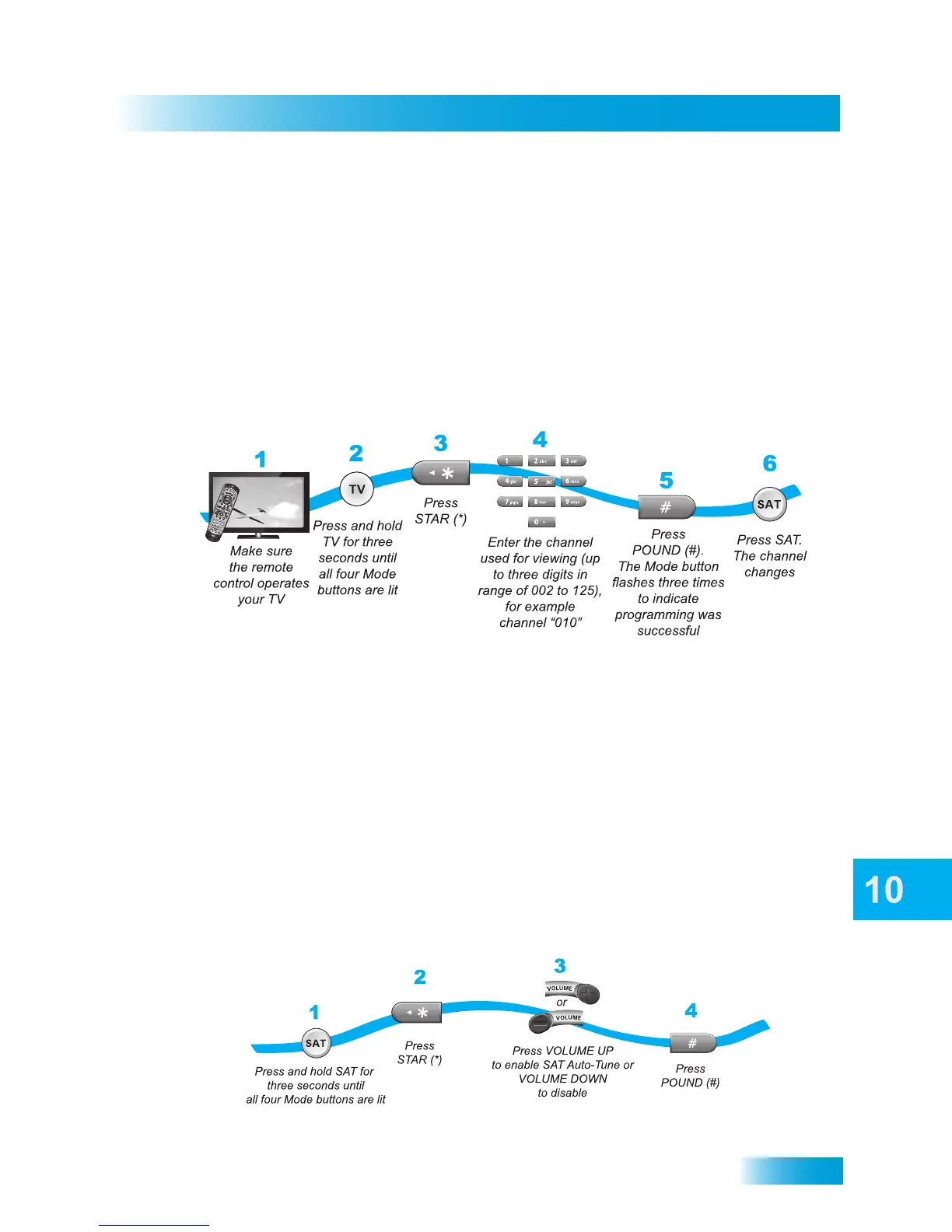
Setting a SAT Auto-Tune Channel
1 Make sure the remote control has been programmed to operate your TV.
2 Press and hold the TV button for three seconds until all four device mode buttons are lit.
3 Press the STAR (*) button on the remote control.
4 Using the NUMBER PAD on the remote control, enter the channel number used for
viewing (up to three digits in the range from 002 to 125), for example channel “010.”
5 Press the POUND (#) button on the remote control. The TV mode button flashes three
times to indicate programming was successful.
6 Press the SAT mode button to test the new Auto-Tune feature. The TV channel changes.
Enabling and Disabling SAT Auto-Tune



 To Next Page