Chapter 2 Commissioning EC-BOS-9 Install and Startup Guide
If the passphrase for the local copy of the station is different from the remote host’s system pass-
phrase, you are prompted to enter the local copy’s passphrase. If there is no passphrase mismatch,
you are not prompted to enter one.
When you select the station, it automatically prompts to enter a passphrase.
Step 4 Select or clear the check boxes START AFTER INSTALL, AUTO-START and click Next to continue.
• START AFTER INSTALL starts the station immediately after it is copied. When you select this
check box, the station is restarted at the end of commissioning, even if you do not reboot the
controller.
• AUTO-START starts the station every time the platform daemon starts. In some commissioning
scenarios, you may wish to disable (clear) both start options when installing a station, especially if
commissioning ends in a reboot. This way the Commissioning Wizard installs the software mod-
ules needed by the station, along with all station files, but leaves the station idle.
In this case, to start the station you must open a platform connection to the controller following the
reboot and start the (now idle) station from the Application Director view. This allows you to see
all standard output messages from the station as it transitions from idle to starting to started.
If doing this, in the Application Director be sure to enable AUTO-START for the selected station.
Otherwise, it will remain idle after the next controller reboot.
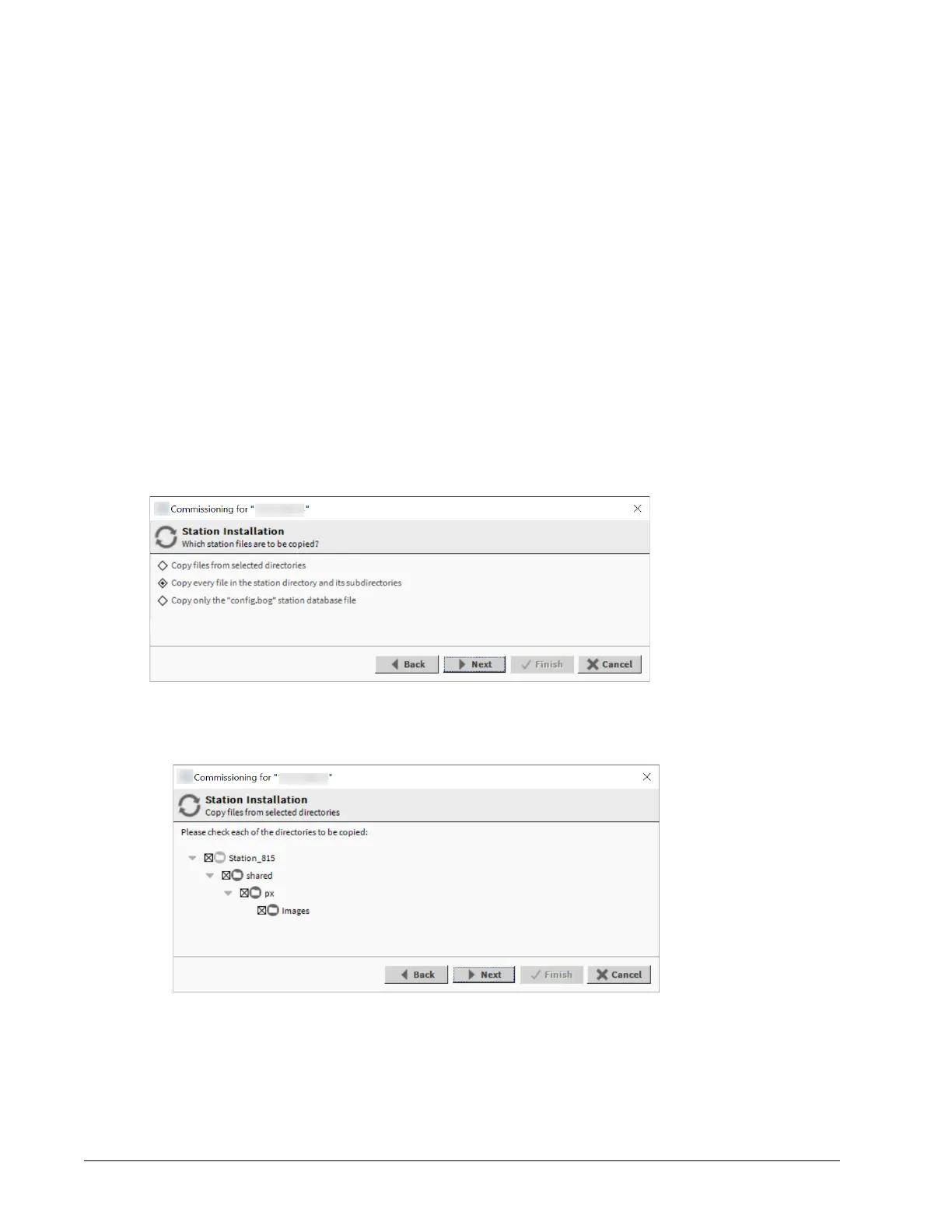
The Station Installation (Which station files are to be copied?) window opens.
This window shows different options from which to copy station files.
• Copy files from selected directories specifies which subfolders under that local station
that are copied. It opens a tree selection window upon Next button.
– If you choose this, click folder controls to expand and contract as needed.
– Selected folders are shown as X and unselected folders show an empty folder check box.
• Copy every file in the station directory and its subdirectories
The default, and most typically used.
18 August 14, 2023








 To Next Page