EC-BOS-9 Install and Startup Guide Chapter 2 Commissioning
Setting up platform users
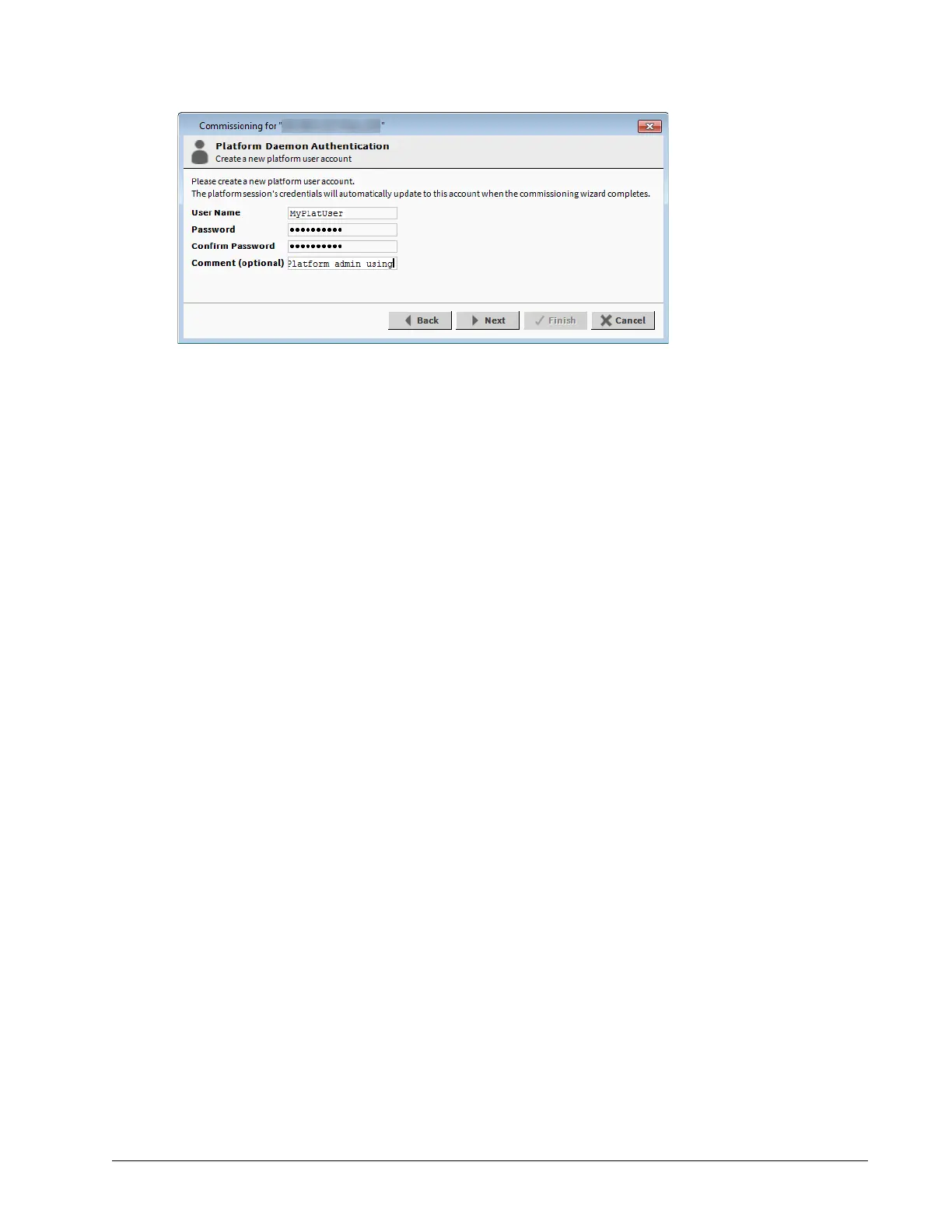
The Commissioning Wizard prevents commissioning a controller that retains the factory-default platform user
account. In this Commissioning Wizard step, you specify platform login credentials (user name and password)
to replace the factory-default platform user in this controller.
Prerequisites: You are stepping through the Commissioning Wizard.
Step 1 Enter the desired User Name with which to log in to the platform.
This name must be different from the default name. It can have a maximum of 14 alphanumeric char-
acters (a - z, A - Z, 0 - 9), where the first character must be alphabetic and following characters either
alphanumeric or an underscore ( _ ).
Step 2 Enter and confirm the Password.
Create a strong password with a minimum of 10 characters including: at least one uppercase charac-
ter, at least one lowercase character, and at least one digit. Entry characters display only as asterisks
(*). An error popup window reminds you if you attempt to enter a passphrase that does not meet the
minimum rules:
• Use both upper and lower case.
• Include numeric digits (a minimum of one).
• Include special characters.
• Don’t use dictionary words.
• Don’t use company name.
• Don’t make the password same as the user name.
• Don’t use common numbers like telephone, address, birthday, and so on.
User name and password entries are case sensitive. If you are not changing the controller’s IP ad-
dress during commissioning, the credentials for your replacement platform user are remembered in
the current session. This can simplify platform reconnection to the controller after it reboots from com-
missioning. This is useful in a migration scenario. However, if you are changing the IP address during
commissioning, you need to remember/re-enter the new credentials for a platform user in order to re-
connect. Always make careful note of any changed platform credentials, and guard them closely—as
they provide the highest security level access to any EC-Net platform.
Step 3 In the (optional) Comment property, enter an alphanumeric descriptor for this platform admin user and
click Next.
This alphanumeric descriptor displays in the Users table and helps differentiate users if you have
more than one platform user. You cannot edit this property after adding a user, unlike with a user’s
password.
August 14, 2023 27








 To Next Page