47
IP2371EN
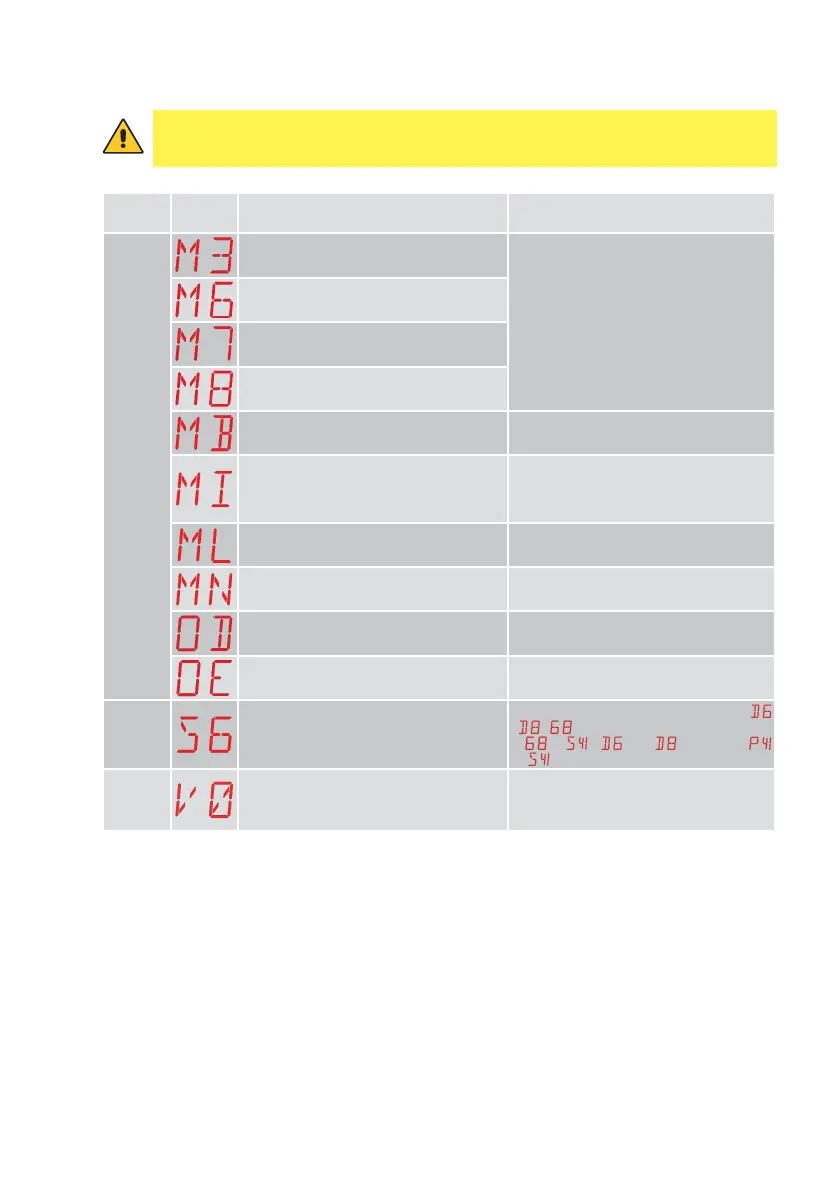
11.3 Visualisation of alarms and faults
WARNING: the visualisation of alarms and faults is possible with any visualisation se-
lection. The signalling of alarm messages takes priority over all other displays.
Type of
alarm
Display Description Operation
M3 - Motor blocked or limit switch not re-
leased within 3 s
Check if there are any obstacles and make
sure the gate moves smoothly and the limit
switch works properly
M6 - Overrun limit switch opens
M7 - Overrun limit switch closes
M8 - Limit switch not found
MB - Motor not detected during operation. Check the motor connection and if the
thermal switch has tripped.
MI - Detection of fifth consecutive obstacle Check for the presence of permanent ob-
stacles along the stroke of the automation.
Check the settings / operating of any limit
switches.
ML - Inverted motor stop limit switches Repair the motor 1 limit switch connection
MN - Inverted motor stop limit switches Limit switches not found during starting
operation
OD - Obstacle on wing detected during ap-
erture.
Check for the presence of obstacles along
the automation stroke.
OE - Obstacle on wing detected during clo-
sure.
Check for the presence of obstacles along
the automation stroke.
Settings
alarm
S6 - Incorrect setting of safety device test
Check the configuration of parameters
,
, .
If
→ , and cannot be
or
.
Service
alarm
V0 - Maintenance request. Proceed with the scheduled maintenance
intervention.



 To Next Page