S ET TIN G VA LUE S
The word "SET" appears on
the bottom tab, and the side
tabs disappear when a menu
item is selected for setting
The joystick controller or
trigger may be used to cycle
through the available values
for each setting.
MAIN MENU
Within the main menu, you
may choose which setting
you want to check or change.
The Main Menu is indicated
by tabs appearing on the
sides and bottom of the
OLED display and the Luxe®
verbally announcing that it is
in the main menu.
VISION CONTROL & BREECH STATUS
The Luxe
®
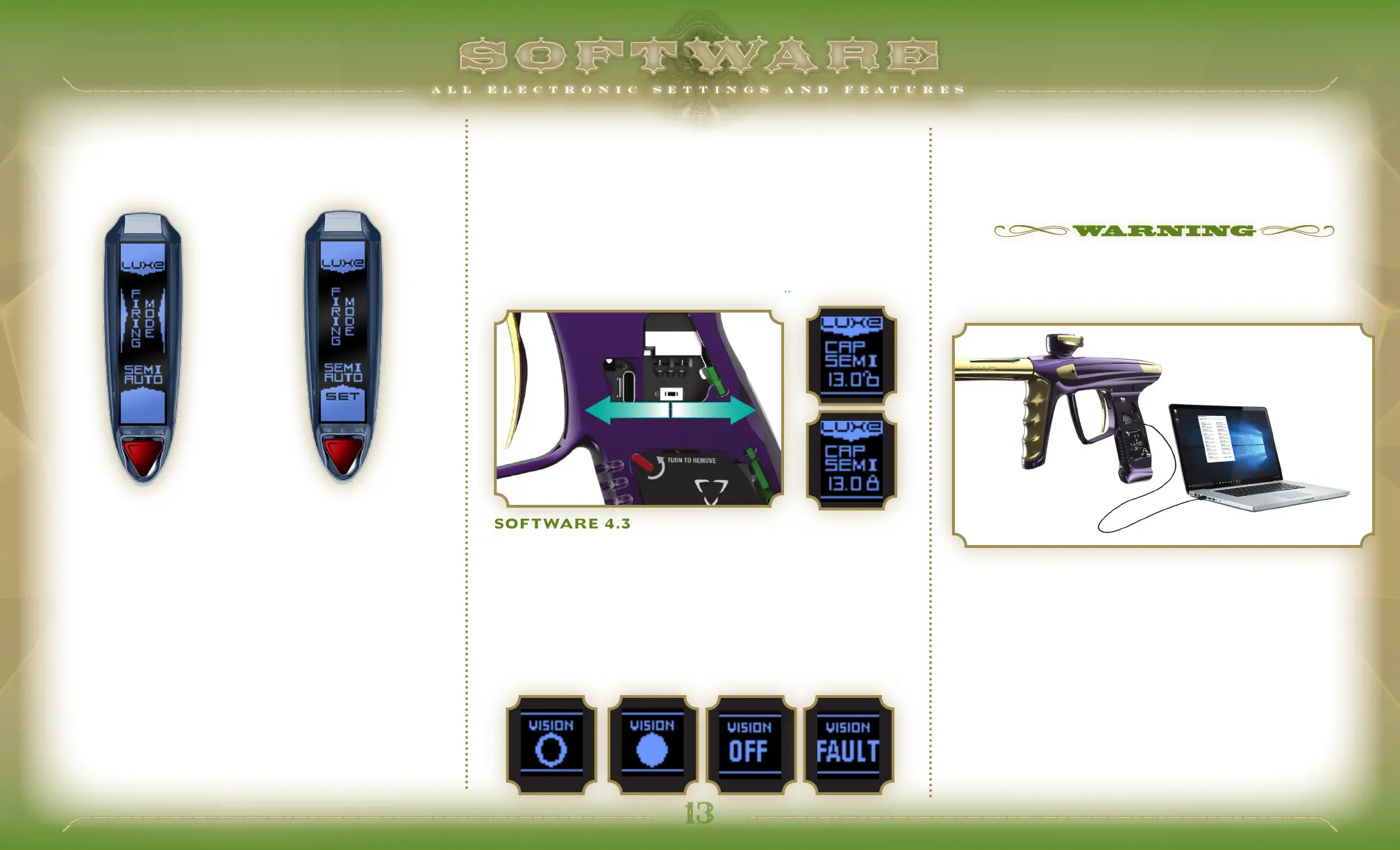
is equipped with a Vision break-beam anti-chop system.
The status of the Vision system is indicated in the OLED display. An
empty circle indicates the breech is empty, while a full circle indicates
a ball has been detected. "OFF" indictates that Vision has been de-
activated, and "FAULT" indicates an error, such as debris blocking the
Vision sensor. Vision may be deactivated by a quick double-tap of the
power button. It may be turned back on the same way.
TOURNAMENT LOCK
Paintball tournaments and field operators require that paintball
markers be locked so that their velocity and firing modes cannot be
changed on the field. The Luxe
®
Tournament Lock is turned on by
sliding the tournament lock switch to the right, towards the rear of the
marker. It is turned off by sliding it towards the barrel. Lock status is
indicated by a locked or unlocked padlock in the OLED display. When
the Luxe
®
Tournament Lock is on, holding the trigger back will not
access the Main Menu for adjustment. For events which require that
adjustments may not be made without the use of a tool, optional grip
screws may be used in place of the Luxe
®
rubber grip posts, securing
access to the tournament lock..
SOFTWARE 4. 5 FACTORY RESET
PRESSING AND HOLDING THE TRIGGER FOR approximately 5
seconds while in programming mode will result in the Luxe
®
resetting
all menu items to their factory default values. Factory Reset is
confirmed by 3 chirps from the speaker.
SOFTWARE 4.2 NAVIGATING MODES
SOFTWARE 4.3
ADDITIONAL POWER BUTTON FUNCTIONS
SOFTWARE 4. 4 USB INTERFACE
INCLUDED WITH YOUR LUXE
®
is a USB-C cable, which can be used
to read or adjust the marker's settings and re-flash the circuit board
with firmware updates, alternate language OLED firmware or alternate
voice sets. Download the latest version of the Luxe
®
USB Interface
software, instructions, voice files and firmware at LuxePaintball.com.
CONFIRM THAT BOTH THE INTERFACE SOFTWARE AND FIRMWARE FILE
VERSIONS ARE COMPATIBLE WITH THE LUXE
®
X BEFORE UPDATING
FIRMWARE OR CHANGING SETTINGS VIA USB. THE LUXE
®
X MUST BE
POWERED OFF TO RE-FLASH ITS SOFTWARE.
LOCK
UNLOCK


 To Next Page