TO REMOVE THE CIRCUIT BOARD FOR CLEANING or replacement, the grip frame must
first be removed from the body (see ADVANCED MAINTENANCE 6.4) and the battery must be
removed from the grip frame (see HARDWARE 3.6). Gently unplug the lower VisonTM flex strip
from the circuit board [FIG. 1] Next twist the red circuit board clips and remove the circuit
board [FIG. 2] When re-assembling, take care to align the circuit board and OLED display
connectors carefully to avoid bending connector pins. Although it is possible to remove and
install the main circuit board with the battery in place and grip on the marker, this is not
recommended, as damage to spring loaded connector pins may result.
ADVANCED MAINTENANCE 6.11 CIRCUIT BOARD REMOVAL
FIG.
FIG.
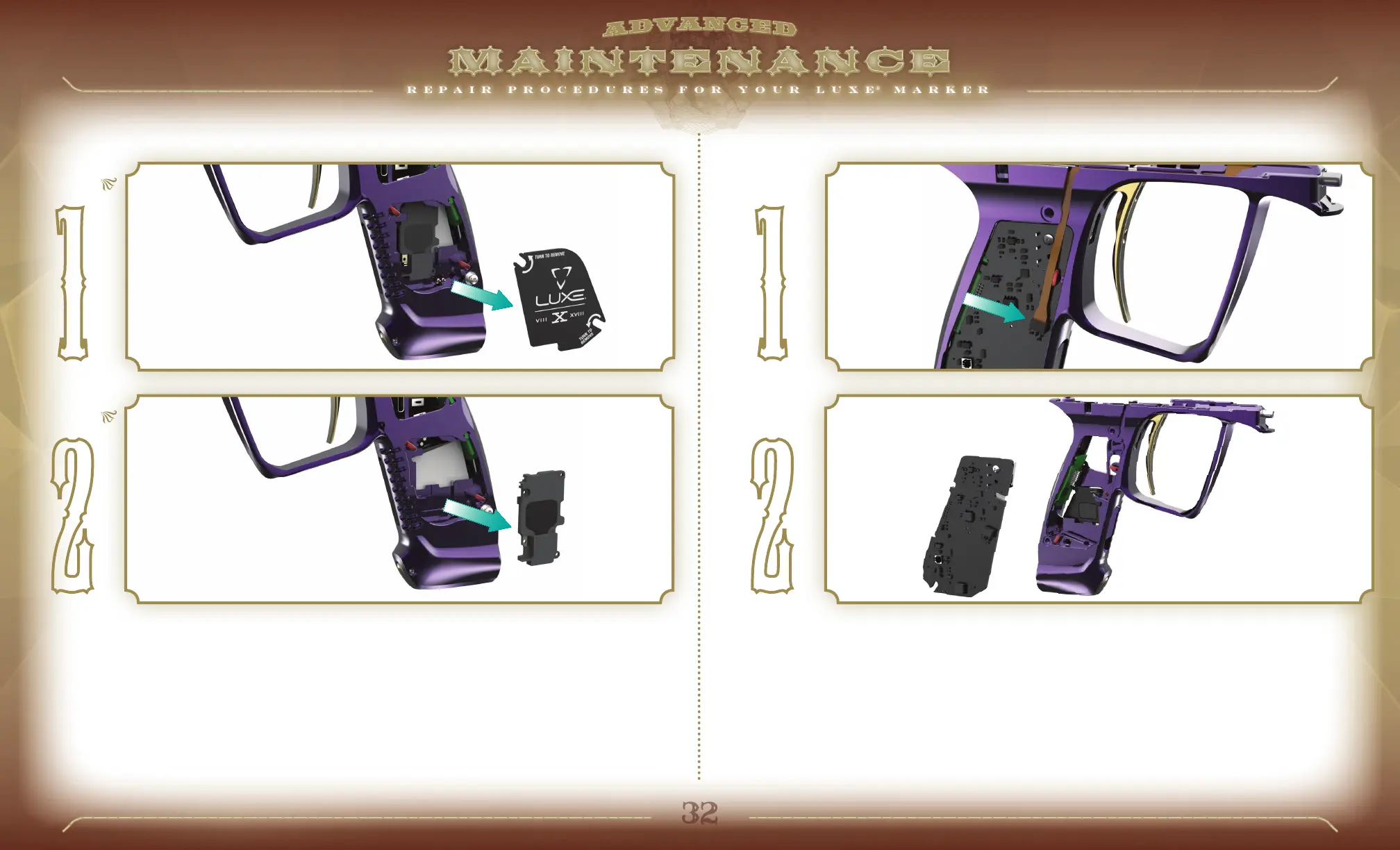
THE SPEAKER MAY BE EXPOSED by removing the rubber grip, twisting the two red
speaker cover clips to release the speaker cover [FIG. 1] and lifting out the speaker cover.
The speaker may then be removed for cleaning or replacement [FIG. 2] Reassembly is the
reverse of removal.
FIG.
FIG.
ADVANCED MAINTENANCE 6.10 SPEAKER REMOVAL


 To Next Page