20
CONTROLCONSOLE(Continued…)
7. IndexReverse.Pushandholdthisbuttontomove
the index vise backwards. Release the button to
stopthemovement.
When then index vise reaches the rear limit,
theyellowlightshines.
8. CreepSpeed.Whenthisbuttonispushedandheld,
theindexingvisespeedisreducedtoslowineither
direction.Thebuttonisamemorytypetoholdlast
position.
9. IndexViseOpen.Whenthisbuttonispushedand
held,themoveableindexjawretractsfromthe
fixed vise jaw. Release the button to stop
movement.
10. IndexViseClamp.Whenthisbuttonispushedand
held,themoveableindexjawclampstowards the
fixed vise jaw. Release the button to stop
movement.
When the index vise is clamping, the yellow
lightshines.
11. FrontViseOpen.Whenthisbuttonispushedand
held,themoveablefrontvisejawretractsfromthe
fixed vise jaw. Release the button to stop the
movement.
12. FrontViseClamp.Whenthisbuttonispushedand
held, the moveable frontjaw clamps towards the
fixed vise jaw. Release the button to stop
movement.
When the front vise is clamping, the yellow
lightshines.
13. SawHeadDown.Whenthisbuttonispushedand
held, thesaw head lowers.Release the button to
stopmovement.
When the saw head reaches the lower limit,
theyellowlightshines.
14. SawHeadUp.Whenthisbuttonispushedandheld,
thesawheadrises.Releasethebuttontostop
movement.
When the saw head reaches the upper limit,
theyellowlightshines.
15. Operator Workstation. The operator workstation
has mostof the controlsto operate themachine.
See the heading‘OPERATORWORKSTATION’ later
inthischapterforinformationoncontrolsandtheir
use.
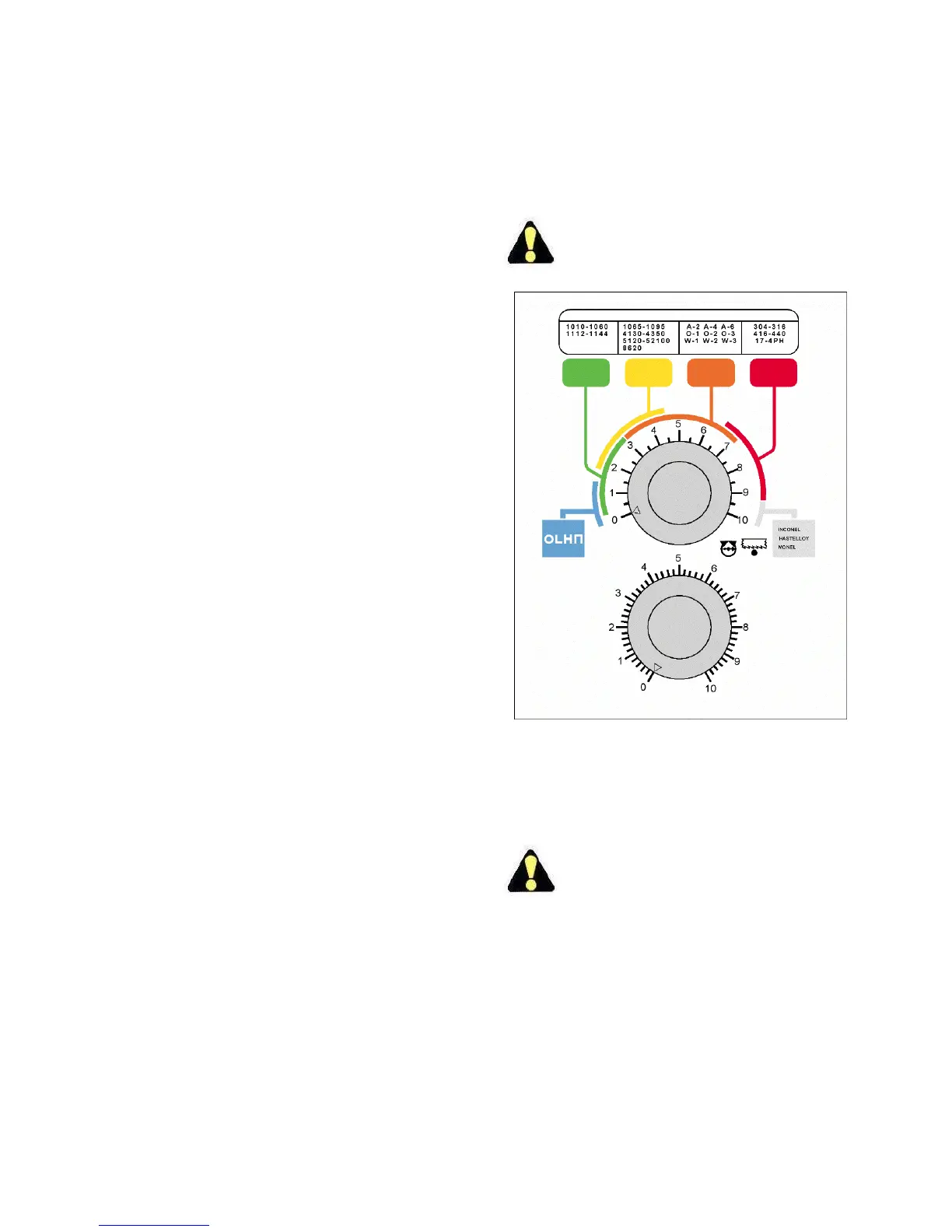
HydraulicPanel
1. FeedForce.Setthefeedforcebyturningtheupper
knobtomaterialbeingcut.Thechartofmaterialis
colorcodedtogiveaforcerangetheoperatorcan
choosefrom.TurntheknobclockwisetoINCREASE
pressure,counterclockwisetoDECREASEit.
TurningtheFeedForcecontrolknobtozero(0)
willnotstopsawingheadmotion.
HydraulicPanel.
2. FeedRate.Turnthelowerknobtothebestsuited
cuttingratetofittheneedssuchascuttingtimeor
cutfinish,etc.TurntheknobclockwisetoINCREASE
thefeedrate,counterclockwisetoDECREASEit.
TurningtheFeedRatecontrolknobtozero(0)
willnotstopsawingheadmotion.



 To Next Page