19
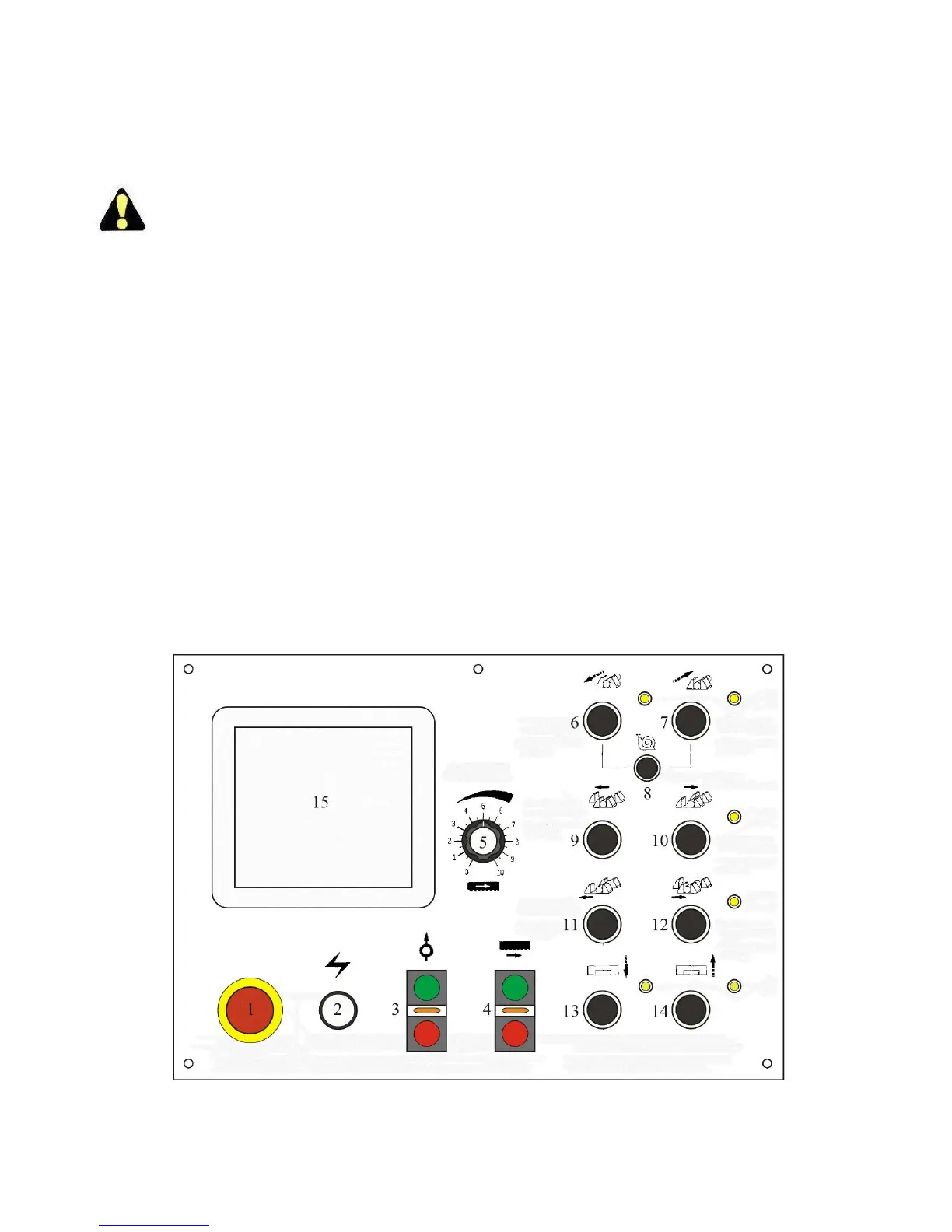
CONTROL CONSOLE
Pushbutton Panel
Number in text refers to identical number
on illustration.
1. Emergency Stop. Except for damage to the
machine or personal injury, pushing this red
mushroom head pushbutton stops all machine
motors simultaneously. This button must be
released or reset before the machine can be
restarted.
To reset, turn the button head clockwise until
the head pops up. To reactivate machine
motors:
To normally stop the machine in non-
emergency situations, push the Saw Head
Up pushbutton.
2. Power On. When the disconnect switch is
turned to “ON”, this lamp will glow indicating
power is on.
3. Hydraulic Start/Stop. Push the upper green
button to start the hydraulic system. Push the
lower red button to stop the hydraulic system.
4. Band Drive Start/Stop. Push the upper green
button to start the band drive. Push the lower red
button to stop the band drive.
The following conditions must exist before
pushing the band start button: (a) hydraulics
must be ON; (b) all doors and covers must
be closed; (c) a saw blade must be installed
and tensioned.
In MANUAL mode, the index vise must be in
the maximum REAR or FORWARD position.
In AUTO mode, one of the vises must be
clamped.
5. Band Speed. Turn the knob clockwise to
INCREASE the speed, counterclockwise to
DECREASE the band speed.
The band speed is shown on the VIEW
screen.
6. Index Forward. Push and hold this button to
move the index vise forward. Release the button
to stop movement.
When the index vise reaches the front limit,
the yellow light shines.



 To Next Page