25
OPERATORWORKSTATION(Continued…)
4. Escape.Choosehowtheindexviserespondsaftera
cutiscompleted.
DOallowstheindexvisetomovebackalittle
toavoidthesawbandfromtouchingthe
materialasthesawbandisraised.Itisdesigned
for bundle cutting and cutting with Tungsten
Carbidetippedblade.
NONEkeepstheindexvisestationarywhilethe
saw band is raised. It is designed for single
cuttinganduseofBimetalblades.
5. Raise Mode. Selects the front vise position when
thesawbandrises.
Viseopentohavethefrontviseopenwhenthe
cutiscompletedandthesawbandrises.
Vise close to have the front vise clamp when
thecutiscompleteandthesawbandrises.
6. Auto stop. Choose how the machine is left after
cuttingisfinished.
NONE allows the machine to keep running
afterthecuttingiscompleted.
If the operator desires to switch off after a
certain time, select TIMER. The preset is 30
minutes.SeetheParameterScreentochange
toadifferenttime.
7. Coolant Delay. Choose how the coolant system
operatesinautomaticcycle.
NONE.Thecoolantsystemisactiveaslongas
thesawbandisrunning.
TIMER. Will allow the coolant system to run
onlywhenthesawbandisrunningandthesaw
headismovingdown.
RETURN. This key will bring you back to the
ViewScreen.
ParameterScreen
1. Pressing PARAMETER will give access to certain
featuresthatcanbechanged.However,youmust
useapasswordtogainaccesstotheseparameters.
Use EXTREME CAUTION when changing any
parametersasundesirableresultsmayoccur.
2. Usethepassword11111111togainaccess tothe
parameterlist.
3. Keepinmindthatcertainitemshavelimitsonthe
valueyouset.Trialanderrormaybenecessaryto
findtherightvalue.
DeviationMonitorScreen
1. Thisoptionalscreenallowsthesettingoftimedelay,
deviation value and workpiece diameter. This
functionisoptional.
SETUPFORCREATINGJOBS
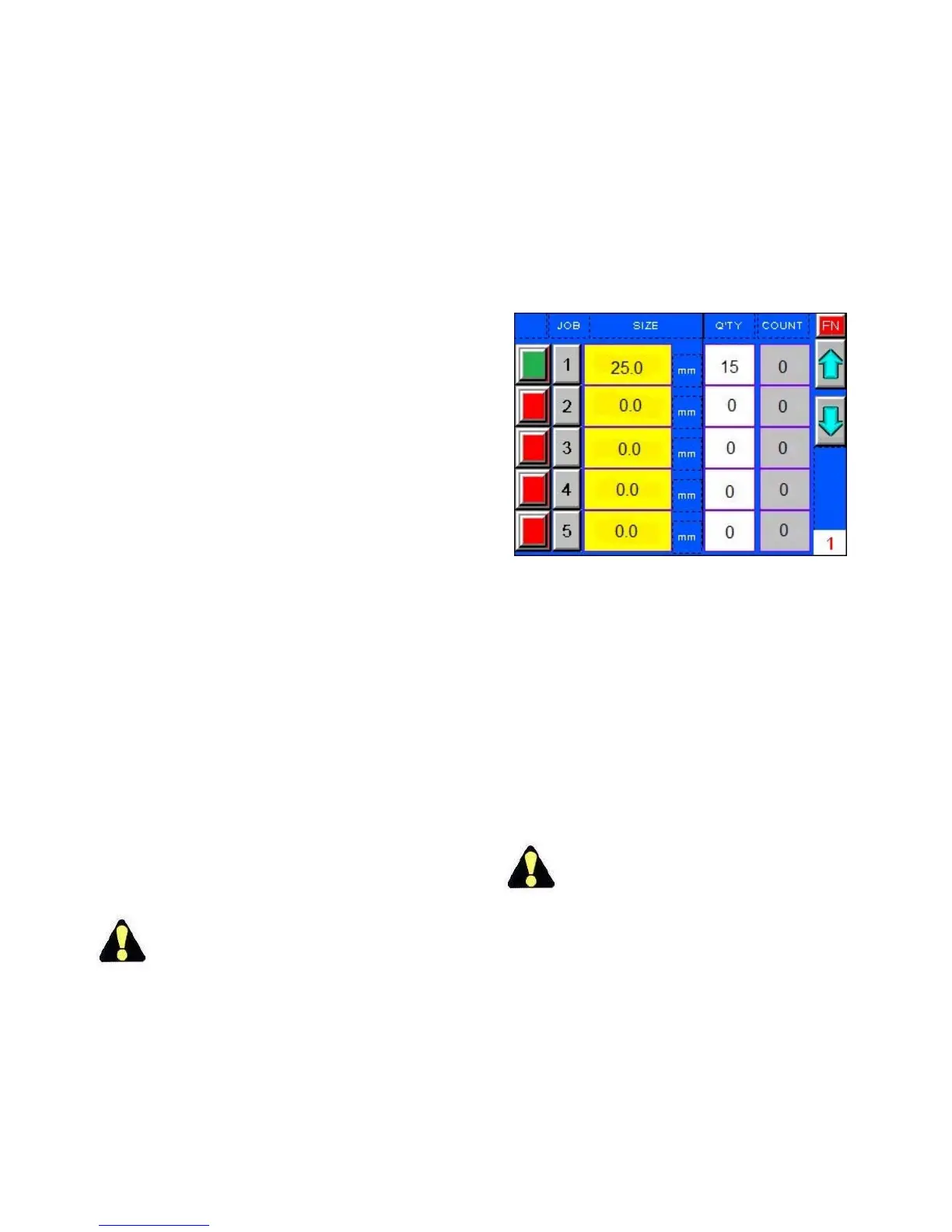
JobScreen
1. WhenLENGTHispressedontheViewScreenthis
willbringtheoperatortotheJobScreenwherejobs
canbeentered.
JobScreen.
2. Theoperatorcanprogramuptotwenty(20)jobsin
thelibrary.Undereachjobnumberyoucanenter
thecutlength,andthequantity.
3. Toenterdatainthejoblist:(a)pressthekeyinthe
Length (Size) column. The keypad will appear; (b)
enterthedesiredcutlengthandthenpressENTER;
(c)pressthekeyinthecolumnQTYinthesamerow
and thekeypad will appear; (d) enter the desired
quantityandthenpressENTER.
4. MakesuretheCOUNTcolumnsaresettozero(0).
5. Gotothenextrowforjobnumber2andproceed
untilthejoblistiscompleted.
Check and make any corrections/ additions/
deletions to the job before exiting the Job
Screen.
6. Pressingthesquareinthefirstcolumnwillactivated
thisjobanddisplayitintheViewScreen.
7. Eachjobselectedwillchangethisbuttonfromred
togreen.
8. Toskipajob,orjobs,inthelistpushtheactivation
buttonuntilitisred.Thisjobwillnotbeexecuted.
9. Limits when entering jobs: (a) the minimum
automaticindexis10mm;(b)themaximum
automatic index is 8.000 mm; (c) the maximum
quantityis9.999cuts.



 To Next Page