24
OPERATORWORKSTATION(Continued…)
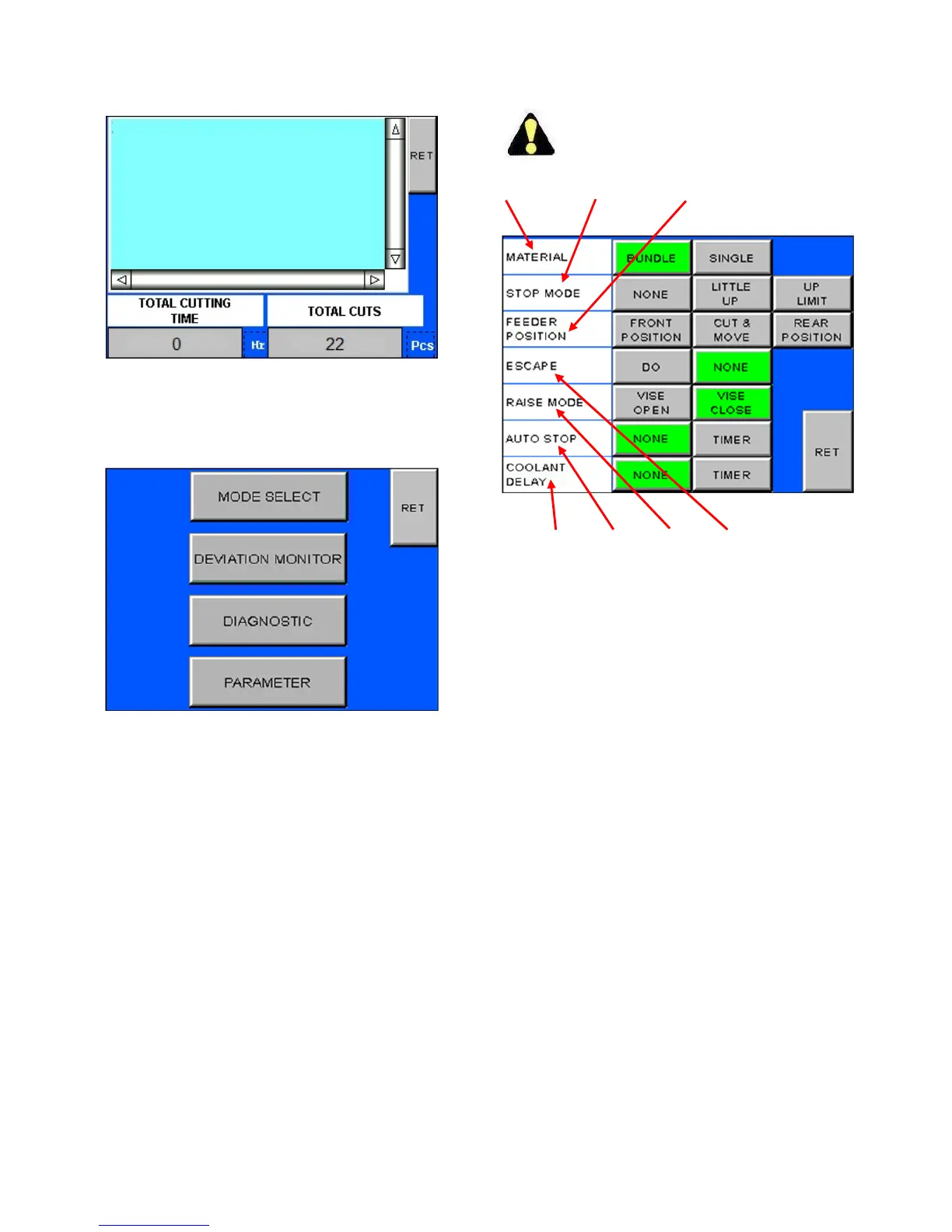
ErrorMessageScreen.
SystemScreen
1. WhentheSYSTEMkeyontheRunScreenispressed,
thefollowingscreenappears:
SystemScreen.
2. Pressing MODE SELECT brings the operator to a
screen that gives choices to common settings for
operation. See Mode Select Screenlaterinthis
section.
3. PressingDIAGNOSTICwillshowdifferentPLCinput
and output modules and their status. These
modulesarefordiagnosticandserviceonlyand
needNOinteractionfromtheoperator.
4. Pressing PARAMETER will give access to certain
features that can be changed. See Parameter
Screenlaterinthissection.
5. Pressing DEVIATIONMONITOR willgive access to
setting the Deviation Monitor (Optional). See
DeviationMonitorScreenlaterinthissection.
ModeSelectScreen
Number in text refers to identical number on
illustration.
123
7654
ModeSelectScreen.
1. Material.Choosethematerialmodeoperation
betweenBUNDLEorSINGLE.
WhenBUNDLEisselected,theCUT&MOVE
andREARPOSITIONkeysaredeactivated.
2. StopMode.Choosehowthemachinewillstopafter
thecutorcycleisfinished.
Nonestopsthesawbandafterthecutandthe
machinestops.
LITTLEUPliftsthesawband5to10mmafter
thecutandthenthemachineisstopped.
UPLIMITallowsthesawbandtorisetothetop
limitandthenmachinewillstop.
3. FeederPosition.Choosewheretheindexisduring
thecutinautomaticcycle.
Toleavetheviseintheforwardposition,select
FRONTPOSITION.
CUT & MOVEallowsthevisetomovetothe
index position while the machine is cutting.
Thisselectioncannotbeactivatedwhen
BUNDLEcuttingisselected.
REAR POSITION will move the index to the
indexpositionbeforecuttingisactivated.



 To Next Page