23
OPERATORWORKSTATION(Continued…)
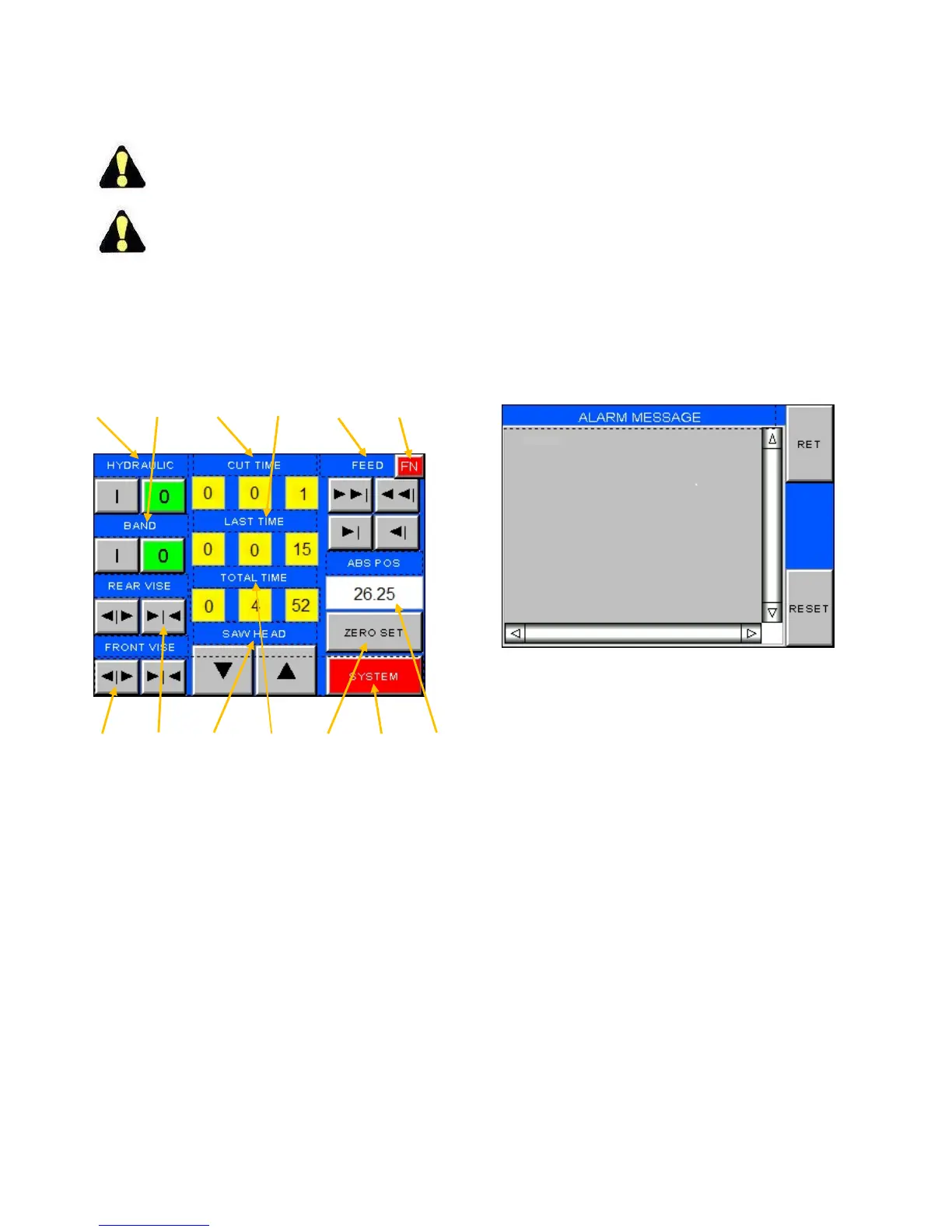
Run(manual)screen
Numberintextreferstoidenticalnumberon
illustration.
Formostofthesecontrols,theMODESETmust
beinmanual.
1. HYDRAULIC.Switchestoturnthehydraulicsystem
off(0)oron(I).
2. BAND(banddrive).Switchestoturnthebanddrive
motoroff(0)oron(I).
3. CUTTIME.Displaysthecurrentcuttime.
4. LASTTIME.Displaysthepreviouscuttime.
123456
13121110987
Run(manual)Screen.
5. FEED.Thissetofkeyscontroltheindexingviseand
givestheoperatorachoiceofFASTorSLOWspeeds
ineitherFORWARDorBACKWARDdirections.
6. FN (function). Pressing this key will take the
operatortootherscreensasdescribedearlier.
7. ABS POS (absolute position). To display the
position of the index vise relative to the HOME
position.
8. SYSTEM.Thiskeytakestheoperatortoascreento
allow mode selections, diagnostics and certain
parameterchanges.SeeSystemScreenlaterinthis
chapterforinformationonthisscreen.
9. HOME.Ifpowerhasbeeninterrupted,cutlengths
areinaccurate,anautocyclealarmisindicated,or
autocyclefailstoinitiate,theindexvisemayneed
tohaveaZEROSET.Clampthefrontviseandpush
thiskeytozerotheindexvise.
10. TOTALTIME.Displaysthetotaltimeofthejob.
11. SAWHEAD.Pushandholdthesebuttonstomove
thesawheadDOWNorUP.
12. REARVISE
.Pushandholdthesebuttonstoopenor
clampthisvise.
13. FRONTVISE.Pushandholdthesebuttonstoopen
orclampthisvise.
Pressing the FN key and then F1 brings the
operatorbacktotheViewScreen.
PressingtheFNkeyandF3bringstheoperator
aheadtotheAlarmScreen.
AlarmScreen.
1. Inthecaseofmachinemalfunction,thisscreenwill
displaythealarmmessageprovidingastartingpoint
fortroubleshooting.
PresstheRETkeyandthenF2togobacktothe
Runscreen.
PresstheRETkeyandthenF4togobacktothe
ErrorMessagescreen.
ErrorMessageScreen
1. Inthecaseofmachinemalfunction,thisscreenwill
displaytheerrormessageprovidingastartingpoint
fortroubleshooting.
PresstheRETkeytogobacktotheViewscreen.



 To Next Page