22
OPERATORWORKSTATION(Continued…)
4. 0‐9, decimal point, +/‐. These keys are used to
entervaluesforthatfunction.Entertheminorder
includingthedecimalpoint.
5. CLR(clear).Thiswillcleartheentryinthedisplay.
6. DEL (delete).Pressing this key willdelete the last
keystrokeentered.
Ifyoumakeanerrorinenteringdata,justpress
the DELETE or CLEAR key, correct or reenter
yourvalueandpresstheOKkey.
7. ENTER. Pressing this key will enter the data into
memoryandthenwillreturntothepreviousscreen.
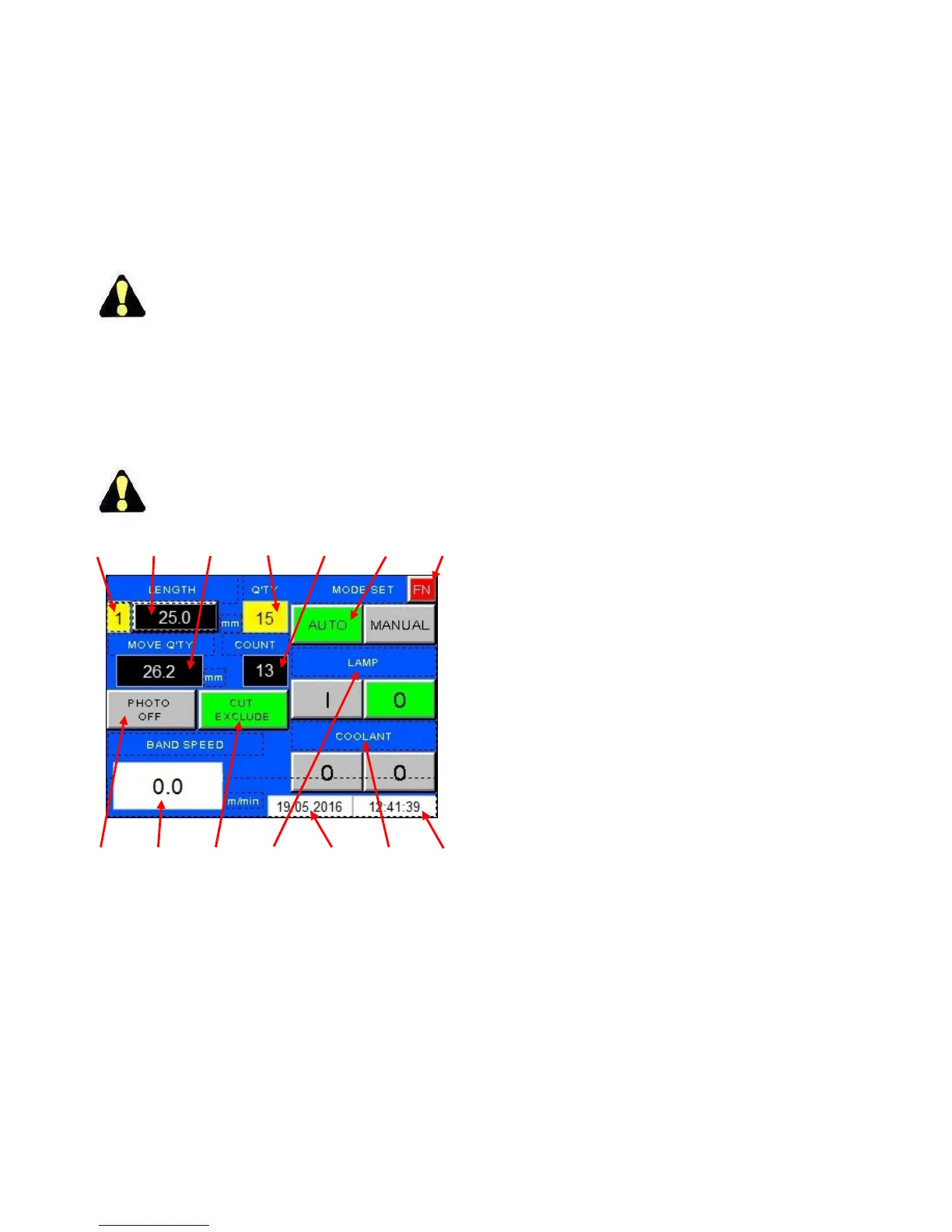
ViewScreen
Numberintextreferstoidenticalnumberon
illustration.
1234567
141312111098
ViewScreen.
1. Displaysthecurrentjobnumberperformed.
2. LENGTH. Displays length for current job. When
different lengths are required, see chapter SETUP
FORAJOBlaterinthissection.
3. MOVE QTY. Displays actual position of the index
vise.
4. QTY(quantity).Displaysthenumbertobecut.
5. COUNT.Displaysthequantitythathasbeencut.
6. MODE SET.Usedtoselectoperationmode.Press
theMANUALkeyforenteringmanualoperation
mode.PresstheAUTOkeyforenteringautomatic
mode.
7. FN(function). Pressing this key will take the
operatortootherscreensasdescribedearlier.
8. Displaysthecurrentdate.
9. COOLANT. When the machine is not in cutting
operation,pushonO(changesintoI)willstartthe
coolant pump. Press again to stop the flow. Press
theAUTOkeybeforecuttingoperation.Thecoolant
will automatically flow when the saw blade is
running.Whencuttingstops,thecoolantflowwill
stop.
10. Displaysthecurrenttime.
11. LAMP.Switchestoturnlampon(I)oroff(O).
12. COUNTED.In automaticmode, ifthefront endof
thematerialisuseable,thefirstcutiscounted,or
otherwiseNOTCOUNTED.Thefunctionispreset.If
the front‐end material is good press, press NOT
COUNTEDafterthecuttingisstarted.Itwillthen
show COUNTED. This function is effective only
when pressing COUNTED/NOT COUNTEDdirectly
aftertheautocyclecuttingisstarted.
13. BANDSPEED.Displaysthebandspeedinm/minor
infeet/min.dependingonmachinesetting.
14. PHOTOCELL ON/OFF
. To turn the out‐of‐stock
photoswitchOForON.
Press the FN key and select F1 will bring the
operatorbacktotheViewScreen.
Press the FN key and select F2 brings the
operatortotheRunScreen.



 To Next Page