Operation Section
-77-
Saving radio stations manually
You can save up to 6 preset channels each for FM 1,
FM2, FMA, AM 1, AM2, and AMA.
If change the stations while driving, use preset button
to prevent accidents.
1. Press the AM or FM button
repeatedly to select the band.
2. After selecting the frequency,
press and hold the PRESET [1∥]
- [6 D+] button.
The frequency is saved to the selected preset button.
A total of 24 frequencies with 6 preset frequencies
each for FM1/FM2/AM1/AM2 modes can be saved.
Saving radio stations automatically
1. Press the AM or FM button
repeatedly to select the band.
The previously chosen
broadcasting station will be
received.
2. Press and hold the AST button
to automatically save receivable
frequencies to Preset button.
"AST" is shown, and then stores
stations in the order of their
frequencies on the Preset buttons.
Up to 6 stations can be stored in each of the AMA and
FMA band.
Listening to a preset station
1. Press AM or FM button
repeatedly to select the band.
You can select the FM 1. FM2. AM
1 or AM2 radio band.
While the Auto Store stations are stored, you can
select the AMA or FMA band by additional.
The previously chosen broadcasting station will be
received.
2. Press Preset [1∥] - [6 D+]
button.
From the 6 presets, select the
frequency you want to listen to.
USB player
Before MP3 [WMA] USB playback
This unit cannot play the following files;
• MP3 files encoded with MP3i and MP3 PRO format.
- MP3 files encoded in an inappropriate format.
- MP3 files encoded with Layer 1/2.
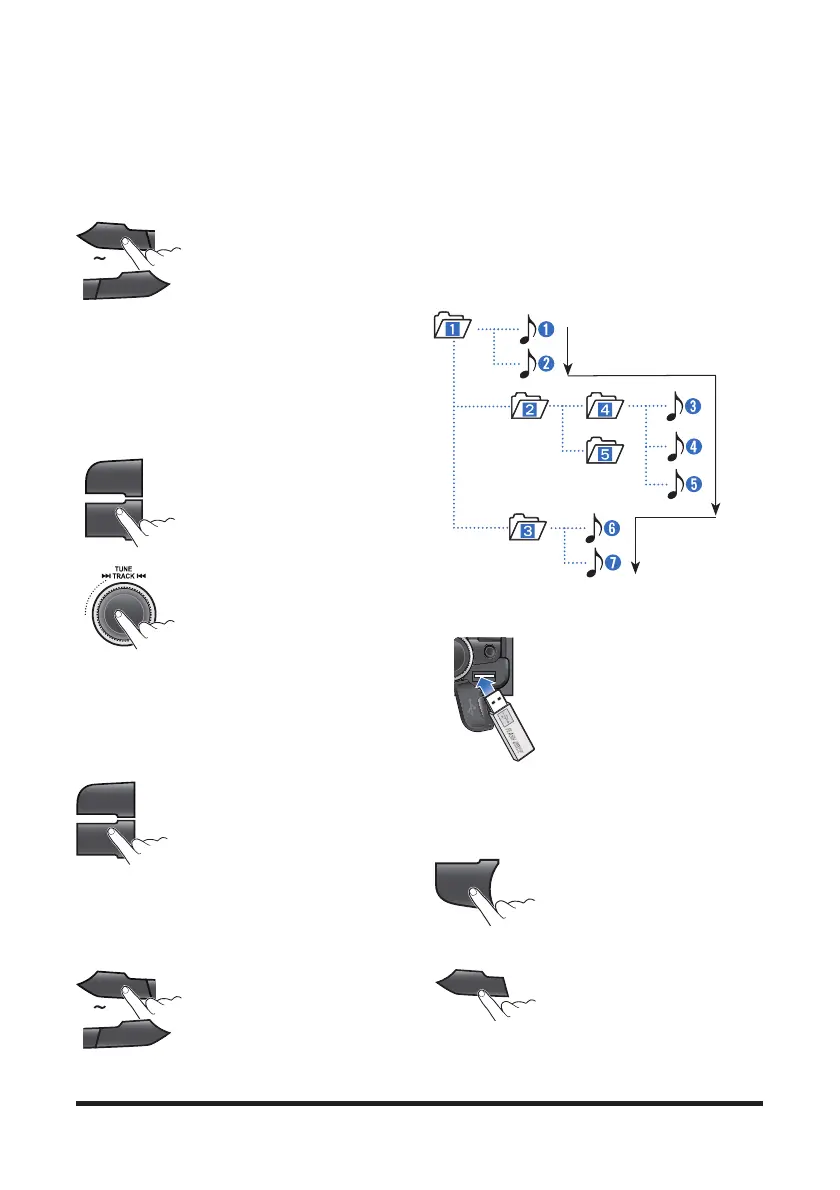
Folder selection order/File playback order;
Playing a USB device
1. Open the cover, plug the USB
device to the USB port.
Once a USB is connected, USB
will automatically start playing from
the first file within the USB.
If a previously played USB is
reconnected, then the file after the
most recently played file is played.
If a different USB is connected or the file information
within the USB was changed, then the USB will start
playing from the first song within the USB.
2. When a USB device to be
played is already connected, press
the USB button to play USB device.
The previously selected file is
played.
3. While playing, press the [1∥]
button to pause the file.
Press the button again to play the
current file.
1
II
6
D+
AM
FM
SCN
AST
AM
FM
1
II
6
D+
USB
1
II



 To Next Page