
 Need help?
Do you have a question about the Dormakaba PORTEO and is the answer not in the manual?
Explains the meaning of symbols like Danger, Caution, Attention, and Note.
Details hazard categories like Danger, Caution, and Attention with their implications.
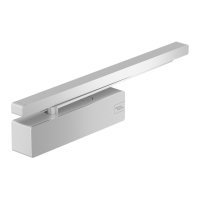
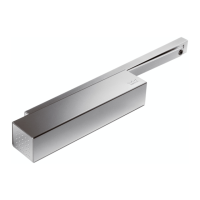
Describes the PORTEO as an electromechanical operator for swing doors up to 140 kg.
Provides crucial warnings regarding electric current and risk of injury by crushing.
Describes residual risks like crushing and force-limited impacts.
Overview of PORTEO preset applications and parameters for smooth operation.
How the PORTEO automatically opens and closes doors, manual operation support.
PORTEO settings for low energy applications according to standards.
Lists parameters required for PORTEO internal control processes.
Lists all components included in the PORTEO package.
Details the function of power switch, program switch, DIP switches, and potentiometers.
Explains terminal assignments for external connections like power and locking devices.
Provides key technical specifications like weight, power supply, and temperature range.
Describes the electrical door opener and its adjustable unlocking time.
Explains the use of contactless safety devices for securing door turning range.
Crucial safety guidelines to follow during the mounting process.
Describes various mounting types and required additional components.
Steps to prepare the site before starting the actual mounting.
Procedure for standard commissioning of the PORTEO.
Checks and conditions that must be met before commissioning.
Final steps for completing the installation of the PORTEO.
Parameters stored with base values in the basic setting.
Step-by-step guide to teach the door operator its movement.
Table showing door widths and corresponding maximum permissible weights.
Further steps for teaching door operator, including door width.
How to activate connected accessories using DIP switches.
Importance of handing over operating instructions and briefing the facility operator.
Identifies parts that are subject to wear and require annual inspection.
Guidelines for cleaning and caring for the PORTEO unit.
Overview of how to switch between operation modes.
Details the PowerMotion mode for activated opening/closing cycles.
Explains the PowerLess mode for manual opening with minimal effort.
Explains the Push&Go mode triggered by manual door movement.
How the system detects and reacts to obstacles during door movement.
Describes the vandalism mode and its behavior.
How the system reacts to a locked door receiving an opening signal.
Details the PermanentOpen mode where the door stays open.
Lists settings adjustable via potentiometers and DIP switches.
Steps to set the PowerLess operation mode using potentiometer 1.
How to adjust opening and closing speed using potentiometer 1.
How to set the hold-open time using potentiometer 2.
How to set unlocking time for electrical door openers using potentiometer 4.
How to enable/disable the end stop function using DIP switch A.
Common malfunctions and their reset/remedy procedures.
Troubleshooting steps when the LED display is off and the door is unresponsive.
Troubleshooting steps when the LED is on but the door is unresponsive.
Troubleshooting steps when the LED flashes and the door is unresponsive.
Troubleshooting steps when the door stops unexpectedly during movement.
Troubleshooting steps for doors opening beyond the set angle.
Troubleshooting steps for doors not reaching the set opening angle.
Declares conformity to EC directives and applied standards.
Declares compliance of the partly completed machine with Machinery Directive.
The PORTEO is an electromechanical operator designed for the automatic opening and closing of swing doors indoors. It is not suitable for use in escape routes, on fire protection doors (fire/smoke protection doors), or in outdoor areas. The device is intended for swing doors with a permissible door leaf weight of up to 140 kg.
The PORTEO operates by transmitting the motion of its drive to the door via a slide rail or an optional scissor arm. The opening of the door is triggered by a pulse, for example, by pressing a button or using other activators like radio control or transponders. Once triggered, the door moves to the "Open" position and remains there for a preset hold-open time, after which it closes automatically.
The device supports two main operation modes: "PowerMotion" and "PowerLess," with an additional "Push&Go" function.
In "PowerMotion" mode, the door's opening and closing cycles are initiated by activators. An electrical door opener may be required in conjunction with this mode. When a pulse is triggered, the door moves to the "Open" position and closes automatically after the preset hold-open time (adjustable from 5 to 30 seconds). If an opening pulse is triggered during the hold-open time, the timer is restarted.
The "PowerLess" operation mode allows the door to be opened manually with minimal effort, as the operator supports the motion. The closing process is automatic once the adjustable hold-open time elapses. This mode is activated by setting potentiometer 1 (speed) to its lowest "PowerLess" position.
The "Push&Go" function is permanently active in "PowerMotion" mode, provided potentiometer 1 is not in the "PowerLess" position. In this mode, an opening pulse is triggered by a manual movement of the door (e.g., using the door handle) by approximately 3 degrees. The door then moves to the "Open" position and closes automatically after the hold-open time. If another opening pulse is triggered during the closing cycle (i.e., the door is opened against its swing direction), the door returns to the set "Open" position and closes automatically once the hold-open time elapses.
The PORTEO also features an "PermanentOpen" switch position, which causes the door to travel to and remain in the open position until another operation mode is selected. This can also be activated with a surge current function in "PowerMotion" mode by pressing a button twice in quick succession or activating a programmed pushbutton on a hand-held transmitter once. The door will then close if the button is pressed again twice or the transmitter button is activated again.
Safety features include obstacle detection during both opening and closing movements. If the door encounters an obstacle during opening, it stops immediately, restarts after approximately 3 seconds, and attempts to open again. If it encounters an obstacle more than three times, it returns to the "Door closed" position. During closing, if an obstacle is met, the door stops, moves a few degrees in the "Open" direction after a few seconds, waits, and then attempts to close again. This process repeats three times before the door stops and remains at the obstacle. Manually moving the door by approximately 3 degrees in the "Open" or "Close" direction will cause it to continue moving in the specified direction.
A vandalism mode is also integrated. If the door is forced against its original driving direction during an opening or closing cycle, the gear is disabled, allowing manual operation. After about 5 seconds, the door automatically returns to its adjusted function program.
The end stop function accelerates the closing speed in the final degrees of movement to overcome air resistance, latch resistance, and friction from door sealings. This feature is deactivated on delivery and can be adjusted during commissioning.
For locked doors, a blocking detection feature is present. If an opening signal is generated at a locked door, the door moves once against the lock and then turns off. Subsequent opening signals are ignored for 5 seconds. Manually moving the door in the "Open" direction will cause it to open and resume normal operation.
The PORTEO is preset for a variety of indoor applications, with default settings for lintel mounting, slide rail use, hinge side mounting, door weight up to 60 kg, and door widths up to 1,000 mm. For installations deviating from these basic values, an extended commissioning procedure is required to determine and adjust specific parameters.
Parameters such as the direction of rotation (left or right), mounting type (lintel or door leaf), mounting side (hinge or opposite hinge), lintel depth, type of arm (slide rail or scissor arm), door width, door weight, and the "Door closed" and "Door opened" positions are learned during commissioning. The end stop can also be adjusted.
The hold-open time is infinitely adjustable from approximately 5 seconds to 30 seconds. In "PowerLess" mode, it can be adjusted from 0.5 seconds to 30 seconds. The opening and closing speed can be adjusted via potentiometer 1, with travel times ranging from 5 to 10 seconds for a 0°-90° movement.
Wall blanking, for use with optional sensors, is adjustable from approximately 80° to 110° opening angle. The unlocking time for an electrical door opener (if connected) is automatically detected and adjustable from 0.2 seconds to 3 seconds.
The end stop can be switched on or off. When off, the door closes gently and is held in the "Door closed" position, suitable for smooth-running doors. When on, the door accelerates in the last few degrees before closing and is disengaged if closed, suitable for doors with high resistance.
Regular maintenance is crucial for the PORTEO to ensure its safe and reliable operation and to extend its service life. The following parts are considered wear parts and should be inspected and, if necessary, replaced annually: the arm, sliding block, and slide rail. Only original spare parts should be used for replacements.
dormakaba and its authorized partners offer premium maintenance services for automatic doors and hold-open systems. Regular testing by trained experts helps detect and eliminate weak points early, preventing property damage and personal injury. This proactive approach also helps manage costs by addressing damage or wear at an early stage.
For cleaning, it is imperative that all cleaning work is performed in a de-energized state. Metal objects must never be inserted into the PORTEO's openings, as this poses a risk of electric shock. Water or other liquids should not be allowed to penetrate the device. The operator should be cleaned with a damp cloth and commercial cleaners. Abrasives should be avoided to prevent surface damage. The device should only be switched back on once its surfaces are completely dry.
 General
| Product Type | Automatic swing door operator |
|---|---|
| Max. door weight | 100 kg |
| Max. door width | 1100 mm |
| Operating voltage | 24 V DC |
| Protection class | IP20 |
| Closing force | EN 4 |
| Maximum Door Width | 1100 mm |
| Maximum Door Weight | 100 kg |
| Protection Rating | IP20 |
| Holding Force | Adjustable |
| Installation | Surface mounted |
| Control Options | Push button |




 To Next Page