Vigor3900 Series User’s Guide
263
H
H
o
o
w
w
t
t
o
o
e
e
d
d
i
i
t
t
t
t
h
h
e
e
o
o
u
u
t
t
g
g
o
o
i
i
n
n
g
g
q
q
u
u
e
e
u
u
e
e
1
1
-
-
5
5
w
w
e
e
i
i
g
g
h
h
t
t
f
f
o
o
r
r
t
t
h
h
e
e
Q
Q
o
o
S
S
p
p
o
o
l
l
i
i
c
c
e
e
r
r
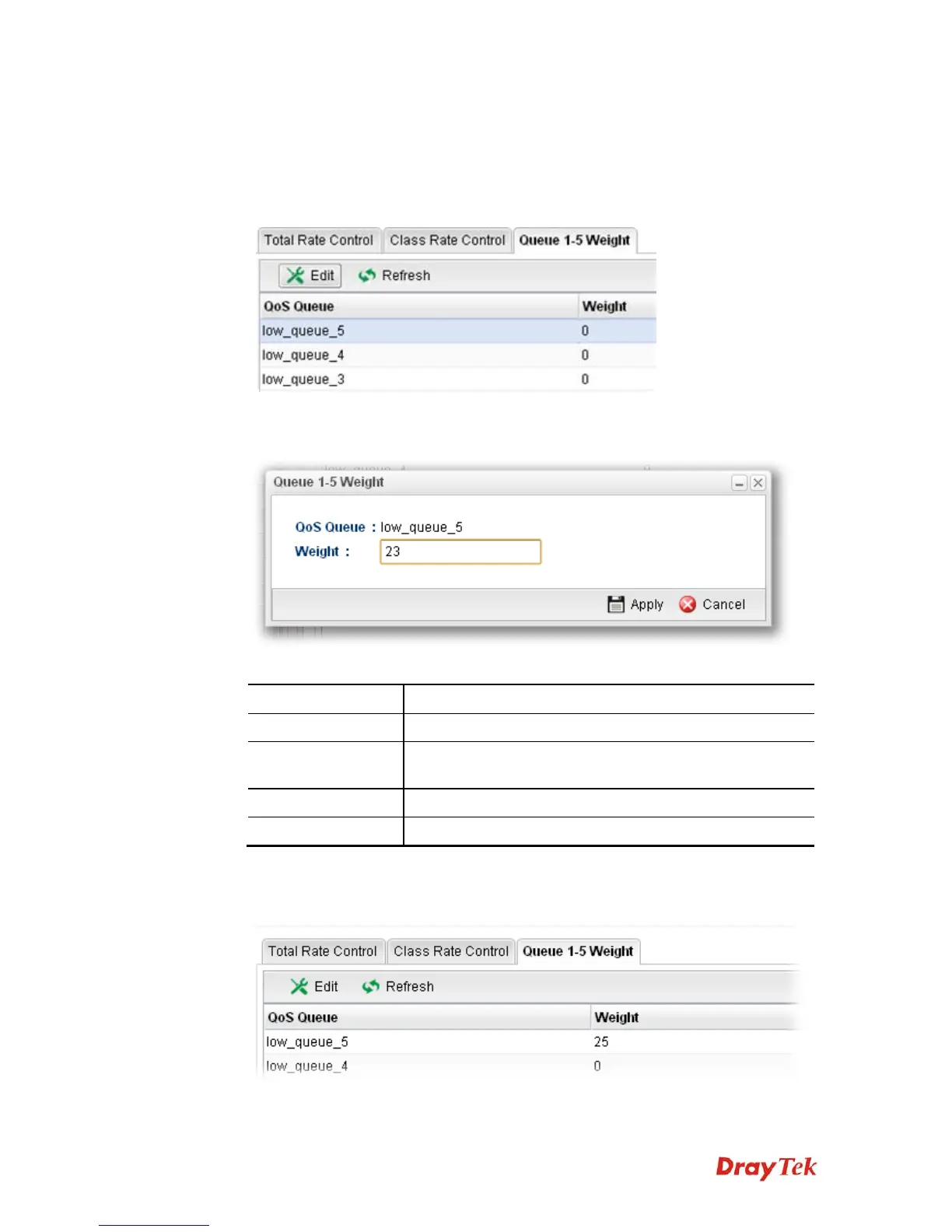
1. Open Bandwidth Management>> Outgoing Class and click the Queue 1-5 Weight
tab.
2. Choose one of the profiles and click the Edit button.
3. The following dialog will appear.
Available parameters are listed as follows:
Item Description
QoS Queue
Display the name of the QoS queue.
Weight
Type the weight of queues in bytes, range from 0 to
1000000.
Apply
Click it to save the configuration and exit the page.
Cancel
Click it to exit the page without saving the configuration.
4. Enter all the settings and click Apply.
5. The outgoing queue 1-5 weight for QoS Policer has been modified.


 To Next Page
 Loading...










