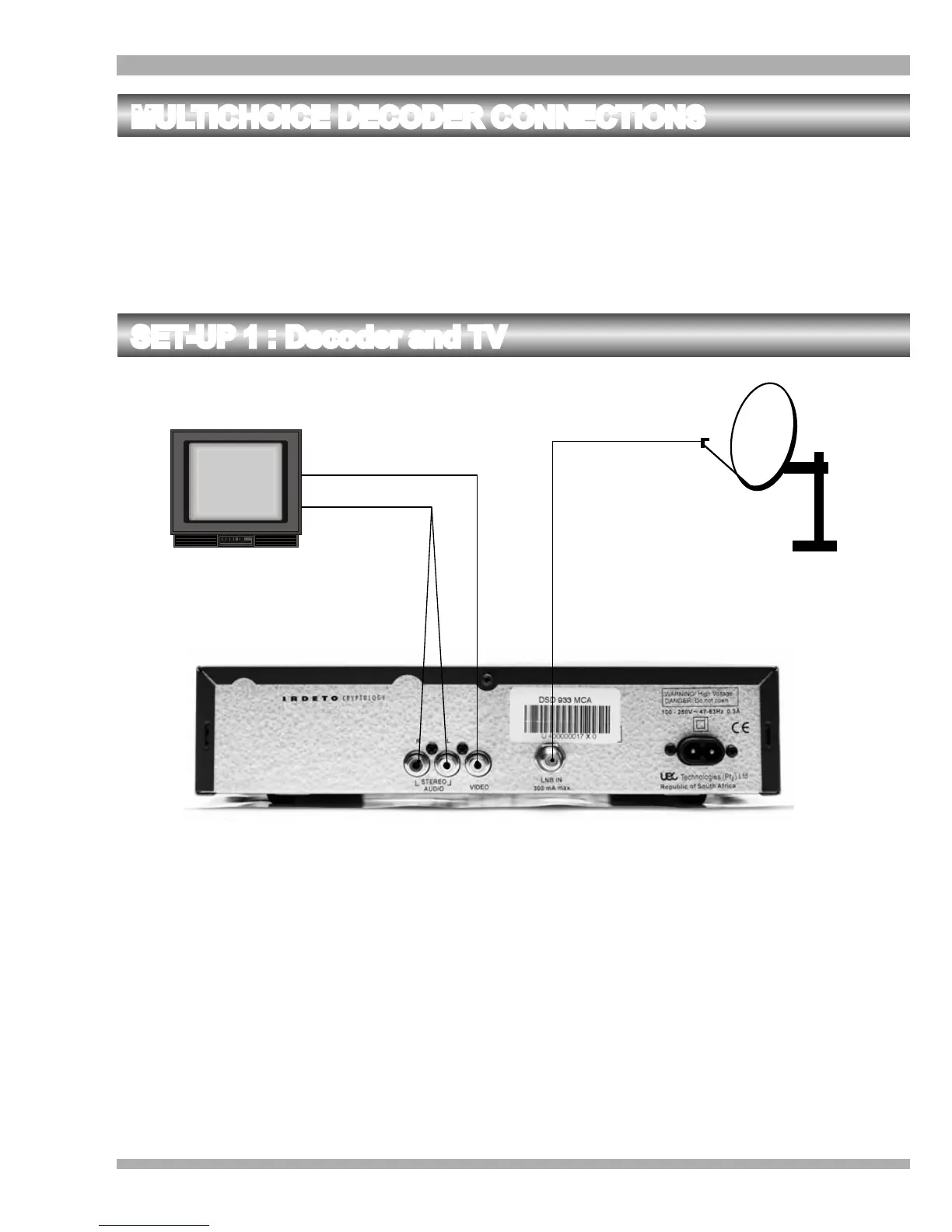
SET-UP 1 : Decoder and TV
1
2
3
1. Connect the Left and Right STEREO AUDIO sockets of the decoder to the Left and
Right AUDIO IN sockets of the TV respectively. (Refer to 1 on the above illustration).
2. Connect the VIDEO socket of the decoder to the VIDEO IN socket of the TV. (Refer to
2 on the above illustration).
3. Connect the LNB IN socket of the decoder to the LNB on the satellite dish. (Refer to 3
on the above illustration).
MULTICHOICE DECODER CONNECTIONS
There are several ways of connecting the decoder to your existing entertainment system.
The following, more common examples, enable you to view the MultiChoice services, record and
playback from your VCR / DVD and listen to CD quality stereo sound on your Hi-Fi.
Consult your local MultiChoice Agent, Branch or Accredited Installer for assistance in setting up an
audio / video configuration best suited to your requirements.
12 MultiChoice 933 Digital Satellite Decoder


 To Next Page