SET-UP 2 : Decoder, TV and VCR
1
2
3
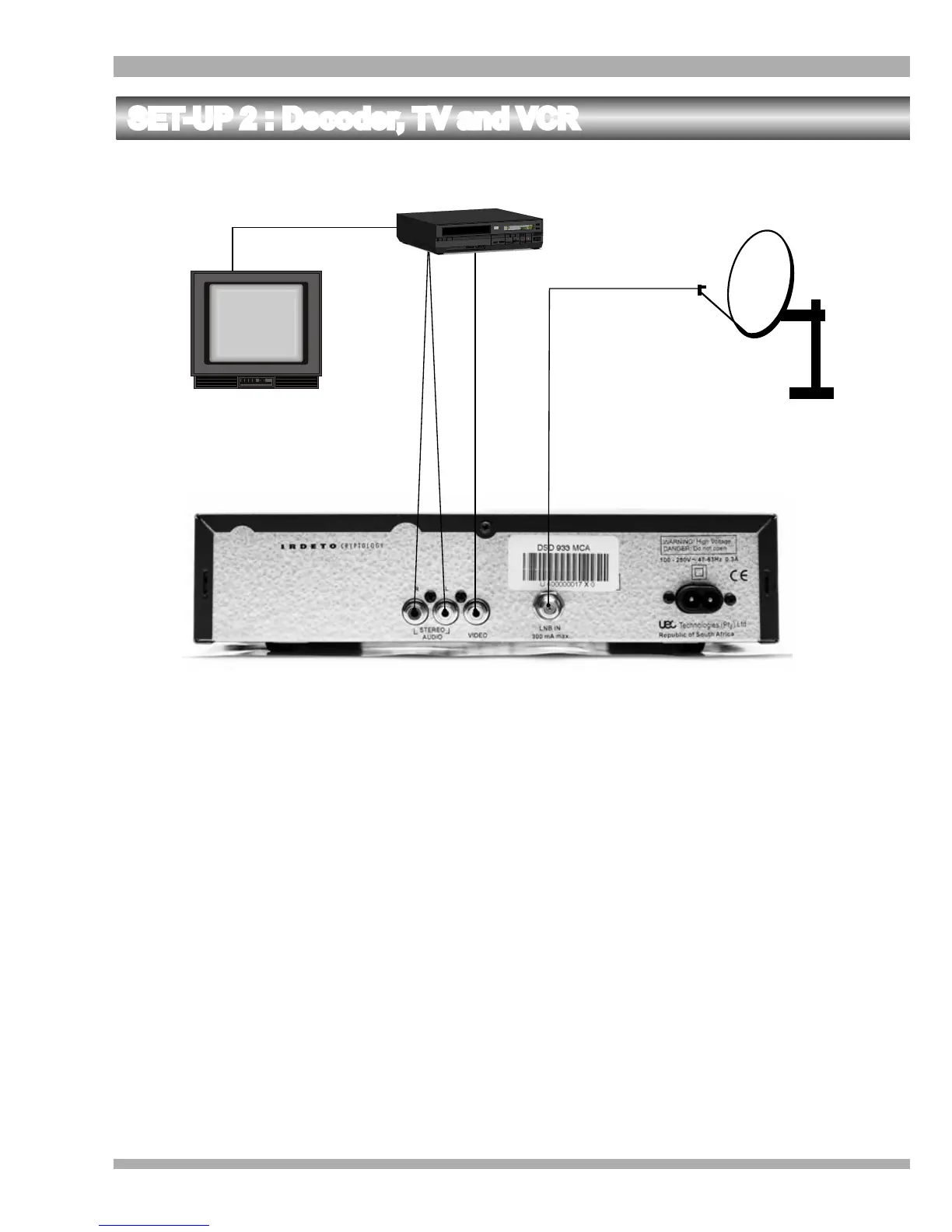
1. Connect the Left and Right STEREO AUDIO sockets of the decoder to the Left and
Right AUDIO IN sockets of the VCR respectively. (Refer to 1 on the above
illustration).
2. Connect the VIDEO socket of the decoder to the VIDEO IN socket of the VCR. (Refer
to 2 on the above illustration).
3. Connect the LNB IN socket of the decoder to the LNB on the satellite dish. (Refer to 3
on the above illustration).
4. Connect the RF OUT of the VCR to the RF IN of the TV. (Refer to 4 on the above
illustration).
5. Refer to VCR manual for using AV connectors.
6. Your VCR needs to be switched on all the time to ensure that this set-up works.
7. View MultiChoice services on the same channel that is used for video.
4
This is the set-up required if you require a RF connection to your TV.
13MultiChoice 933 Digital Satellite Decoder


 To Next Page