USING YOUR DECODER
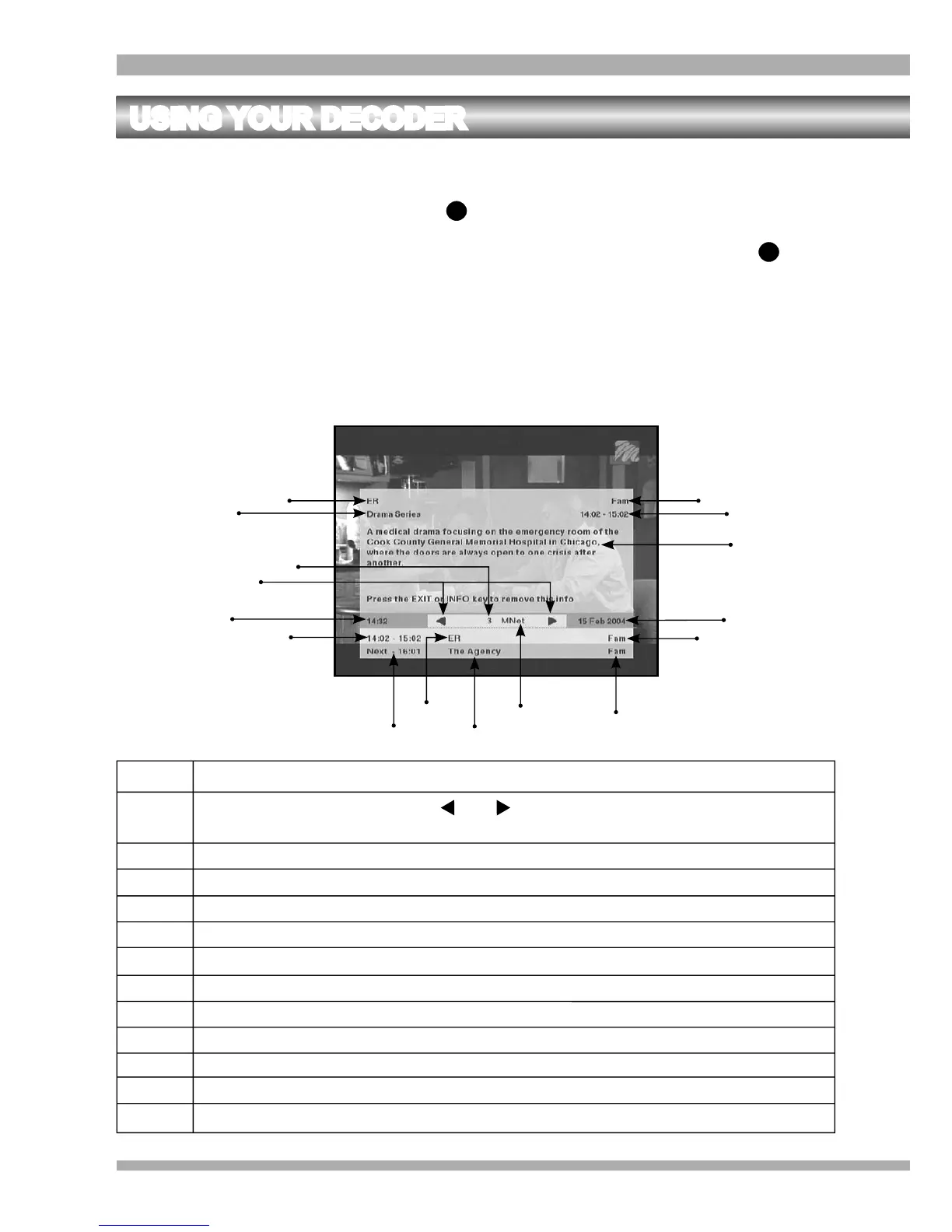
THE INFORMATION PLATE (i-plate)
The i-plate is displayed each time you press , change channels or exit back to TV from a menu.
If you require more information about a programme while the i-plate is displayed, press
again. This will display extended information about the selected programme.
To remove the i-plate, press EXIT or TV.
For your convenience the i-plate display period can be changed in the Information Display
Period menu. Refer to page 38.
i
i
1
1 Channel Number
2 Left and Right Arrows - Use the and arrows for browsing through the i-plate of
other channels
3
Clock - Displays the current local time
4 & 13
The start and end time of the current programme
5
End time of the next programme
6 & 15
Name of the current programme
7 Name of the next programme
8 Channel Name
9 Parental Guidance Level of the next programme
10 & 14 Parental Guidance Level of the current programme
11 Current date,
month and year
12 A synopsis of the current programme
2
3
4
5
6
7
8
9
10
11
12
13
14
15
1
6
16 Type of programme showing
16
MultiChoice 933 Digital Satellite Decoder


 To Next Page