35MultiChoice 933 Digital Satellite Decoder
1. From the Parental Control sub-menu,
select Service Blocking and press OK.
2. The Service Blocking Bouquet Selection
screen is displayed.
3. Use the arrows to select the bouquet
in which you want to unblock channels
and press OK.
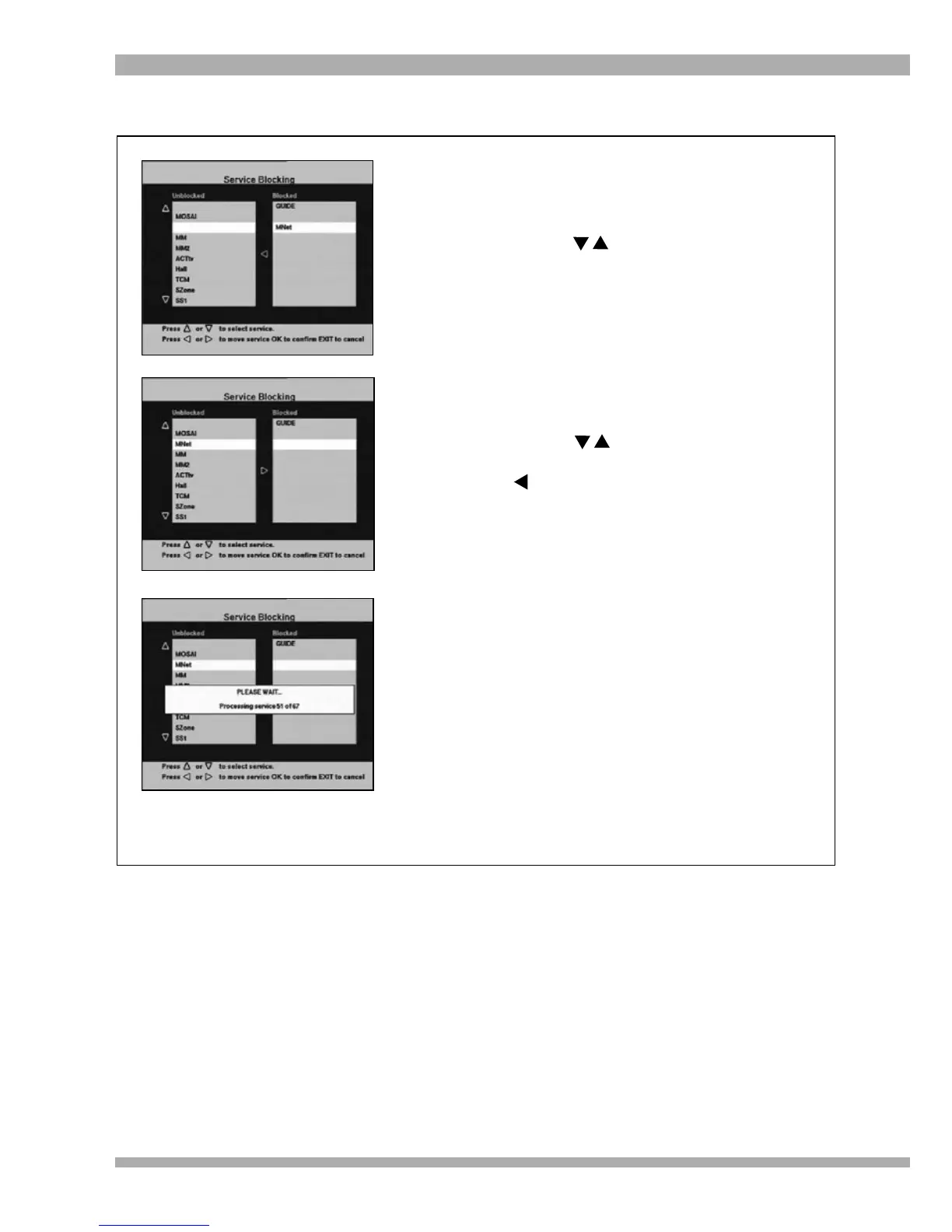
4. The Service Blocking screen will be
displayed (see picture, top left).
This screen lists all channels in the
selected bouquet. The unblocked
channels are listed on the left and blocked
channels on the right. (see picture, top
left)
5. Use the arrows to select a channel
you would like to unblock and press the
arrow to move the selected channel
into the list of “unblocked channels”on the
left (see picture, middle left).
6. Repeat this process for every channel you
would like to unblock.
7. Once you have completed unblocking
channels, press OK. A “Please wait”
banner will appear on-screen while your
request is processed (see picture, bottom
left).
8. Once processing is complete, you will
return to the Service Blocking Bouquet
Selection screen.
9. To return to the Main Menu, press EXIT
twice. To exit from all menus press
MENU.
REMOVING CHANNELS FROM SERVICE BLOCKING


 To Next Page