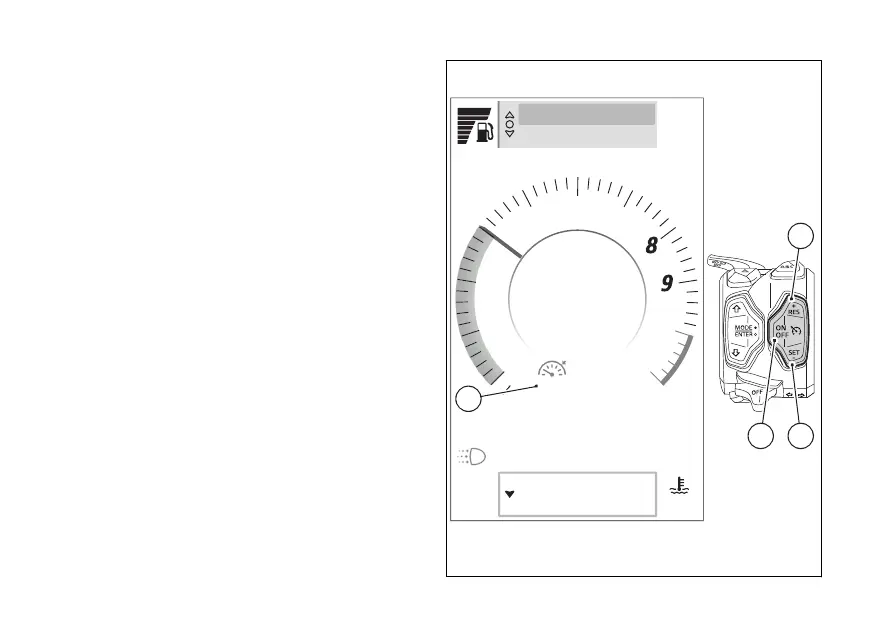
The icon on the instrument panel informs the user of
system status and current
Switching on the CC
Press the ON/OFF (C) to turn on the CC.
Saving the speed and activating the control
To store the current motorcycle speed as your
cruising speed and activate the control, press SET/-
(E, Fig 72) RES/+ (D, Fig 72). The stored speed is
shown in the Cruise Control icon (A, Fig 72).
Switching the CC
Press the ON/OFF (C, Fig 72) to turn the
Cruise Control. The Cruise Control icon (A, Fig 72)
disappears.
Icon (A, Fig 72)
The Cruise Control icon can be:
●
green and grey: the system is on but the speed
control is not active. If no speed is stored, dashes
are shown; otherwise, the last stored cruising
speed is shown;
●
green: the system is on and speed control is
active;
Air
22
°C
90
°C
Range km450
Total km2600
rpm X1000
1
2
3
4
5
6
7
10
11
SPORT
10:34
am
Chrono
Setting menu
A
Fig 72
127













 To Next Page