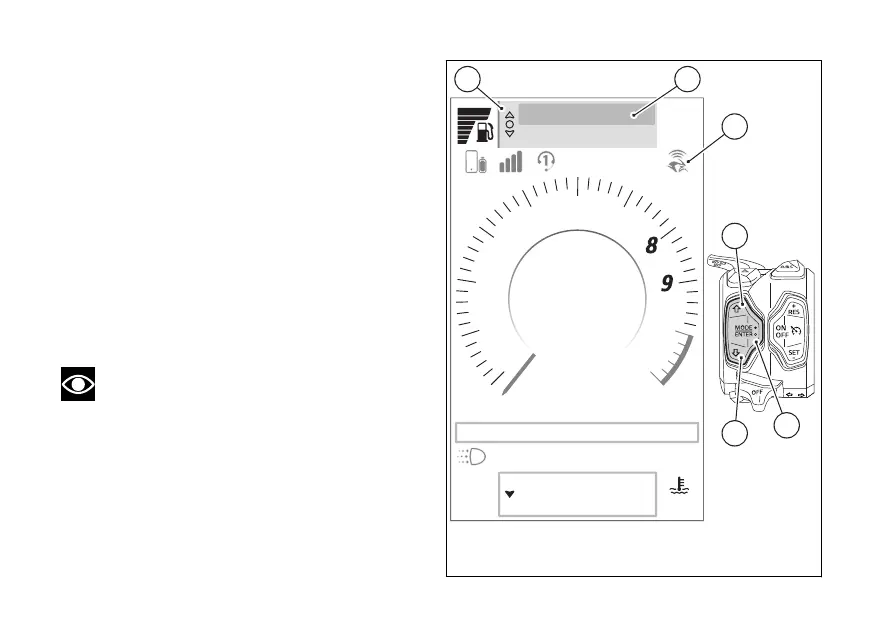
The function appears in the Interactive Menu only if
the following is observed:
●
have previously paired the to the
instrument panel via Bluetooth (page 22);
●
have the Bluetooth connection active on your
●
have the paired connected.
●
The Ducati Link function must be activated on
the The Ducati Link icon (A)
indicates that the connection has been made.
To the function:
●
Select the Interactive Menu (B) by pressing and
holding (1) down for a long time.
●
Use (1) and (2) to select item "Turn by
turn” (C) and press the ENTER (3).
Note
The item "Turn by turn" is displayed in grey if
the has not been connected via
Bluetooth and/or the connection with the Ducati
Link app has not been
Air
22
°C
90
°C
Range km450
Total km2600
rpm X1000
1
2
3
4
5
6
7
10
11
km/h
Gear
N
SPORT
DWC 3 DTC 5 ABS 3 EBC 2
10:34
am
Turn by turn
Phone
A
Fig 80
139













 To Next Page