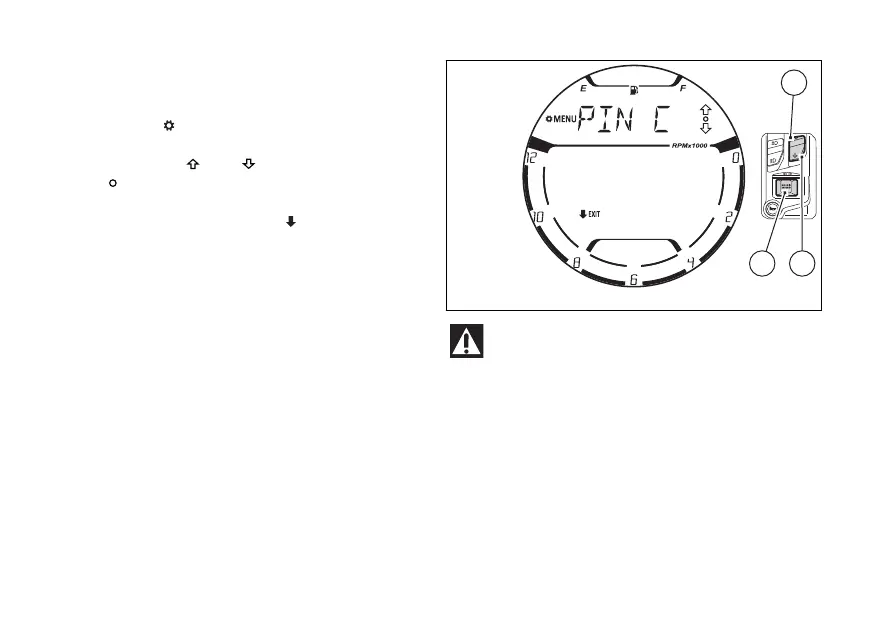
Once entered in the SETTING MENU the display
changes the display mode showing what follows:
●
the “MENU” indication preceded by the gear
symbol “ ”
●
the name of the first function in the list
●
the arrows “
” , “ ” and the empty circle
“ ”
●
the “EXIT” indication preceded by the black
arrow facing downwards “
”
The functions available inside the SETTING MENU
are:
●
PIN CODE
●
CLOCK SETTING
●
DATE SETTING
●
SERVICE INFO
●
BACKLIGHT
●
DRL CONTROL - active only if the DRL lights are
present
●
BATTERY
●
UNITS SETTING
●
TURN INDICATORS
●
RPM
●
BLUETOOTH – active only if the Bluetooth
module is
For safety reasons, it is recommended to use
this menu with the motorcycle at a standstill.
Press (1) or (2) to view the above functions of
the SETTING MENU one by one: in use
(2) to view the following item and (1)
to view the previous item.
The names of functions are displayed with the
characters scrolling from right to
displaying the required function, press
(4) to open the corresponding menu page.
Fig 93
110















 To Next Page