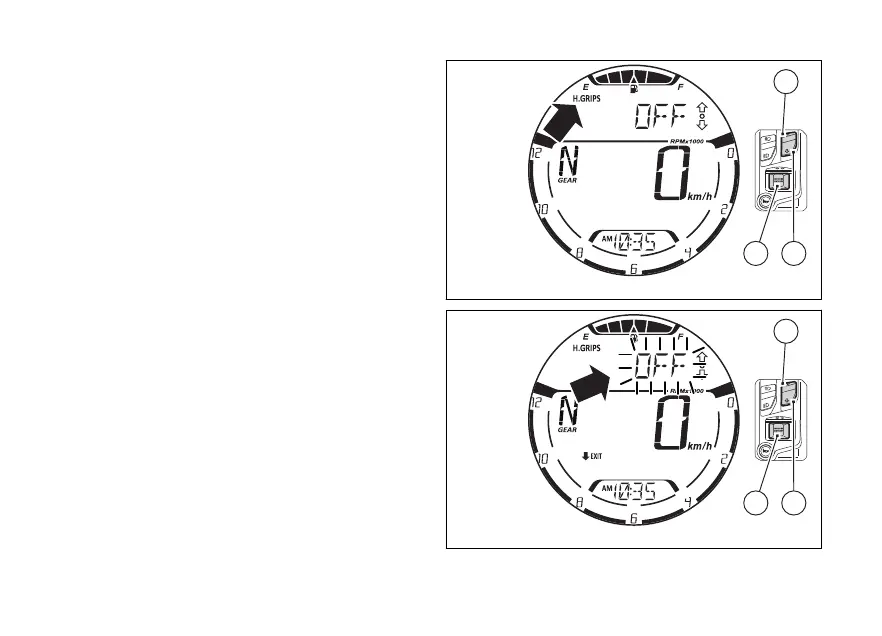
Heated handgrips (H. GRIPS) (if any)
This function is available only if the heated
handgrips have been installed, allowing their
activation, deactivation and adjustment.
Press (1) and (2) to select the H.GRIPS
function inside the function menu. The display
shows the current of the heated handgrips
level, which can be: “OFF”, “LOW”, “MED”, “HIGH”.
The level can be set by pressing (4). The
instrument panel enters the procedure of the
heated handgrips level, making the current level
flash and showing the indication “EXIT” preceded by
the black arrow facing downwards (Fig 72).
Each time (1) or (2) is pressed the
display shows the levels flashing and
scrolling, from the current one: “OFF”,
“LOW”, “MED”, “HIGH”.
To quit the procedure without the new level,
press (2) for 2 seconds.
Otherwise, press (4) to select the level
currently displayed in flashing mode and quit the
Fig 71
Fig 72
97















 To Next Page