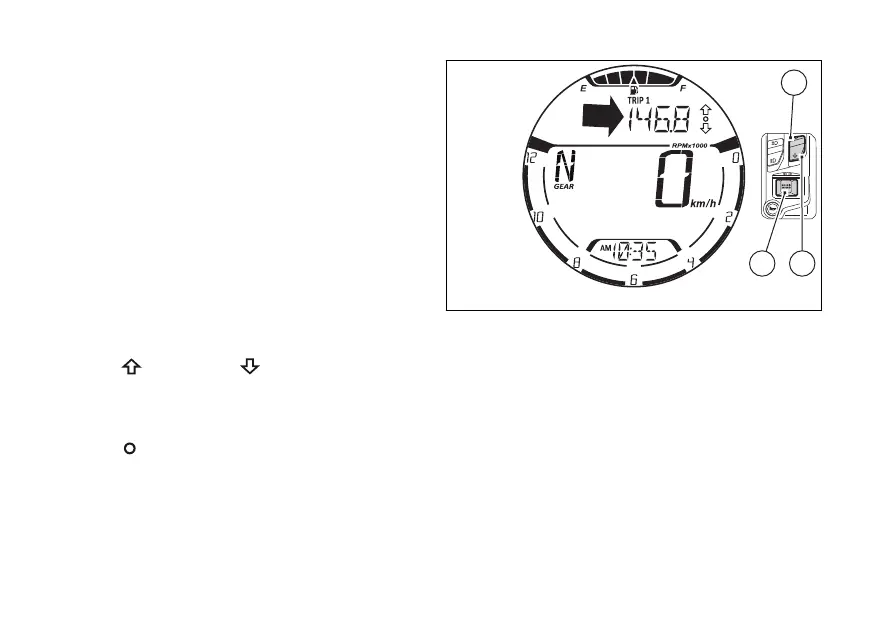
From the main screen, press (1) or (2) on LH
switch to scroll through the functions inside the
menu:
●
Odometer (TOT)
●
Trip meter 1 (TRIP 1)
●
Trip meter 2 (TRIP 2)
●
Residual range (RANGE)
●
Heated handgrips (H. GRIPS) (active only if
present)
●
Ambient air temperature (T-AIR)
●
PLAYER – only if the Bluetooth module is
present and at least 1 is connected
●
CALLS – only if the Bluetooth module is present
and at least 1 is connected.
●
Menu (SETTING MENU)
The UP
and DOWN arrows - corresponding
to (1) and (2) on LH switch - appear on
the RH side of the menu indicating the possibility to
scroll through the functions. The empty circle
symbol
is displayed when it is possible to interact
with the displayed function by pressing (4) on
LH switch, for instance to reset trip meter 1 (TRIP 1,
page 92).
The instrument panel stores menu current
upon KEY-OFF.
Upon next KEY-ON, the instrument panel displays
the "Odometer" function for 10 seconds in the Menu
and then displays the function previously saved
upon KEY-OFF.
During these first 10 seconds, if (1) or
(2) is pressed, the “forced” 10-second visualisation of
the Odometer (TOT) is interrupted and the function
previously saved upon KEY-OFF will be displayed.
Fig 58
81















 To Next Page