24
Chapter 1 Before Operation
Copyright © 2019 Duplo Corporation All Rights Reserved
No. Name Function
[11]
(Cancel)key
Returnstothe[BasicSettings]screen.
Pressandholdtoreturntothe[Ready]screen.
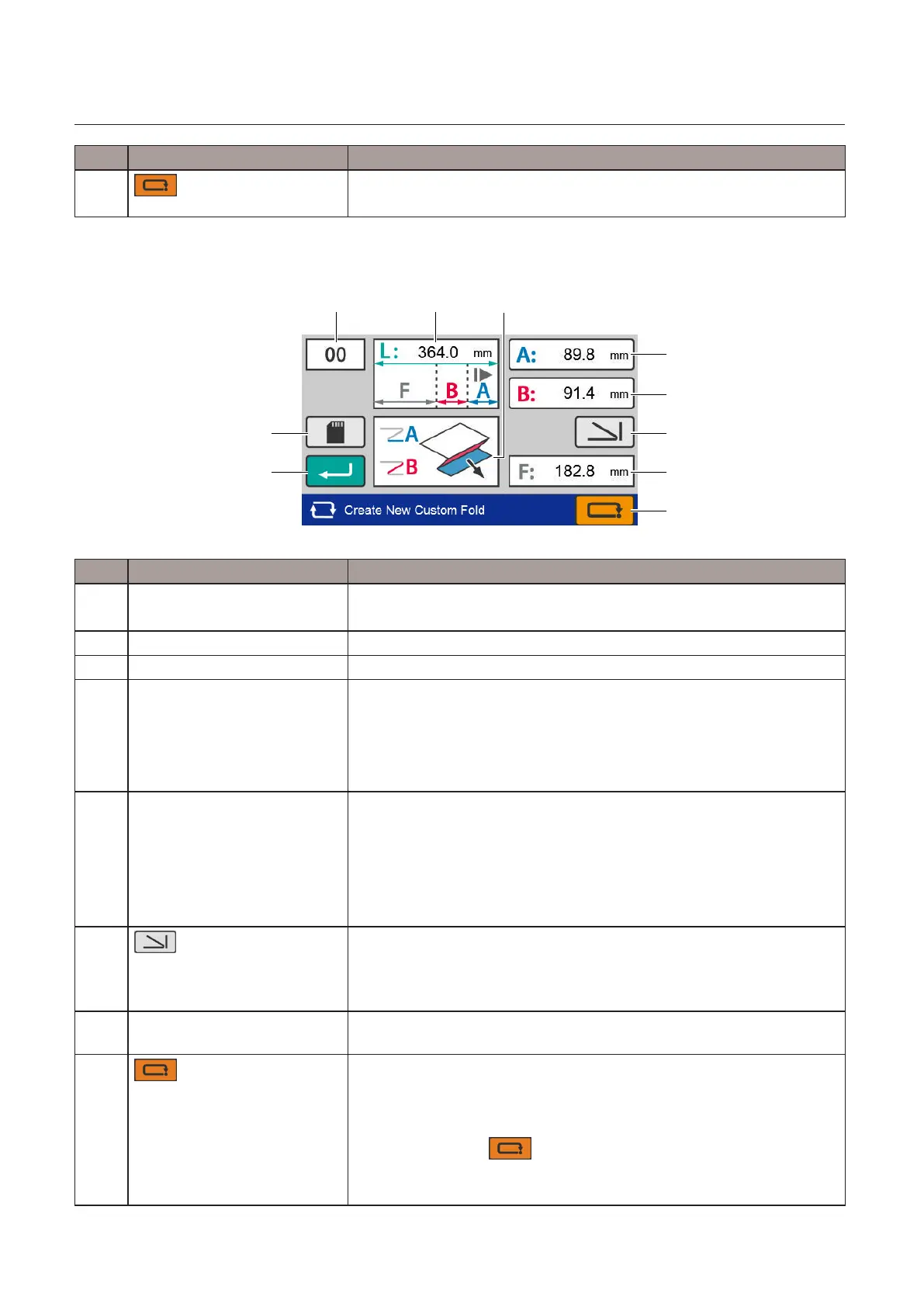
Editing screen
[4]
[5]
[6]
[7]
[8]
[1] [2]
[3]
[9]
[10]
No. Name Function
[1] Saved data number display Displays the number of the data being edited.
Whendataisnewlycreated,[00]isdisplayed.
[2] Paper length Displays the currently set paper length.
[3] Folding form outline display Displays a brief shape of the folding form.
[4] Folding A setting Displays currently set folding A length.
Whenthekeyistouched,the[Edit]screenoffoldingAisdisplayed.
Settingrange:42.0to***mm/1.65to***inch
***:325.0mm/12.80inchesor"Paperlength+5.0mm/+0.197inch",
whichever is shorter.
[5] Folding B setting Displays the currently set folding B length.
Whenthekeyistouched,the[Edit]screenoffoldingBisdisplayed.
WhenfoldingBisnotused,setas0mm.
Settingrange:0/47.0to***mm/1.85inches
***:217.0mm/8.54inchesor"Paperlength+5.0mm/+0.197inch",
whichever is shorter.
[6]
(Foldingmodeselection)
key
Whenthekeyistouched,the[FoldingMode]screenisdisplayed.
Whenfoldingmodeisset,valueofthefoldingAandfoldingBisinput
automaticallyaccordingtothepapersizeandfoldingform,anddisplay
returns to this screen.
[7] Finishingsize Displaystheestimatedvalueofthenishinglengthbasedontheinput
value and folding form.
[8]
(Cancel)key
Whenyouenterthisscreenfromthe[BasicSettings]screen,thedisplay
returnstothe[PaperLength]inputscreen.Inthiscase,thevaluesoffolding
A and folding B that you have input are temporarily saved, and the values
are restored when you save the paper length.
Whenyoutouchthe keyonthe[PaperLength]inputscreen,
however, the temporarily stored values are discarded.
Pressandholdtoreturntothe[Ready]screen.



 To Next Page