94
Function Settings
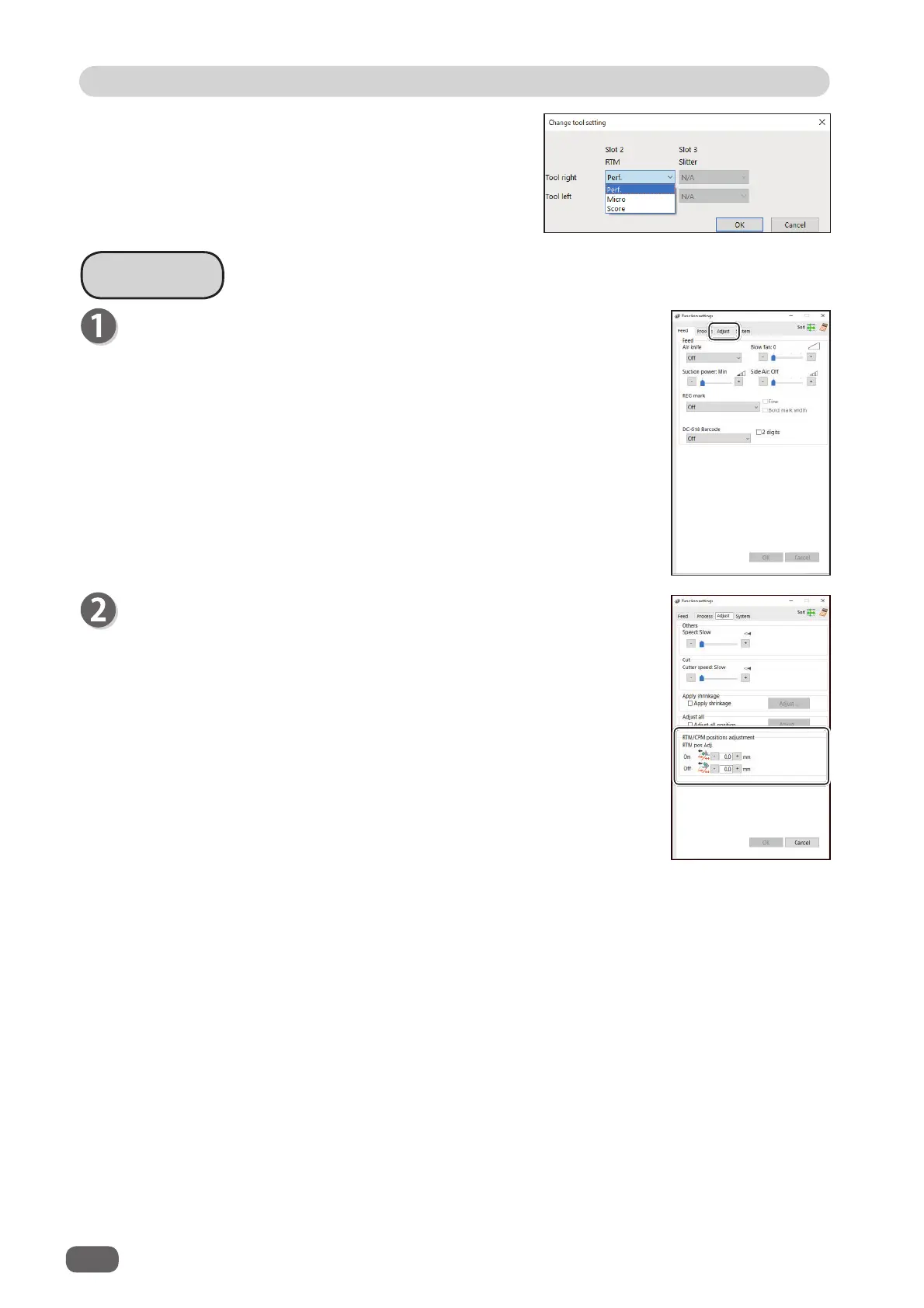
3. Select each tool for
Slot 2
or
Slot 3
from the
Tool left
box and the
Tool right
box.
Click
OK
when the setting is completed.
Clicking
Cancel
returns to the previous screen
without changing the settings.
Adjust
●
RTM (Rotary Tool Module) Adjust
You can change the settings for the
rotary tools
of the modules
that are installed in slot 2 and slot 3.
1.
RTM on pos Adj. (RTM on position Adjustment)
You can adjust the processing start position of the
rotary tool
in
the range of -9.9 to +9.9 mm.
+
: Each click on this increases the value by 0.1 mm.
The processing start position moves toward the document
trail edge.
-
: Each click on this decreases the value by 0.1 mm.
The processing start position moves toward the document
lead edge.
2
. RTM off pos Adj. (RTM off position Adjustment)
You can adjust the processing stop position in the range of -9.9
to +9.9 mm.
+
: Each click on this increases the value by 0.1 mm.
The processing stop position moves toward the document
trail edge.
-
: Each click on this decreases the value by 0.1 mm.
The processing stop position moves toward the document
lead edge.
Click the
Adjust
tab.



 To Next Page