90
Retrieving and Processing a Saved JOB
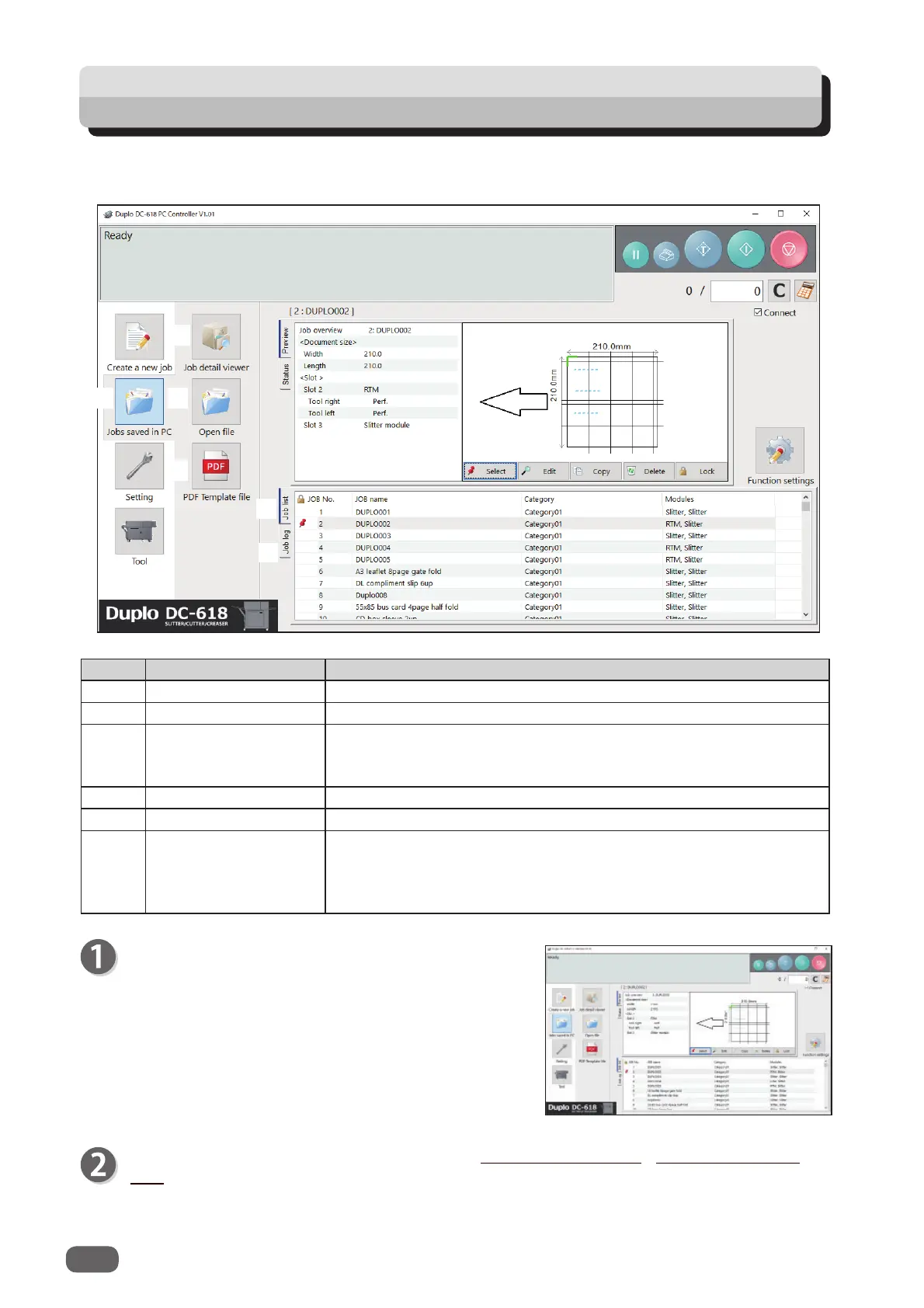
No. Name Function
1 Jobs saved in PC Opens a JOB saved on a computer.
2 Job detail viewer Displays a list of JOB fi les programmed with the PC Controller.
3 Open fi le
Opens a JOB fi le and displays the
Wizard
screen, the
Direct
screen, or the
All JOBs
screen on which the JOB was
programmed.
4 PDF Template fi le Opens a folder in which PDF templates are saved.
5 Job list Displays a list of JOBs saved in the DC-618.
6 Job log
Displays JOBs processed with the TEST key or the START key
clicked on the PC controller and saved in the computer as logs.
You can save up to 50 of lately processed JOBs. If the number of
saved JOBs exceeds 50, they are deleted in chronological order.
This section describes the procedure for retrieving a JOB saved in the DC-618 or on a computer
and processing it.
1
2
3
4
5
6
Click
JOBs saved in PC
on the main screen.
Select a saved JOB in
Job detail viewer
, in
PDF
Template fi le
, on
JOB list
, or on
Job log
.
For the subsequent procedure, see Chapter 5 PC Controller Setting - Checking a Saved
JOB in the DC-618 PC Controller Instruction Manual.



 To Next Page