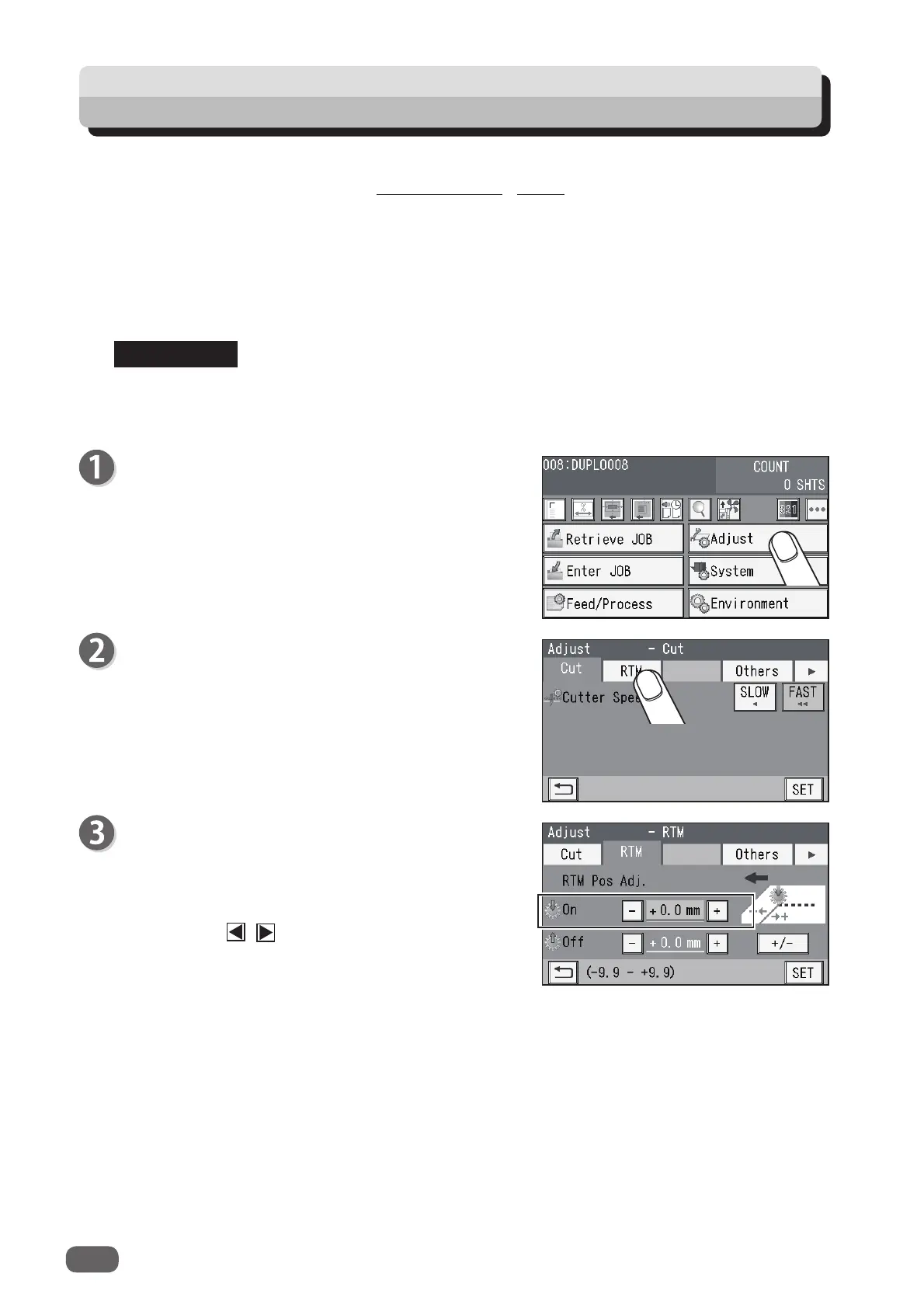
This section describes the functions which relate to the
RTM (Rotary Tool Module)
.
For other settings, refer to Chapter 3 Basic operations - Adjust in the DC-618 Instruction Manual.
RTM On Pos. Adj. (RTM On Position Adjustment)
This adjusts the processing start position of the
RTM (Rotary Tool Module)
.
RTM Off Pos. Adj. (RTM Off Position Adjustment)
This adjusts the processing stop position of the
RTM (Rotary Tool Module)
.
Settings for
RTM On Pos. Adj.
and
RTM Off Pos. Adj.
are active after the power is turned
OFF
as well.
Make sure that the
standby
screen is displayed on
the
touch panel
, and then touch
Adjust
.
Touch
RTM
.
RTM
RTM Pos Adj.
1.
On
This adjusts the processing start position
(lowering the tool) of the
rotary tool
.
Touch the / icon to adjust the value.
You can make an adjustment in the range of -9.9
to +9.9 mm.
+
: Moves the processing start position toward the
document rear edge.
−
: Moves the processing start position toward the
document lead edge.
REFERENCE
54
Adjust



 To Next Page