58
PC Controller Setting
Main Menu
No. Name Function
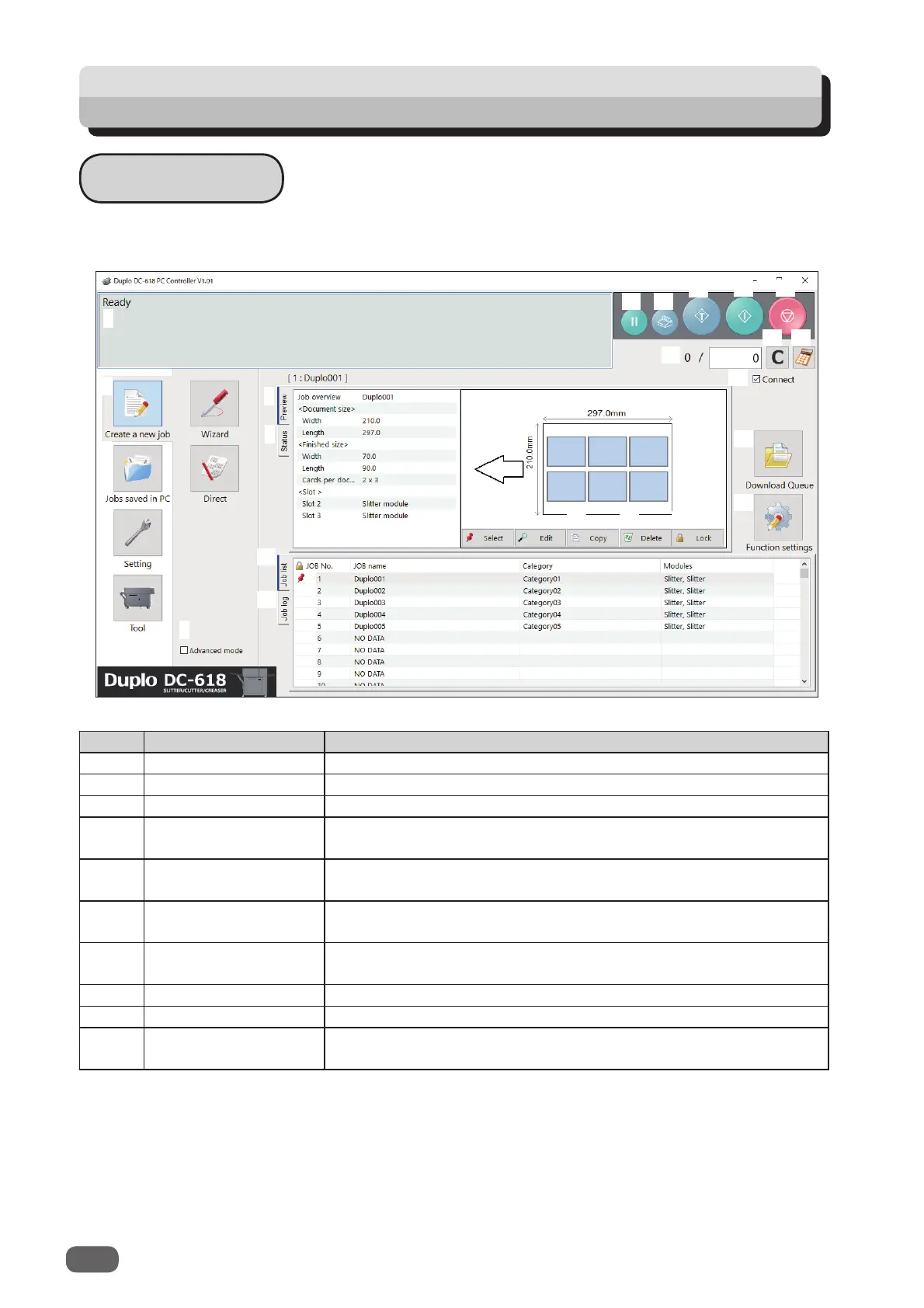
1 System status Displays the current machine status by letters.
2 Create a new job Click this and select
Wizard
or
Direct
to program a JOB.
3 Jobs saved in PC Opens a JOB saved on a computer.
4 Setting
Make default settings for the PC Controller. The other functions
are for a service person use only to set the DC-618.
5 Tool
Backs up a JOB saved in the DC-618. Restores backed-up data
of a JOB in the DC-618.
6 Advanced mode
Select this to program a JOB in the
advanced mode
. Clear this to
program a JOB in the
simple mode
.
7 JOB preview
Displays an overview of a selected JOB. You can change settings
for the selected JOB here.
8 Preview Displays an overview of a programmed JOB.
9 Status Displays the current machine status.
10 Select
Select a JOB on the
Job list
below and then click this to process
the selected JOB.
The main screen appears when the PC Controller is launched.
Select items on the main screen and make settings for a JOB.
1
2
3
4
5
6
7
8
9
11
12
13
14
15
16
17 18
19
20
10
21
22
23
24
25
26
27



 To Next Page