62
PC Controller Setting
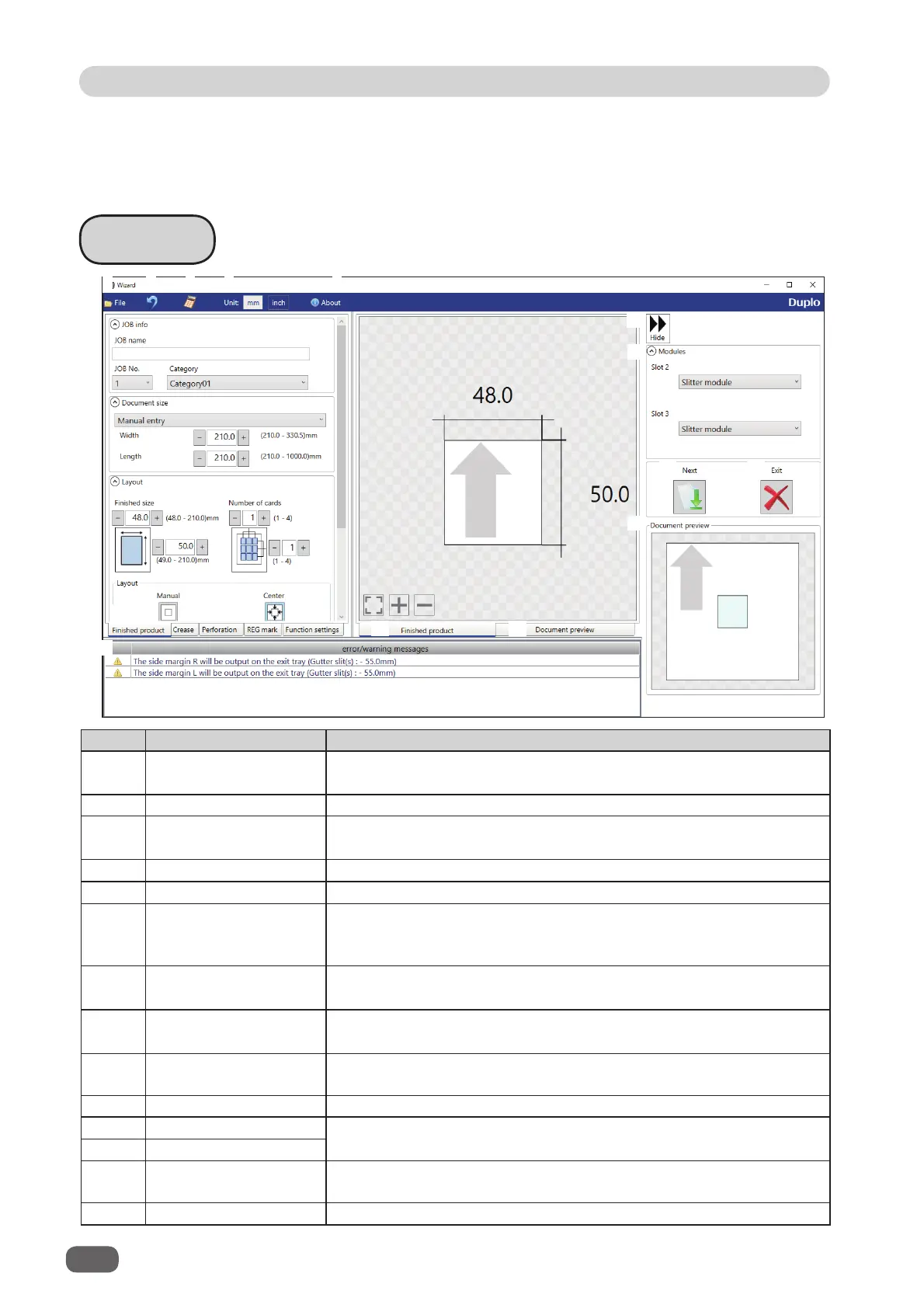
Wizard
No. Name Function
1 File
Displays a menu. You can switch the
Wizard
screen to the
Direct
screen or exit the
Wizard
screen by clicking each item in this.
2 Undo Returns to the previous setting.
3 NUMERIC key
Displays the NUMERIC keys, with which you can enter numerical
values instead of using the keyboard.
4 Unit Select a unit of values to enter out of mm or inch.
5 About Displays the trademark and the open source software.
6 Finished product
Make settings for a JOB name, a JOB number, a category, a
document size, a fi nished product size, the number of cards,
margins, and gutters.
7 Crease
Specify crease positions on the document in the
Standard
positions mode
or the
Non standard positions mode
.
8
Perforation
Specify perforation positions on the document in the
Standard
positions mode
or the
Non standard positions mode
.
9 REG Mark
Make settings for the REG mark reading function. Appears only
when CCD is activated.
10 Function settings Make settings for each function of a JOB.
11 Finished product
Switches previews of a JOB between
Finished product
and
Document preview
.
12 Document preview
13 Hide
Hides the right part of the
Wizard
screen and displays a JOB
preview in a larger size.
14 Modules Displays modules installed in slot 2 and slot 3.
The DC-618 can save up to 250 JOBs.
This section describes the procedure for programming a JOB in the
Wizard mode
with a
preview of the JOB and in the
Direct mode
on which you directly enter each value
, which is
related to the
RTM (Rotary Tool Module)
.
1
2
3
4
5
6
7
8
9
11 12
13
14
15
16
17
18
10



 To Next Page