Accessing the EN-204 via a Web Browser
83
To configure the input alarm triggered actions
From the sidebar menu, select Configuration > Alarm Settings > Alarm Input. The Alarm
Input Settings screen opens on the Arming Schedule tab. See Figure 79: Alarm Input
Arming Schedule (page 81).
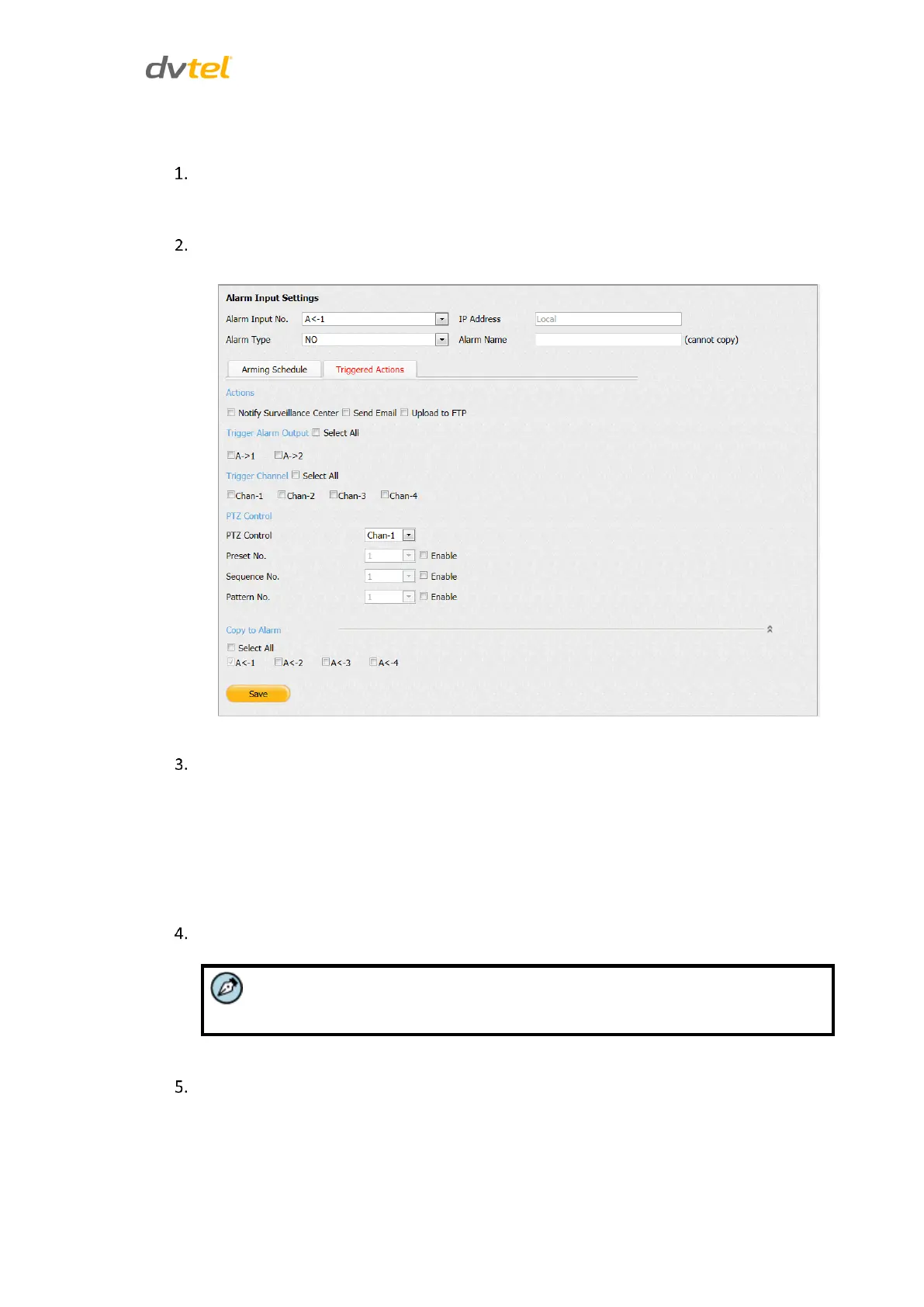
Select the Triggered Actions tab. The Alarm Input Settings > Triggered Actions screen
opens.
Figure 80: Alarm Input Triggered Actions Screen
In the Actions section, select one or more of the following alarm methods:
Notify Surveillance Center – When an event occurs, an ONVIF alarm
message is sent to the remote client PC in the Video Management
System.
Send Email – When an event occurs, an email is sent with alarm
information to a user or users. To configure email settings, see Email
(page 63).
Upload to FTP – Capture the image when an alarm is triggered and upload the picture to a
FTP server. To configure FTP settings, see
You must reboot the unit in order to activate the settings.
FTP (page 67).
In the Trigger Alarm Output area, do one of the following when an event occurs:
Check Select All to trigger an external alarm output on both alarm outputs.
Check A->1 to trigger an external alarm output on alarm output 1.
Check A->2 to trigger an external alarm output on alarm output 2.



 To Next Page