3
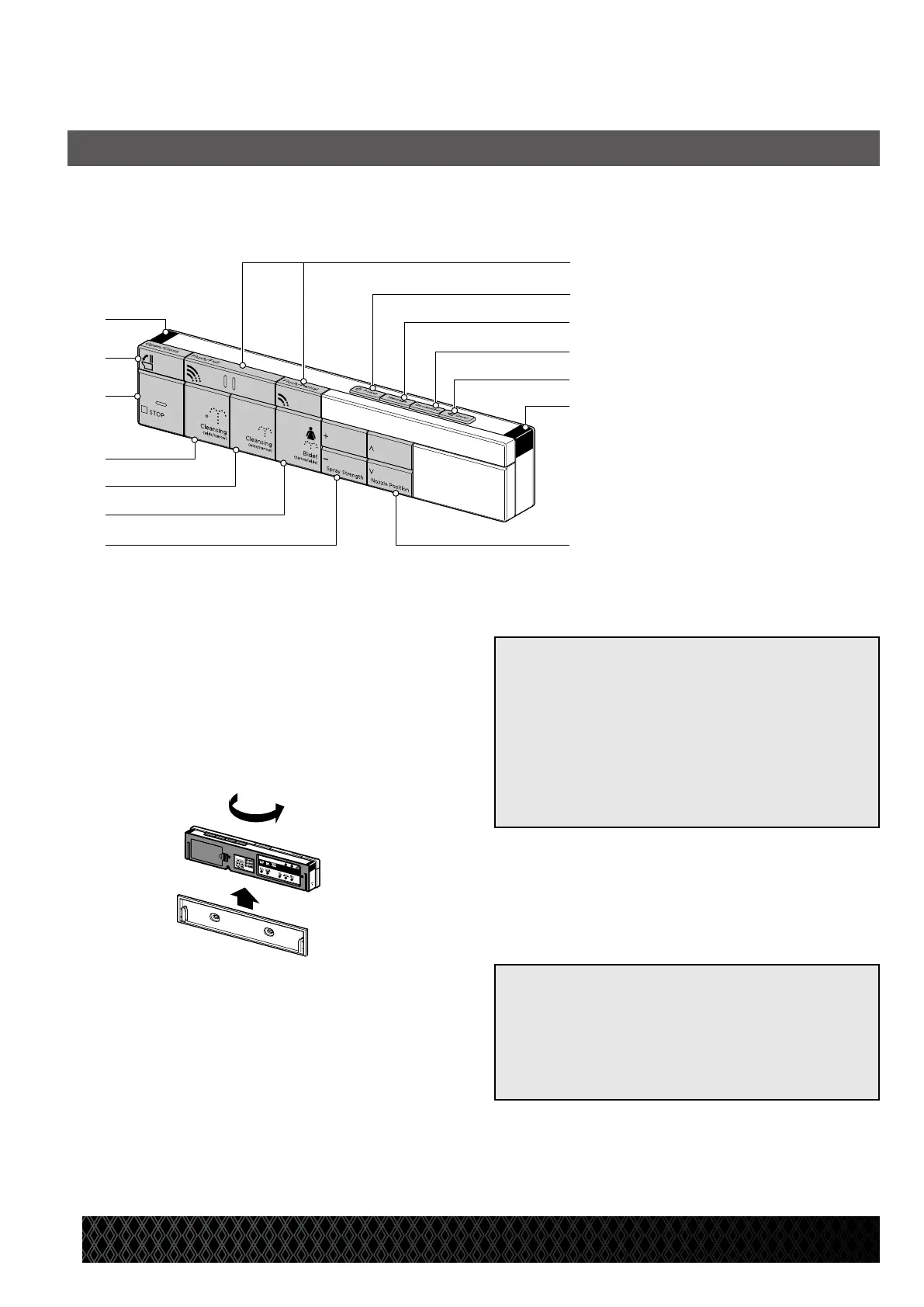
Remote Control Unit
a Transmitter
b
Toilet seat OPEN/CLOSE button
c STOP button
d Rear cleansing button
e Rear cleansing - mild button
f Front cleansing button
g
Water pressure adjustment button
h Flush buttons (Full/Partial)
i Power button
j Massage button
k Deodorizer button
l Dryer button
m Transmitter
n
NOZZLE POSITION adjustment
button
1. Main Panel
* Remote control backlight will be illuminated when in use.
AT200 Features
a
b
c
d
e
f
g
h
i
j
k
l
m
n
(1) Remove the remote control from the holder.
(2) Reverse the remote control.
[Reference]
● When operating the sub-operation panel,
make sure the transmitter is facing the
upper body sensor on the indicator .
* The operation may not be accepted due
to failure of signal transmission.
[Note]
●
When the remote control is removed from
the holder, buttons on the operation panel
cannot be used, except the [STOP] button.
Be sure to use the remote control while
set in the holder.
● Do not operate the remote control with
wet hands.
* Failure to observe this may cause failure.


 To Next Page