Auto Accompaniment
Chord Input Methods
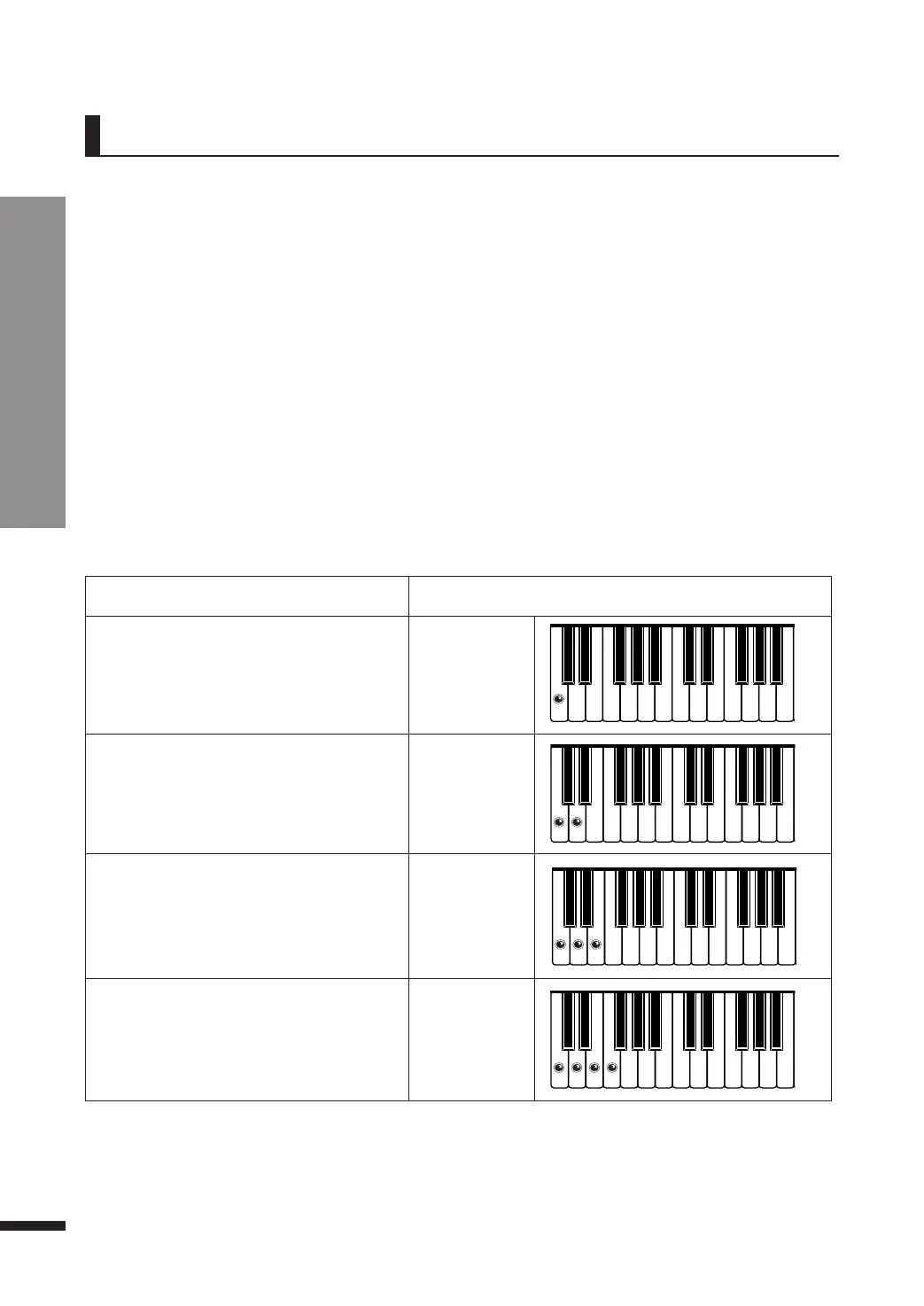
Chord
Example
MAJOR
Play a note to generate a major triad
with that note as its bass.
C
MINOR
Play a note and its next white key to
generate a minor triad with the first note
as its bass.
Cm
Dominant 7th
Play a note and its next two white keys to
generate a dominant 7th chord with the
first note as its bass.
C7
Minor 7th
Play a note and its next three white keys
to generate a minor 7th chord with the
first note as its bass.
Cm7
♬ Fingered (Default)
The fingered mode detects a chord only when all notes of the chord is played on the lower register
(determined by the Split Point). It is the most commonly used method. (See page 36).
♬ Single Finger
The single finger mode allows the user to indicate chords by playing 1, 2, 3, or 4 adjacent white notes
on the lower register to play the major, minor, dominant 7th and minor 7th chords, and is suitable for
novices.
♬ Full Keyboard
The full keyboard mode detects chords from all notes played on all 88 keys, and do not reserve the
lower register for chord indication.
Chord Input Methods
Single Finger Method
The chords may be indicated on the lower register, using 1~4 fingers following the rules below.
There are three available methods for a player to indicate chords to be generated.
42



 To Next Page