USING THE WEB INTERFACE
EATON Managed ePDUt User’s Guide S 164201xxx Rev 1 DRAFT 10−OCT−2008
27
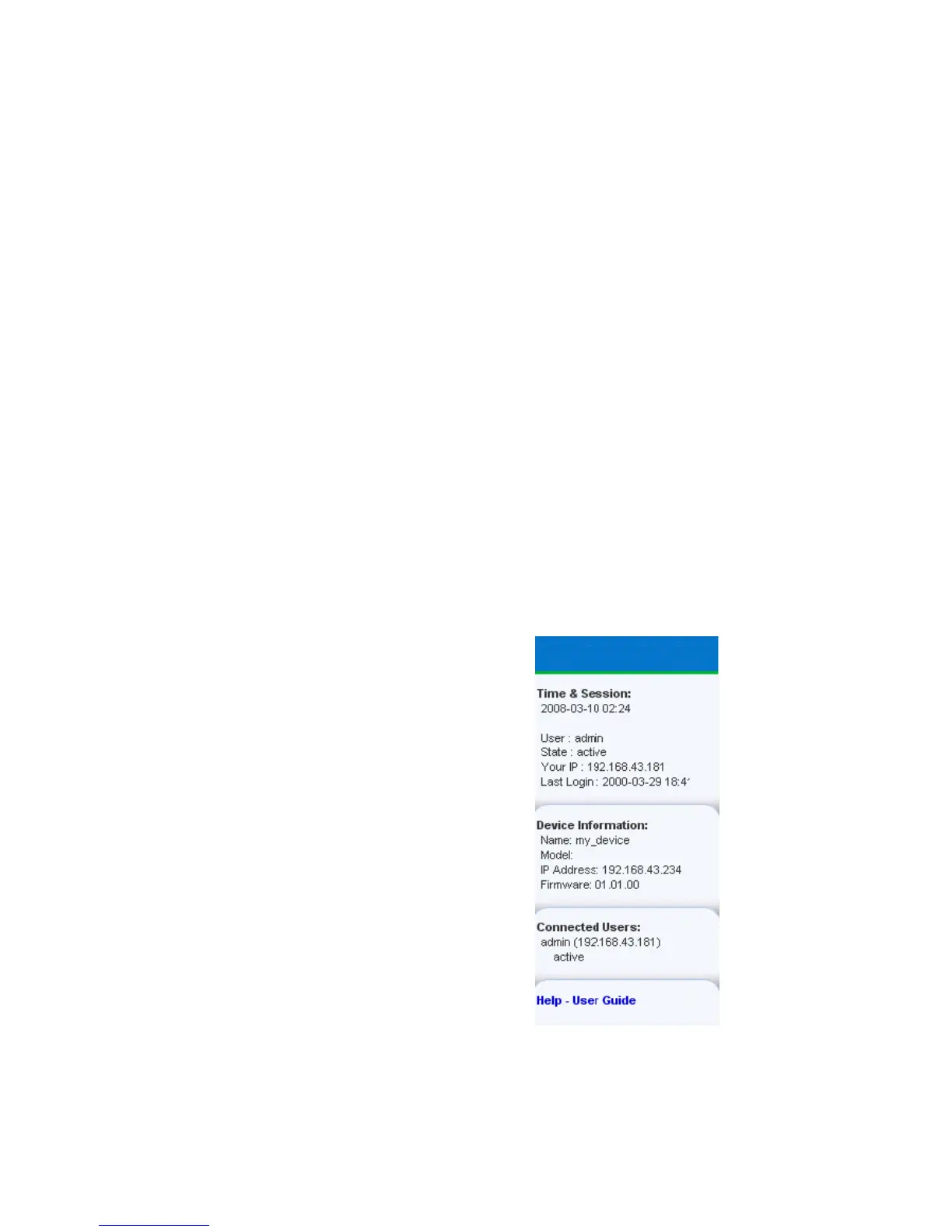
Status Panel
The Status panel displays on the left of every page in the interface (see Figure 27). It
shows:
S Current date and time
S Information about the user, including:
− User name
− User’s current state (active, idle, and so forth)
− IP address of the user’s computer
− Date and time of the user’s last login
S Information about the ePDU, including:
− Model name and number
− IP address
− Firmware version
S Information about all the users currently connected, including:
− User name
− IP address
− Current state
Your current session is included in this list.
S A link to the User’s Guide on the Eaton Web site.
ePDU
Figure 27. Status Panel
The State field in the user information section considers a user to be idle 30 seconds
after the last keyboard or mouse action. It then updates the idle time every 10
seconds until another keyboard or mouse action is detected.
If you exceed the idle time limit, you will be logged out, and redirected to the main
login page automatically.





 To Next Page