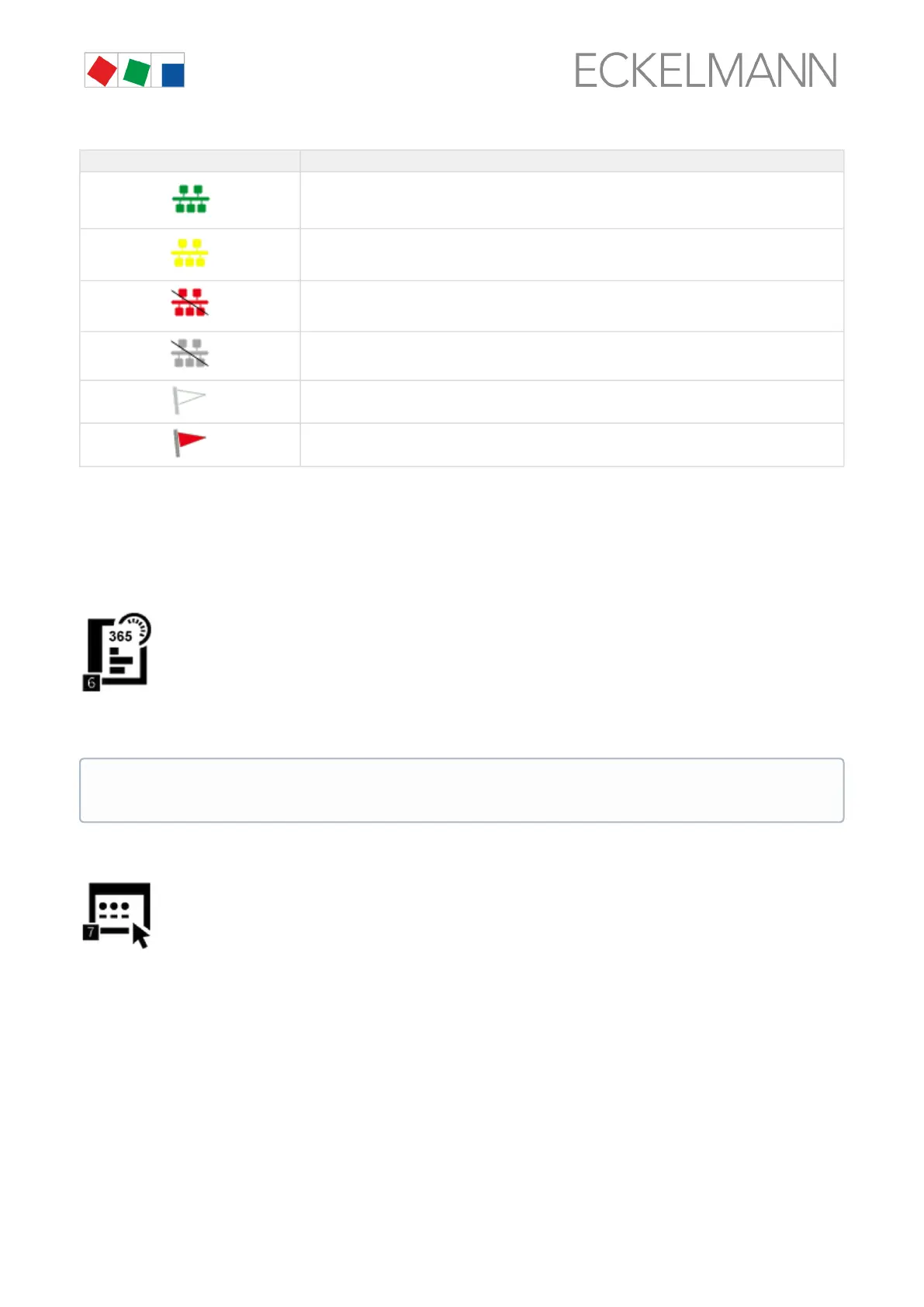
Diverse statuses and operating states are also displayed.
Symbol Meaning
The status of the connection (communication) with the node is OK
The status of the connection (communication) with the node is unknown
The node has failed
The node has been unloaded
The status of the node is OK
The node has alarm status
Remote control using terminal mode
Tapping the Remote Control button opens the terminal mode screen. In the terminal mode, all parameters of
the component, if possible, can be viewed, but not changed (read-only). For more information, see chapter
Remote control of E*LDS components (terminal mode).
6 Menu 2-6 - EU Archive
IftheEUarchivinghasbeenconfiguredforacoldroomcontrollerandanassignmentofthe
temperature sensors there to the sensors of a UA 300 L / UA 410 L is made, an EU archive is created for this
sensorpair.TheavailableEUarchivesaredisplayedusingthisbutton.A24hlistwithtemperaturesin°Cin15
minutes grids from 0:00 to 23:00 of the required day is displayed.
7 Menu 2-7 - Signal inputs
This button is used to call up the signal and alarm inputs of the system centre. All important
parameters and the status of the digital inputs are displayed there.
The days can be changed between by pressing the left / right button; the archive has a storage depth
of one year.


 To Next Page