EasyManua.ls Logo

ECOWITT HP3501 - Page 27

ECOWITT HP3501
87 pages
Print Icon
To Next Page IconTo Next Page
To Previous Page IconTo Previous Page
Loading...
27
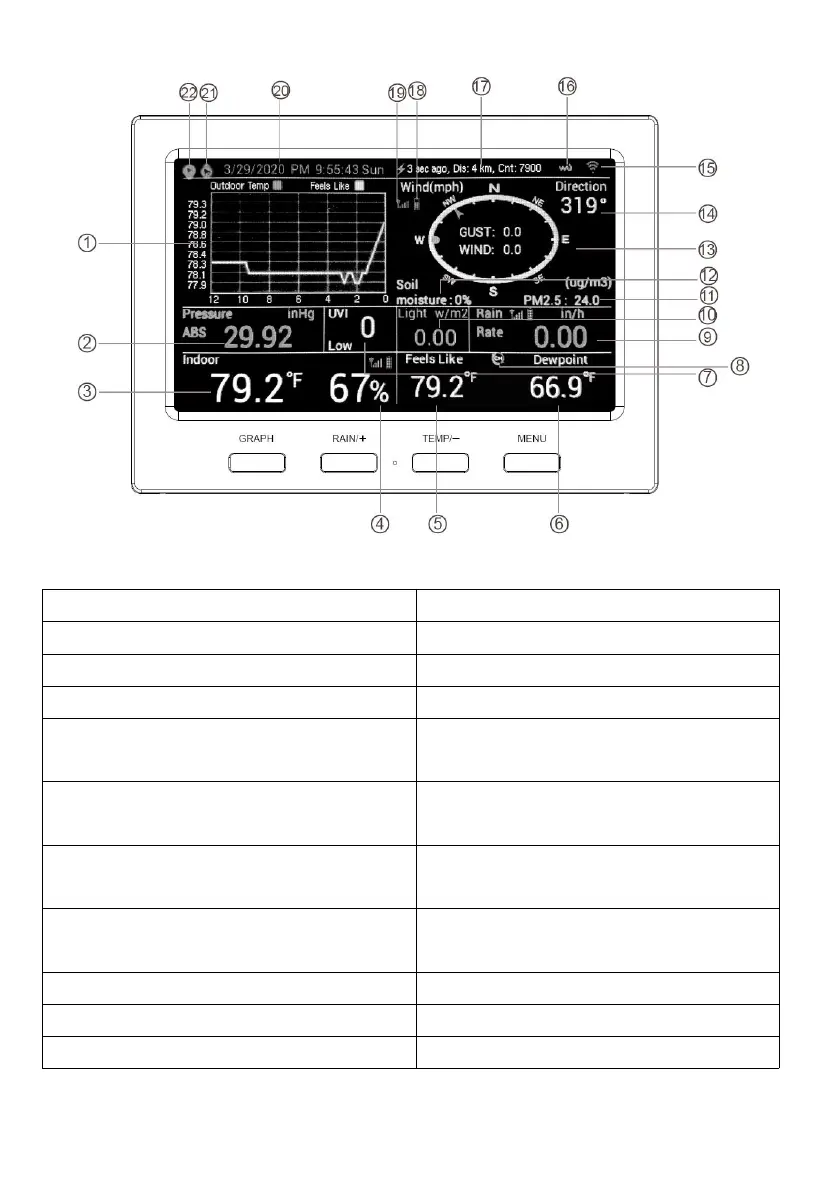
Figure 20: Display Console Screen Layout
1 Historical Data Graph
12 Soil Moisture (optional)
2 Barometric Pressure
13 Wind speed/Gust speed
3 Indoor Temperature
14 Wind Direction
4 Indoor Humidity
15 Wi-Fi Signal icon
5 Outdoor Temperature /
Multichannel Temperature (optional)
16 WU Icon
6 Outdoor Humidity / Multichannel
Humidity (optional)
17 Last lightning strikes detected
time/distance; daily count(optional)
7 UV index
18 Sensor battery power status
icon
8 Multichannel temp and humidity
cyclemode icon
19 Sensor signal icon
9 Rainfall
20 Time and Date
10 Solor Radiation
21 High Alarm icon
11 PM2.5 concentration (optional)
22 Low Alarm icon
Table 5: Display console detailed items

Table of Contents

Related product manuals