99
support@edgeovens.com
Technical Support: +1 (724) 628 3050
OPERATION
PREVENTATIVE MAINTENANCE
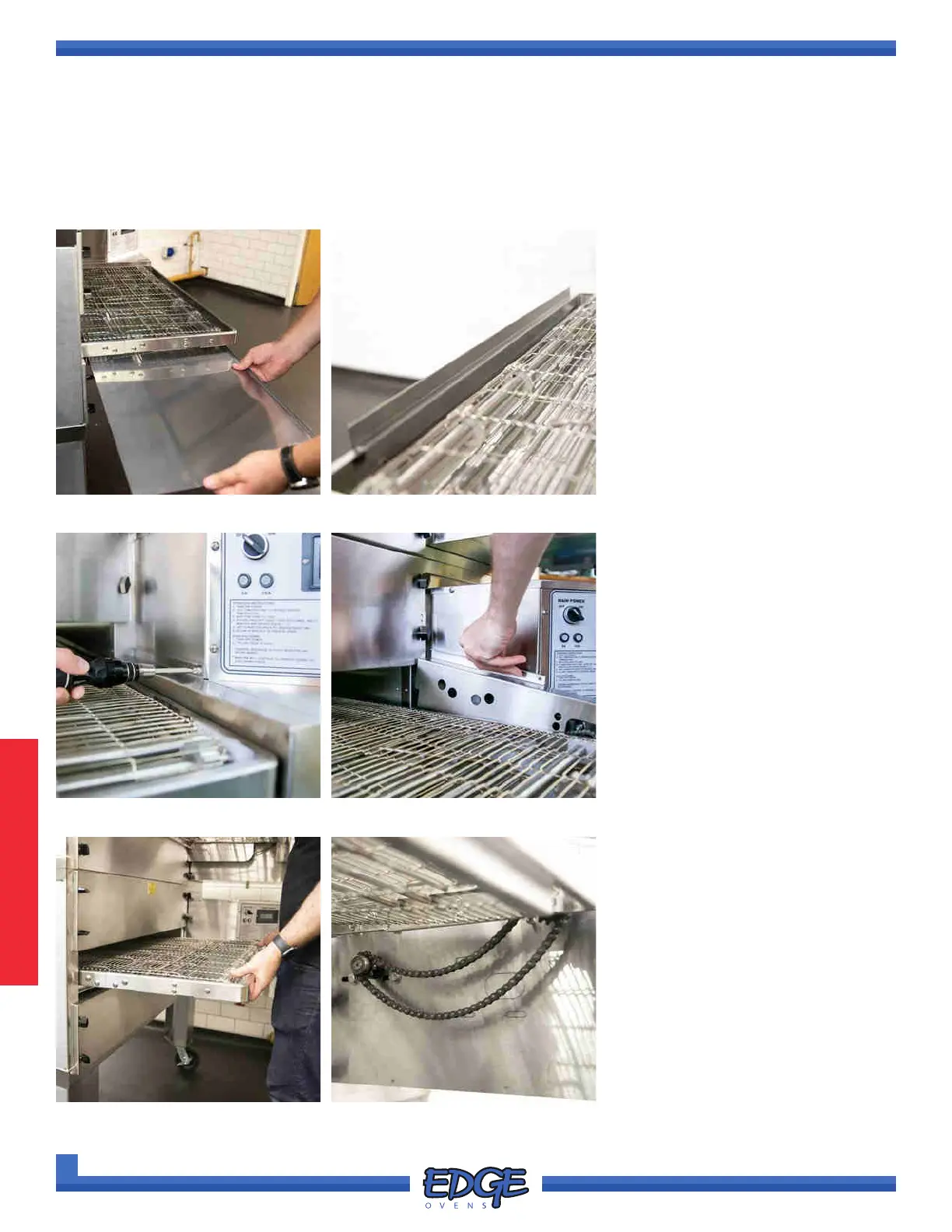
CONVEYOR BELT LINKAGE REMOVAL
FIGURE 3-30
1. Remove all crumb trays and belt
stops from the conveyor belt
(Figure 3-30 and 3-31)
FIGURE 3-31
FIGURE 3-32 FIGURE 3-33
FIGURE 3-34 FIGURE 3-35
2. Using a #2 Phillips screwdriver,
remove the securing screw from
the conveyor drive chain guard.
(Figure 3-32)
3. Lift the chain guard upwards to
remove it. (Figure 3-33)
4. Lift and push the conveyor frame
into the oven mouth (Figure
3-34) approximately 1-2” so that
the crumb tray support bracket
rests on the BOTTOM end panel.
This will leave the conveyor drive
chain slack for simple removal.
(Figure 3-35)
Removal of conveyor belt linkage should be undertaken if you have expended the adjustment amount of the
adjustment brackets or if your oven does not have this feature and your conveyor belt is slack.



 To Next Page