71
support@edgeovens.com
Technical Support: +1 (724) 628 3050
OPERATION
OVEN OPERATION
OVEN SETTINGS
ACCESSING THE SETTINGS MENU
The CUSTOMER level SETTINGS MENU provides access to:
• temperature unit (C/F),
• customer PIN setup,
• recipe download/upload.
• software updating,
MANUAL
470°F
F-L►R
06:00
R-L►R
04:30
• belt direction,
This menu is protected by the Customer PIN, the factory default value is 0000.
DISPLAY
✔
✖
6
7
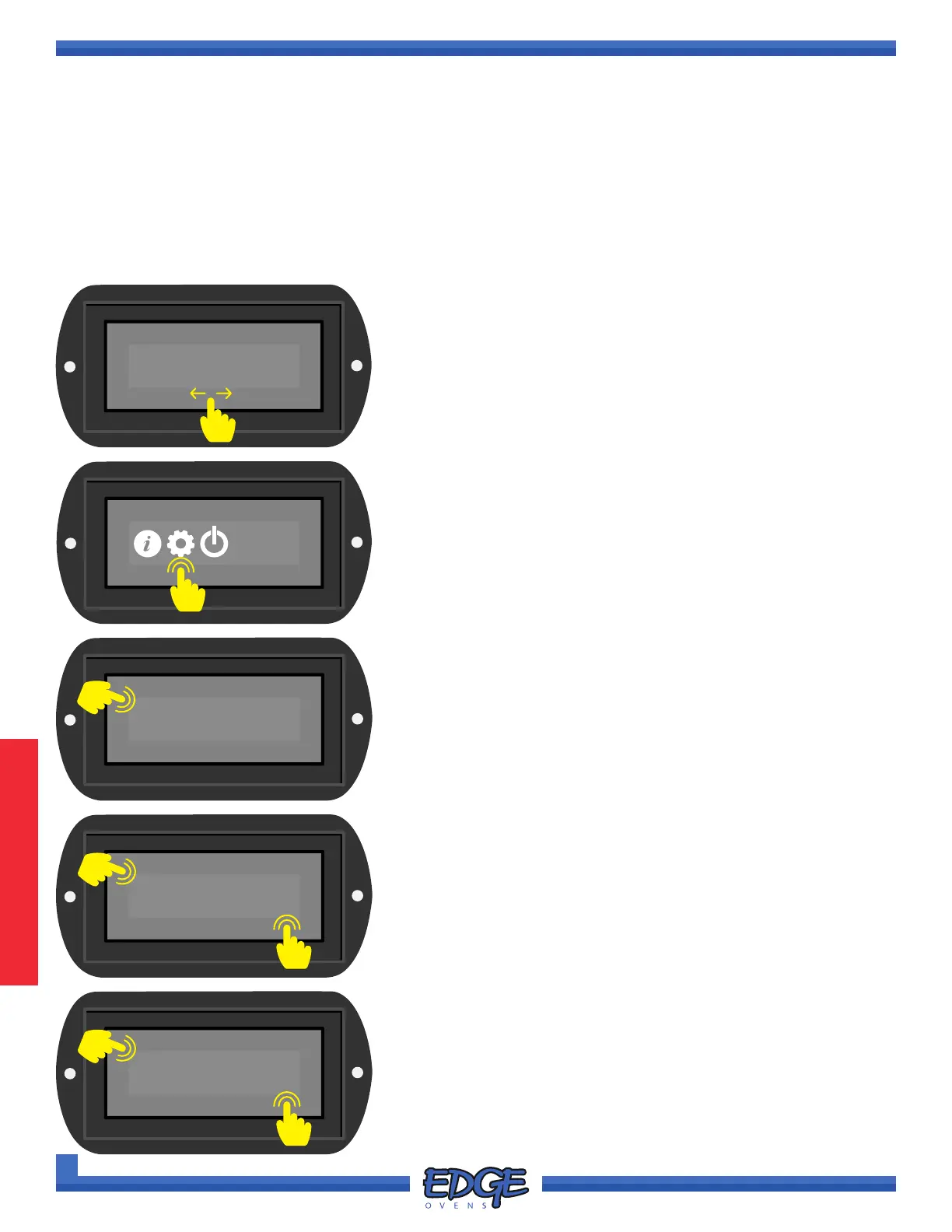
3. When prompted, enter the Customer PIN, default value is 0000.
Touch the tick (✔) icon to conrm.
0000
✔
✖
4. Use the UP () or DOWN () arrows to navigate to the desired
operator level. Customer PIN will grant access to CUSTOMER
level options only.
5. Touch the tick (✔) icon to conrm selection.
CUSTOMER
✔
✖
4
5
6. Use the UP () or DOWN () arrows to navigate to the desired
option.
7. Touch the tick (✔) icon to conrm selection.
1. To access the SETTINGS MENU swipe the screen to change to
the SYSTEM MENU screen.
2. Touch the GEAR icon to navigate to the SETTINGS MENU.
1
2
3



 To Next Page