31
support@edgeovens.com
Technical Support: +1 (724) 628 3050
INSTALLATION
OVEN ASSEMBLY
STANDARD CONVEYOR DRIVE SYSTEM ASSEMBLY
The oven conveyor belt will arrive tted in your oven. Each belt end is folded to protect the
belt from damage during shipping. For instructions of how to unfold the belt ends please see
the “BELT ASSEMBLY” section.
NOTICE
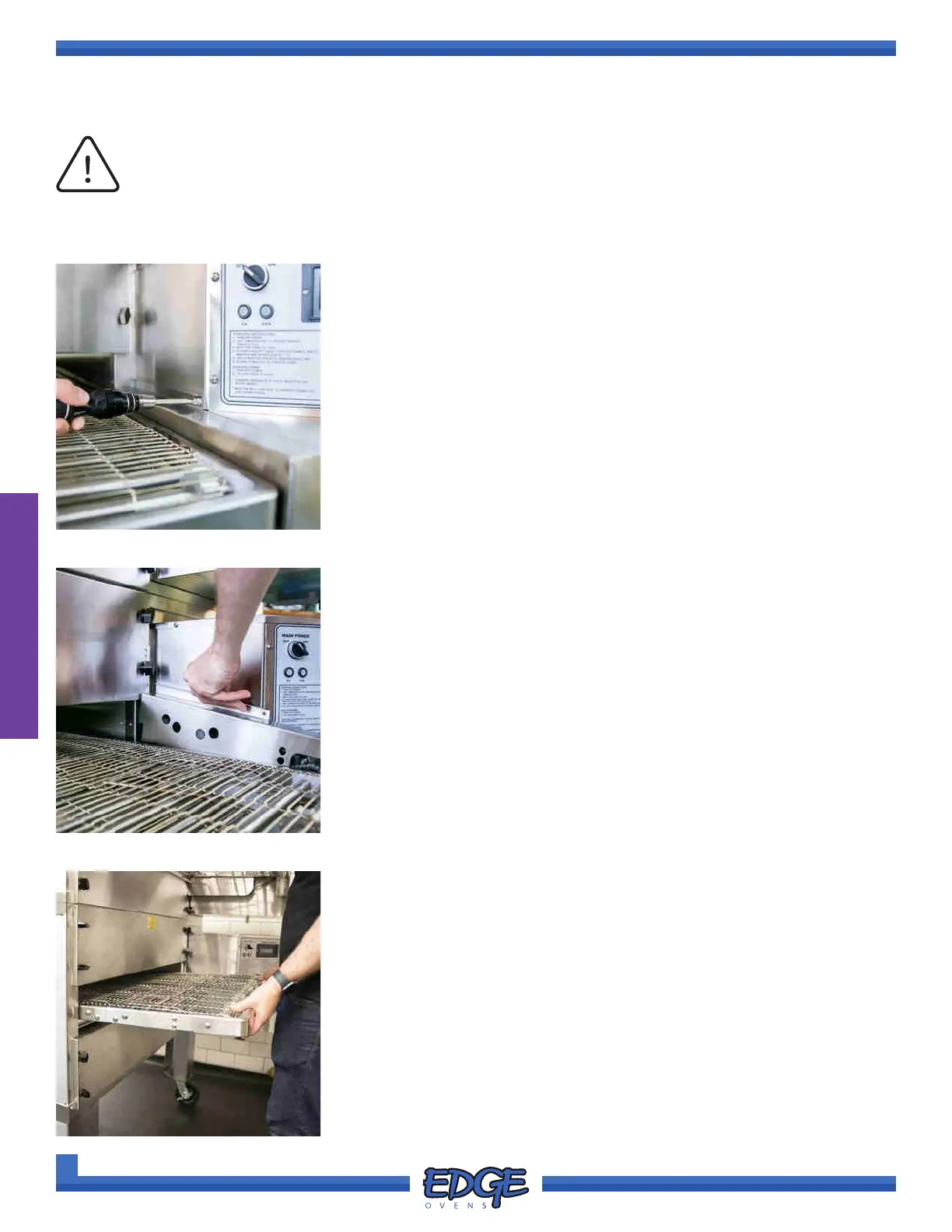
1. Using a #2 Phillips screwdriver, remove the securing screw from the
conveyor drive chain guard. (Figure 2-60)
FIGURE 2-60
FIGURE 2-61
2. Lift the chain guard upwards to remove it. (Figure 2-61)
3. Remove the conveyor drive chain from the hardware pack supplied
with your oven.
FIGURE 2-62
4. Lift and push the conveyor frame into the oven mouth approximately
1-2” so that the crumb tray support bracket rests on the BOTTOM end
panel. (Figure 2-62)



 To Next Page