DCP 350
4.2.4 Batch
Batch is to repeat encoding/decoding test continuously. In the Repeat, you input the number of repeat and
click “Batch Start”, then the test is run as many times as the number of set. When you check “Include Card
In/Out”, each time the printer brings a card from input hopper and performs an encoding test and ejects the
card. But if not, encoding test will be done only by one card. At this time, if there is no card in the printer, the
printer brings a card into the printer from input hopper and repeats the encoding test on the card, and if
there is a card in the printer, the encoding test is performed on the card repeatedly. “Card Holding” is
activated when “Include Card In/Out” is ticked. When “Card Holding” is ticked and the repeat number is set,
the printer repeats the encoding test as many times as the number of set in the “Card Holding” without
ejection. When it is completed, the printer ejects the card and brings a new card into the printer and starts
testing.
In the Setting, “Retry” is to retry the encoding test when the error occurred. “Prompt on Error” is to
display Pop up Message when the error occurred. If not, Error number will be counted without message.
The number of error is displayed at Error section.
4.2.5 Encoding
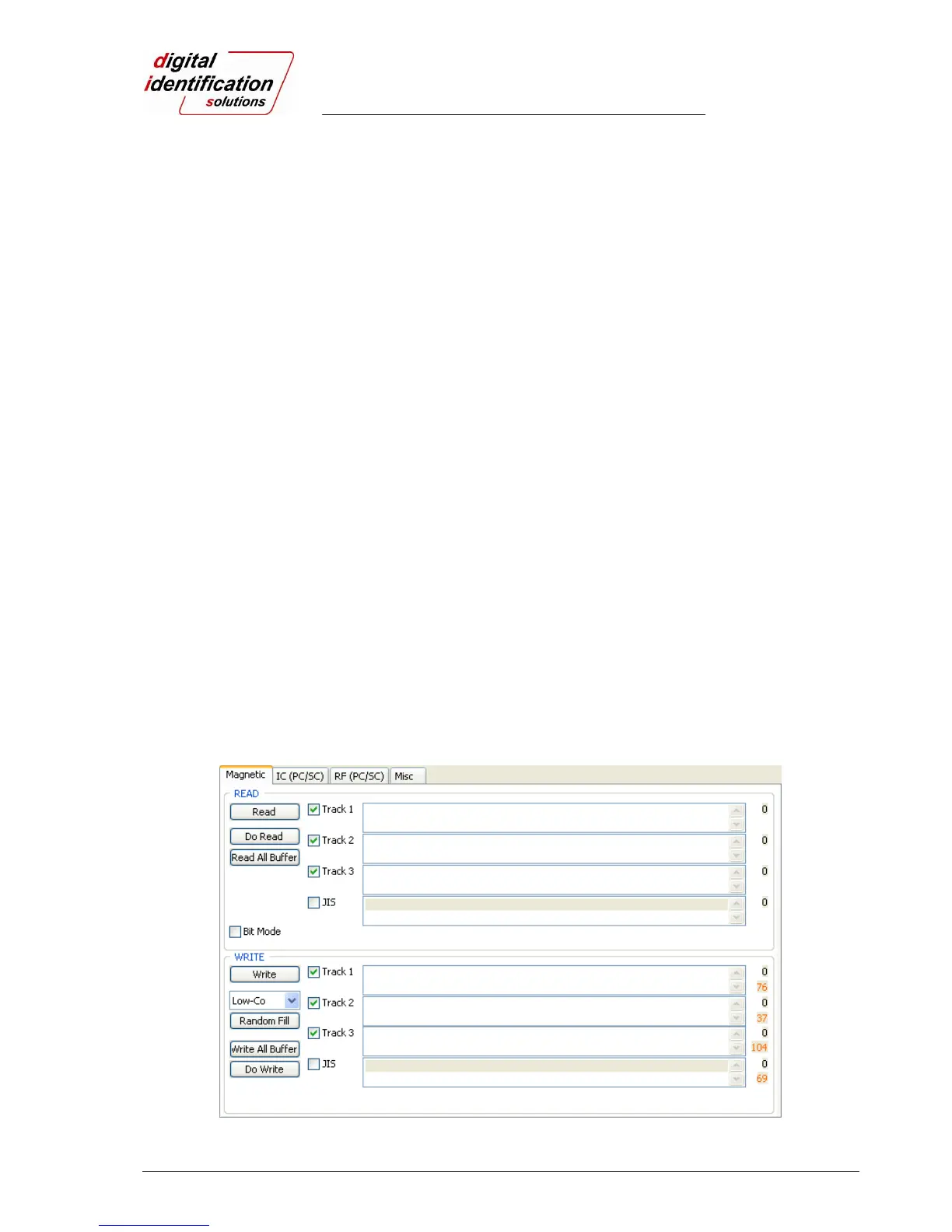
Magnetic: Magnet Stripe Encoding
“Read” is to read and display the data from magnetic stripe card. It is composed of “Do Read” and “Read All
Buffer” and runs “Do Read” and “Read All Buffer” sequentially.
“Do Read” is to read the data from magnetic stripe card and store the data in the buffer.
“Read All Buffer” is to transmit the date stored in the buffer to PC. If the track number is ticked, the data of
the ticked track is only transmitted to PC.
“Write” is to write the data to the magnetic stripe. It is composed of “Write All Buffer” and “Do Write” and runs
“Write All Buffer” and “Do Write” sequentially.
“Write All Buffer” is to transmit the data to the buffer.
“Do Write” is to write the data stored in the buffer to the magnetic stripe of card. You can choose the
magnetic foil type (LoCo or HiCo) and the track of magnetic stripe. “Random Fill” is to create a random
magnetic encoding data for testing.
Batch process repeats the following steps sequentially, Card “IN” Move “Mag” Magnetic “Random
Fill” Magnetic “Write” Magnetic “Read” Card “OUT”.
Pic.82 Magnetic stripe encoding



 To Next Page