EE Bright Box User Manual
73
WEP security mode is only available as an option in the ‘Security’ dropdown when the
router is in ‘11b+11g’ Wireless Mode.
Please note that WEP mode security is not as secure as the more modern WPA/WPA2
wireless security standard, and should only be used if a device you wish to connect to the
network will only support WEP security mode.
To change to WEP security:
1. Login to the router’s admin pages.
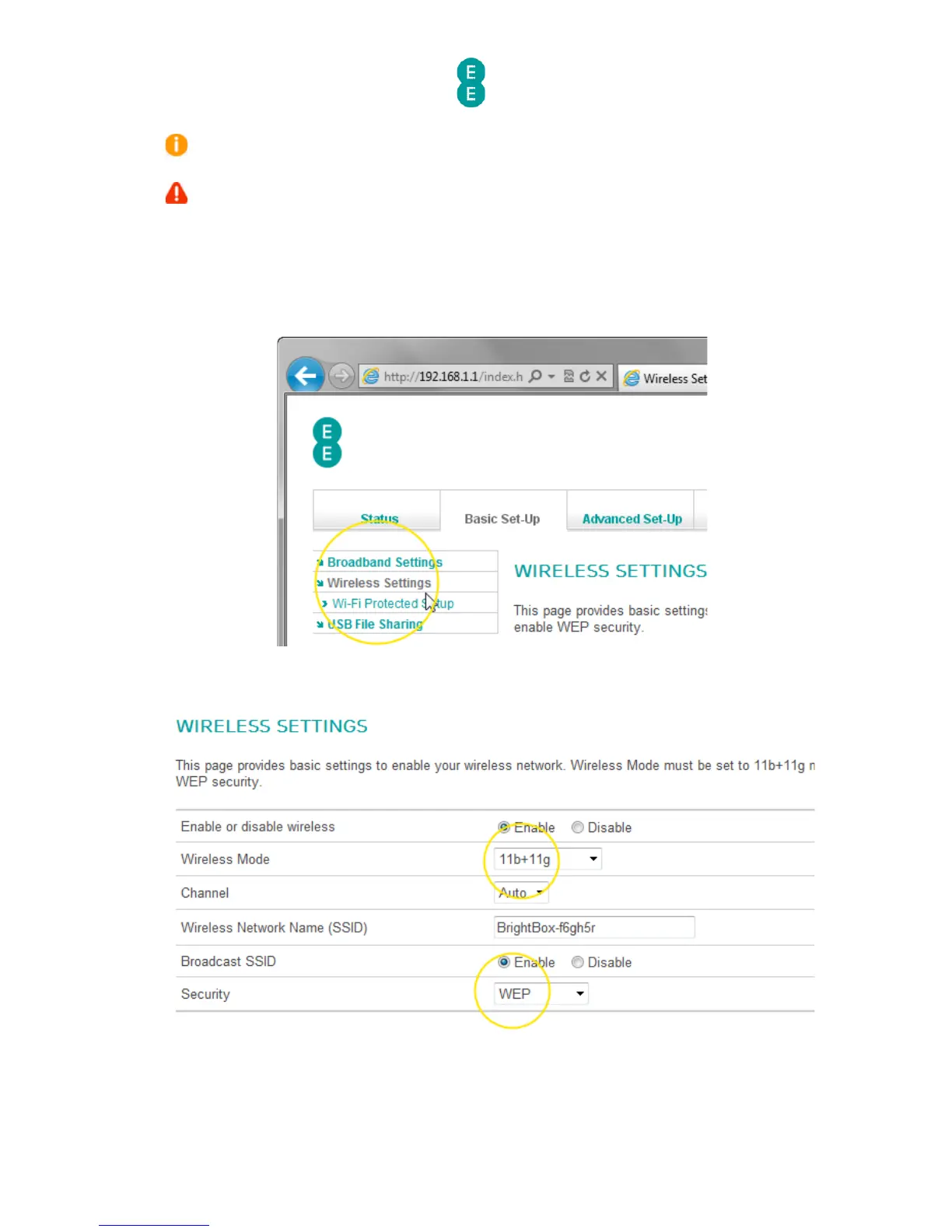
2. Click on the Basic Set-Up tab and then select Wireless Settings from the left hand
menu:
3. Select the ‘Wireless Mode’ dropdown and choose the ‘11b+11g’ option
4. Select the ‘Security’ dropdown and choose the ‘WEP’ option. Your wireless settings
should look like this:
5. Scroll down to the Security Setting section of the page and choose the ‘WEP mode’
option. In this example we select ’128-bit’
6. Select a ‘Key Entry Method’ of ‘HEX’



 To Next Page