Technical Support - BSP 45/47 599 73 09-98 Rev. 02
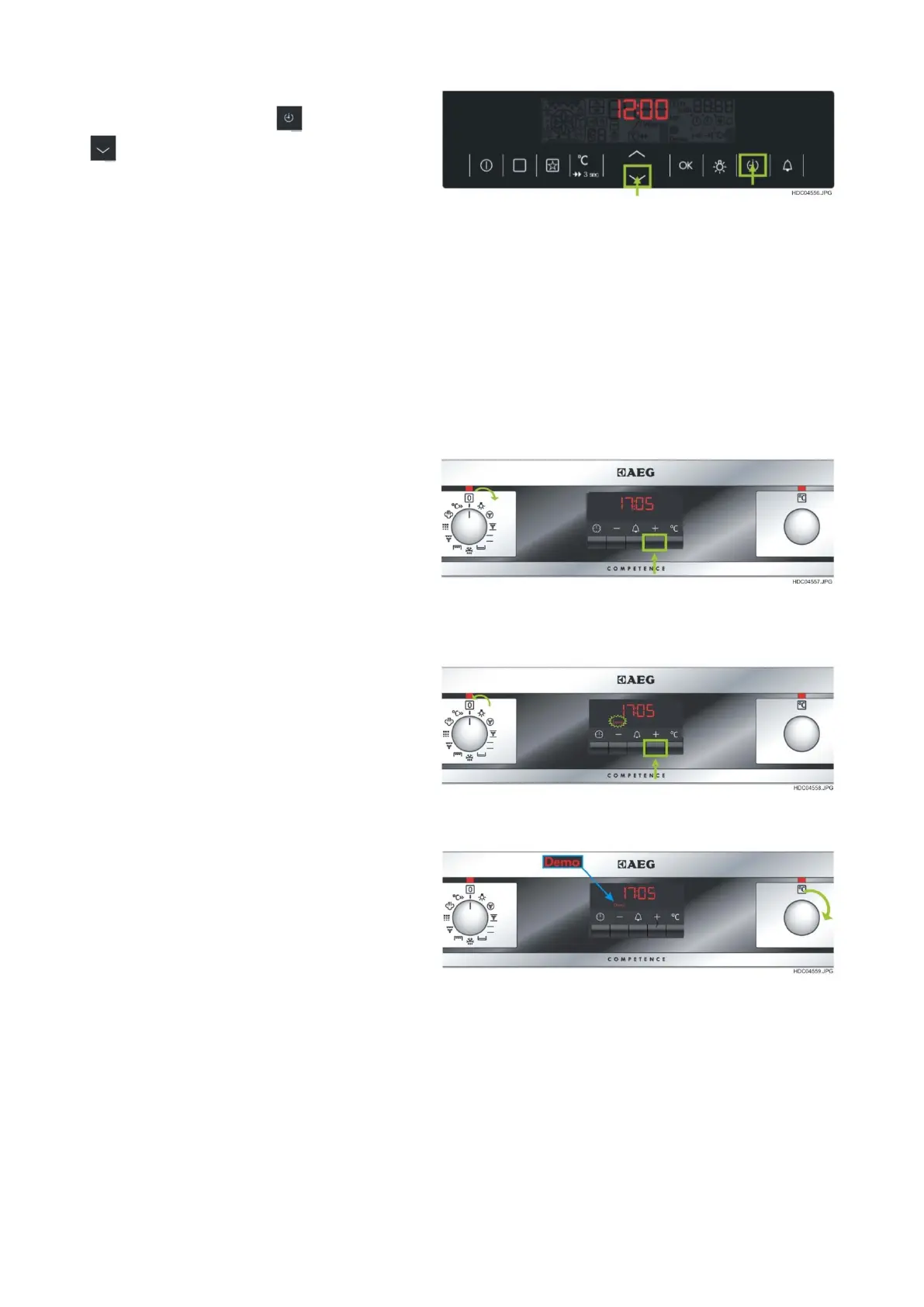
4. After release the main switch keep the
combination key mode + key down
simultaneously pressed for two seconds
(see Fig. 51.
- If the demo mode is active:
Indication of Demo Mode with icon “Demo” if the oven is switched on Demo
function (see Fig. 49).
- If the demo mode is deactivated:
No indication of “Demo” icon if the oven is switched on.
15.3 - DEMO MODE IN THE EXAGON UI
Activate / deactivate the demo mode:
1. In the OFF state the key “+” (STEP 1) has
to be pressed until a beep is audible then
turn the program selector to the 1st oven
function (STEP 2) (see Fig. 52).
2. The indicator “DEMO” starts flashing and the
rotary function has to be set back to “0”
(STEP 3) (see Fig. 53) .
3. Release key “+” and turn temperature
selector right until beep is audible (step 4).
Buzzer sounds (3 x Beep) and
- If the demo mode is active:
Indication of Demo Mode with icon “Demo” if the oven is switched on Demo
function (see Fig. 53 and 54).
- If the demo mode is deactivated:
No indication of “Demo” icon if the oven is switched on.


 To Next Page