2. The User Interface
8
iConnect User Manual
Service Call Button
TheServiceCallbuttonenablesyoutocontactthemonitoring
serviceandtalktoanoperator.
Toinitiateaservicecall,pressandholddowntheServiceCall
buttonforafewseconds.
Service Call
Vocal Message Recording and Playback
Message Play
Using Message Play and Message Record buttons on the LED
TopCoveryoucanrecordashortmessagethat maybeplayed
back later by another user. When there is a new message
waiting,theMessagePlaybuttonisflashingfast.
To play back a recorded message, press the Message
Playbutton.
Message
Record
Torecordamessage,pressthe MessageRecordButton,recordyourmessage,thenpress
the Message Record button again to stop recording. The message is then played back
andsaved.
During recording, the Message Record button is lit. When you have 5 seconds
left out of the 20 seconds timeout, the Message Record and the Service Call
buttonsbacklightsflash.
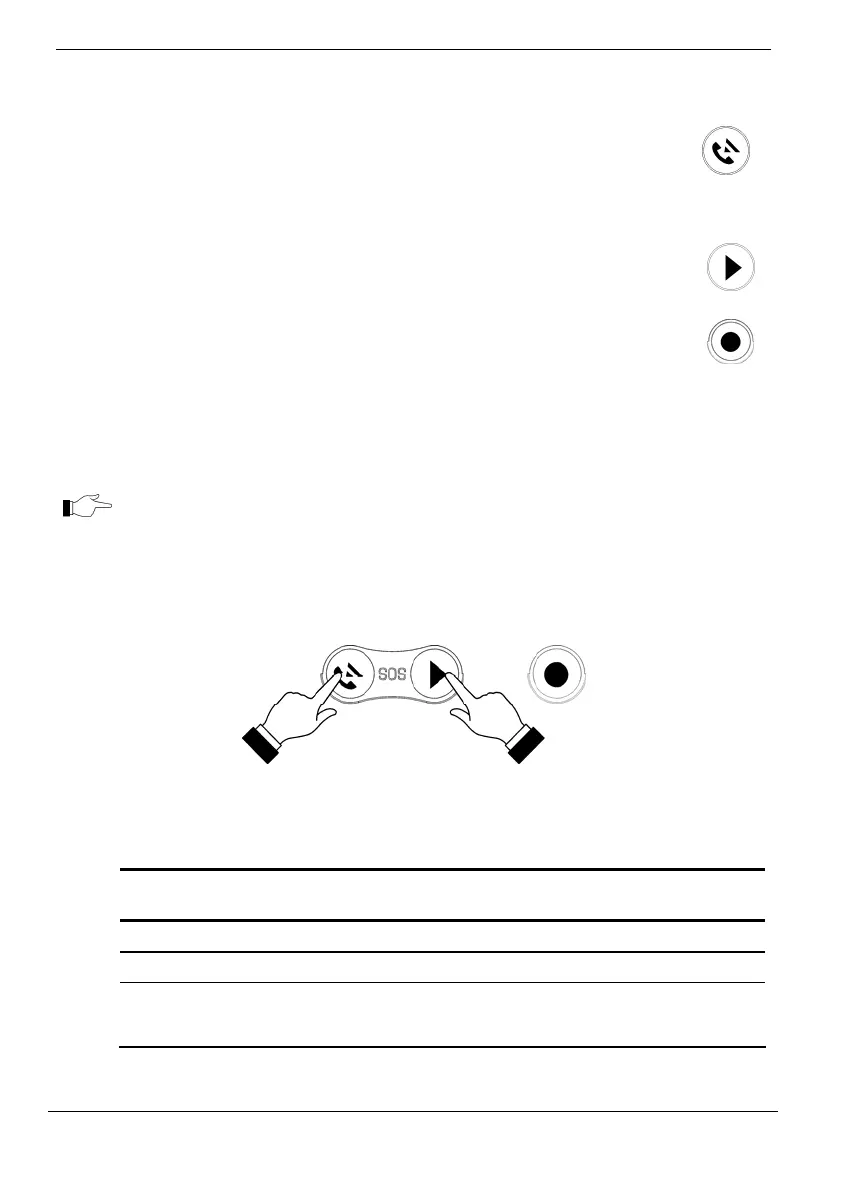
SOS Panic Alarm Activation
UsingtheLEDTopCover,youcanactivateanSOSPanicalarmbypressingtheService
CallandMessagePlaybuttonssimultaneously.
System and Arming Status LEDs
The System Status indicators provide essential information on the status of the system
suchasarm,disarm,alarmandpowerfailureconditions.
OK LED Status
(Green)
Meaning
Off System cannot be armed
On The system is ready for arming.
Flashing Open Zone. Check that the relevant entrances are secured (i.
e. windows and doors are closed and no movement is detected
by the sensors within the protected area).



 To Next Page