2. The User Interface
iConnect User Manual
11
2.6. Wireless Terminal
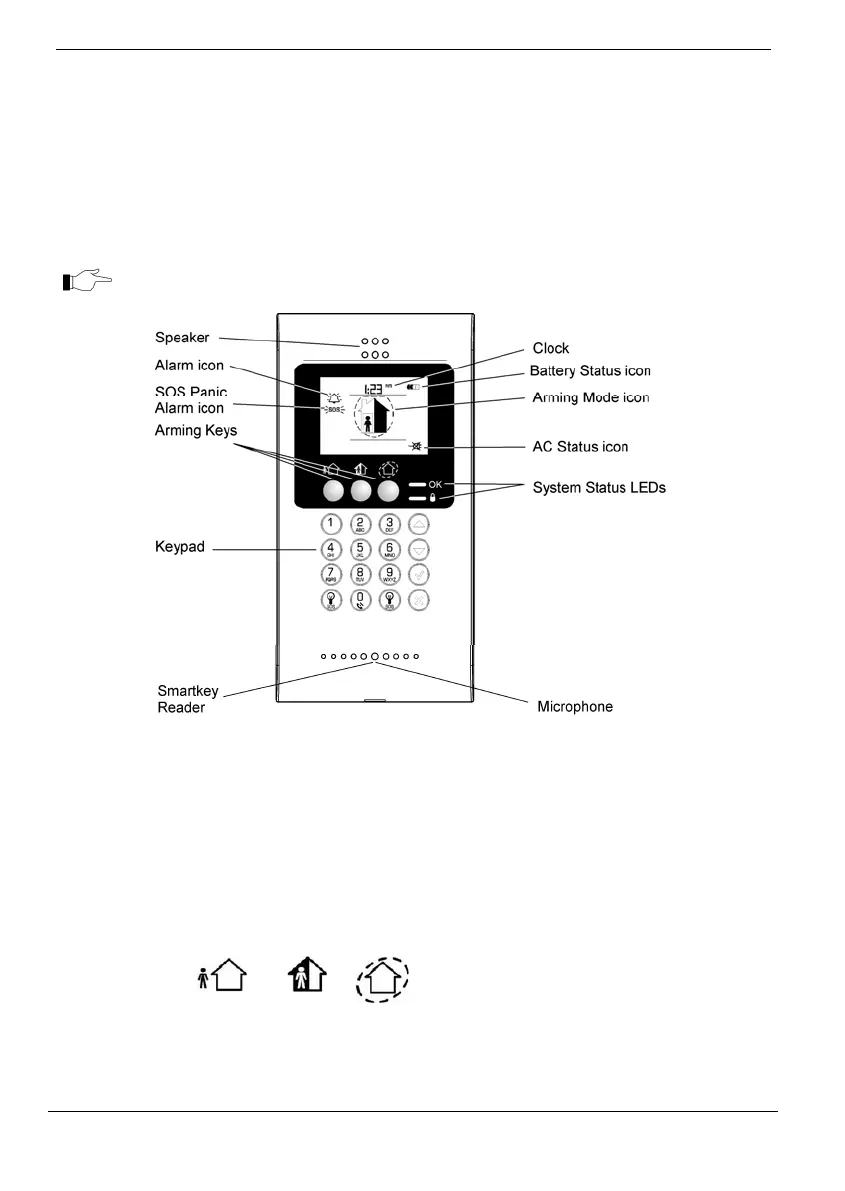
The EL‐2724 Wireless Terminal is an intelligent two‐way wireless keypad with a large
display.Apartfromservingasanadditionalarmingstation,theEL‐2724providesmemo
recording options, control over up to 16 home automation devices, and panic alarm
function. You can arm and disarm the system with the Wireless Terminal using the
smartkey (if supported). The EL‐2724ʹs display shows arming status, power status,
alarms,andtime.ThesystemsupportsuptofourWirelessTerminals.
WirelessTerminalEL‐2724doesnotsupportpartitioning.
Keypad
TheWirelessTerminalkeypadistheuserinterfacethatprovidesyouwiththefunctions
youneedtocontrolyoursecuritysystem.Threearmingkeys(Full,Part,andPerimeter)
allowyoutoarmthesystemusingoneofthethreearmingmethods–seep.15,
3.Arming
andDisarming.One‐keyArmingisanoptionthat isprogrammedbyyourinstaller.Ifthis
optionisdisabled,youmustalsoenterausercodewhenarming.
Function Press… Additional Information
ARM
FULL PART PERIMETER
If One-key Arming is disabled, enter your
user code or place a registered smartkey (if
supported) against the center of the
smartkey reader.
DISARM [USER CODE or SMARTKEY] Entering your user code also silences the
siren in the event of an alarm.
OR
OR



 To Next Page