2. The User Interface
iConnect User Manual
5
2. The User Interface
Thereareseveralmethodsyoucanusetooperatethesystem.Apartfromthe keypadon
the front panel, your system may include a number of peripheral devices, such as
keypadsandkeyfobs.
Thischapterprovides abriefintroductionto eachofthedevicesyoucanuseto operate
the system.
It is important that you familiarize yourself with these devices before
readingthefollowingchaptersthatshalldescribesystemoperationinfurtherdetail.
The front panel is the main user interface that provides you with all the functions you
needtocontrolyoursecuritysystem.iConnectGPRSControlSystemis
availableintwo
frontpanelconfigurations:LCDandLED.
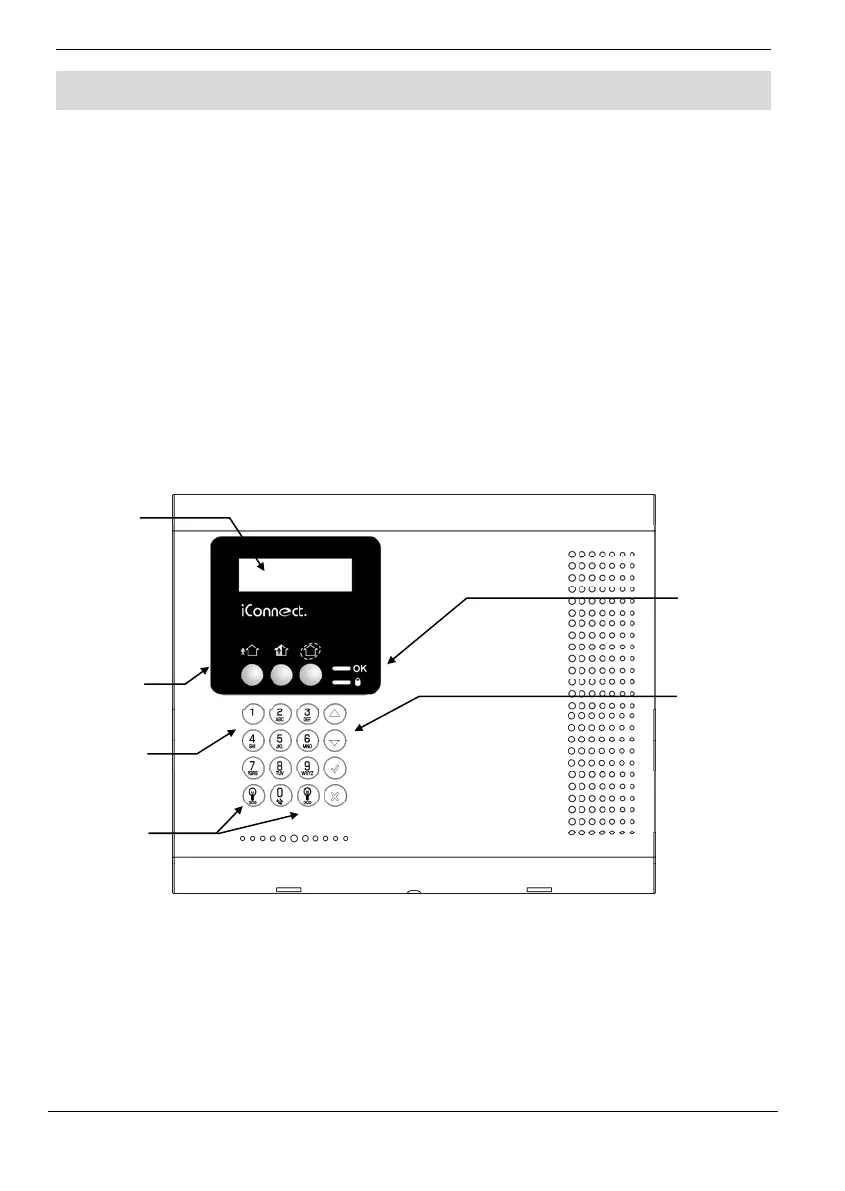
2.1. Front Panel (LCD Configuration)
LCDFrontPaneldisplayandLEDsinformyouofsystemarmingstatus,powerfailures,
andsystemtroubleconditions. Itsalphanumerickeypadenablesyou toenteryouruser
codewhenarminganddisarming,andtosilencethesirenintheeventofanalarm.
Arming Keys
Threearmingkeysareavailable:Full,Part,andPerimeter.Thesebuttonsarmthesystem
using one of the three arming methods. One‐key Arming is an option that is
programmedbyyourinstaller.
System
Status
indicators
LCD
Display
Arming Keys
Alpha-
numeric
Keypad
Menu
Navigation
Keys
Home
Automation
Keys



 To Next Page